


Have you ever found yourself squinting at a shipping label, wondering why the barcode looks more like a series of faded grey smudges than a crisp set of lines? When the dymo labelwriter print head becomes clouded with paper dust or adhesive residue, your once-reliable printer starts to produce inconsistent results that can stall your entire dispatch process. It's incredibly frustrating to manage label jams or scanning errors when you're trying to organise a busy workday. We're here to help you regain control over your print quality and protect your hardware investment. This guide explains how to accurately identify print head wear, perform a safe cleaning routine, and select the correct consumables to minimise future disruptions. We'll also explore how the right maintenance habits can maximise the lifespan of your LabelWriter, keeping your Australian business running smoothly without unnecessary downtime.
Key Takeaways
- Learn how to identify common print quality issues like horizontal lines or faded text caused by a dirty dymo labelwriter print head.
- Discover the correct method for using cleaning cards to safely remove adhesive and dust from your thermal printer without causing damage.
- Understand how selecting original DYMO label rolls can help maintain consistent thermal sensitivity and protect your hardware.
- Implement proactive maintenance habits to maximise the operational life of your printer and reduce the frequency of labels jamming.
Troubleshooting Your DYMO LabelWriter Print Head and Print Quality
Understanding how your printer creates an image is the first step in diagnosing quality issues. Unlike traditional inkjet printers, DYMO devices utilise Thermal Printing Technology. This process uses heat rather than ink or toner to react with the chemicals on the label surface. Because there are no cartridges to replace, the dymo labelwriter print head is the most critical component of your machine. When it functions correctly, you'll see crisp, dark text. However, issues like consistently faded print or horizontal white lines often signal that the thermal elements aren't making proper contact or are losing heat efficiency.
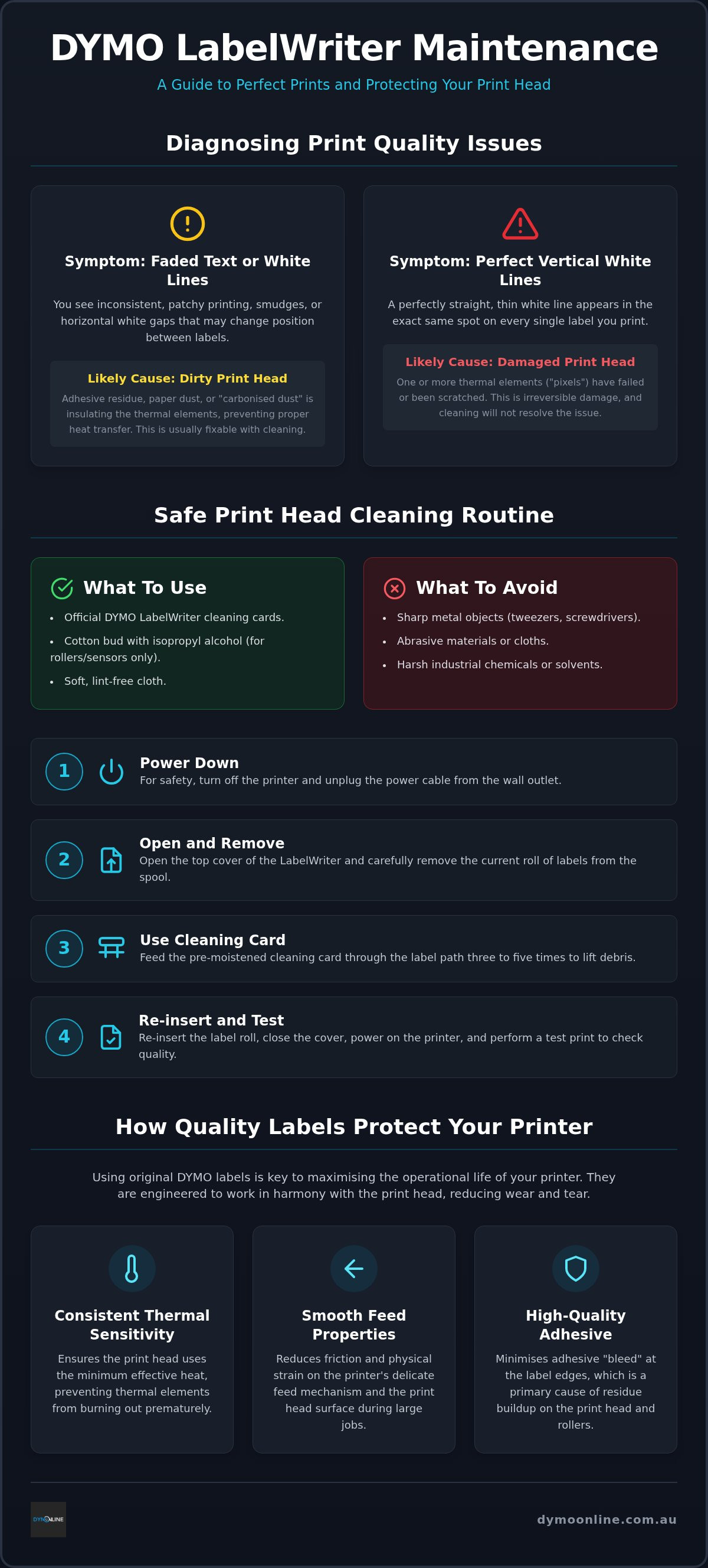
It's vital to distinguish between temporary debris and permanent damage. Dust and adhesive buildup can insulate the thermal elements, leading to patchy results that are easily fixed. In contrast, physical scratches on the thermal surface create irreversible gaps in the print. For a broader look at common hardware faults, our Dymo Troubleshooting Guide offers specialist solutions for Australian businesses.
Is Your Print Head Dirty or Damaged?
A visual inspection often reveals the source of the problem. Open your printer and look for dark adhesive residue or silver-coloured scuffs on the thin glass-like strip. If you notice perfectly straight vertical white lines that never change position, you're likely dealing with "dead pixels" where a thermal element has failed. While cleaning might resolve smudges, it won't fix a burnt-out element. If your older printer is struggling with these permanent defects, it's often more cost-effective to upgrade to a modern LabelWriter 550 than to attempt a complex hardware repair.
Maintenance Techniques to Clean Your LabelWriter Print Head
Regular maintenance is the most effective way to protect your hardware from premature failure. Over time, microscopic paper fibres and adhesive residue accumulate within the printer. If left unaddressed, this "carbonised dust" acts as an insulator on the thermal elements. This insulation forces the printer to use more heat to achieve the same results, which eventually degrades the dymo labelwriter print head. Consistent cleaning ensures that heat transfers efficiently to the label surface every time.
Using a dedicated LabelWriter cleaning card is the safest method for routine care. These cards are pre-moistened with a specific solution designed to lift debris without abrasive contact. You can find these and other essential items in our range of DYMO accessories. Never use sharp metal objects like tweezers or screwdrivers to scrape the thermal strip. Doing so will strip the protective coating and cause permanent failure. Avoid harsh industrial chemicals, as these can dissolve the internal plastics or damage the sensitive sensors.
Step-by-Step Cleaning Process for Australian Users
Follow this simple routine to keep your machine in peak condition:
- Power down the printer and unplug the power cable to ensure safety.
- Open the top cover and remove the current label roll from the spool.
- Feed the cleaning card through the label path three to five times.
- Reinsert your labels and perform a test print to verify the results.
For stubborn residue on the platen roller or sensors, a cotton bud dipped in a small amount of isopropyl alcohol is effective. Keeping the internal compartment free of label dust helps minimise mechanical wear on the feed mechanism. If you encounter persistent issues during this process, reach out to our specialist team for guidance.
Selecting Quality Labels to Minimise Print Head Wear
The relationship between your printer and its consumables is often described as a "razor and blade" model. While the hardware provides the mechanism, the quality of the labels determines the long-term health of the dymo labelwriter print head. Original DYMO labels are specifically engineered with consistent thermal sensitivity. This precision ensures the print head doesn't need to overcompensate with excessive heat, which prevents the thermal elements from burning out before their time.
For high-volume environments like Australian warehouses, using LabelWriter Value Packs offers a practical way to maintain stock without compromising on material quality. Products such as LW Address Labels are designed with smooth feed properties that reduce friction. This careful engineering reduces the physical strain on the printer's motor and the delicate surface of the print head during large print runs.
The Impact of Adhesive Quality on Hardware Longevity
Low-quality labelling materials often suffer from "adhesive bleed." This occurs when the glue on the back of the label seeps out from the edges during the printing process. This creates a sticky film on the print head that acts as a magnet for paper dust and debris. Over time, this mixture hardens into the carbonised buildup that causes streaks, faded text, and frequent jams.
When handling wide-format shipping tasks, the precision of 4XL and 5XL labels is essential. These larger rolls require a perfectly aligned feed to avoid skewing, which can cause the label edge to scrape against internal components. Choosing the right materials from the DYMO Labels collection ensures your machine remains efficient and your print quality stays sharp for your specific business needs.
Protect Your Hardware Investment for Long-Term Performance
Maintaining a functional dymo labelwriter print head is essential for any Australian business that relies on efficient dispatch and organisation. Regular cleaning with specialised cards prevents the buildup of carbonised dust that leads to faded text. Choosing original DYMO labels further ensures that thermal elements operate at the correct temperature, reducing the risk of damage from adhesive bleed. These proactive steps help you maximise the lifespan of your printer and maintain professional results across all your shipping tasks.
If you need further assistance with hardware maintenance or selecting the right consumables, our team provides specialist Australian support and nationwide delivery for authentic DYMO products. Browse the full range of DYMO Labels and cleaning supplies today to keep your operations running smoothly. We're here to help you get the most out of your labelling equipment.
Frequently Asked Questions
Can I replace the print head on my DYMO LabelWriter myself?
The internal print head isn't designed as a user-replaceable component for most desktop models. While technical parts are sometimes available, installing them requires specialised tools and can easily lead to further mechanical issues. If your hardware is failing, it's usually more practical to upgrade to a modern machine like the LabelWriter 550 Turbo to ensure you have access to local Australian support and the latest software.
How often should I clean the print head on my LabelWriter 550 Turbo?
You should ideally clean the dymo labelwriter print head every time you switch to a new roll of labels or at least once a month. Routine maintenance using a DYMO cleaning card prevents paper fibres and adhesive residue from baking onto the thermal elements. This proactive habit ensures your barcodes remain scannable and helps you avoid the mechanical strain caused by stubborn label jams.
Why are there white lines appearing on my printed labels?
White lines that appear in the exact same vertical position on every label often indicate a failed thermal element or "dead pixel." If the lines are horizontal or appear as patchy smudges, the issue is likely just dirt or adhesive buildup. We recommend running a cleaning card through the printer several times to lift any debris. If the vertical gaps remain, the hardware might be permanently scuffed.
Will using non-branded labels damage my DYMO print head?
Using non-branded labels can lead to premature wear because these materials often lack the precise thermal sensitivity of original DYMO rolls. Poor quality adhesives can also seep from the edges, creating a sticky film on the dymo labelwriter print head that attracts dust. This buildup eventually hardens and acts as an insulator, forcing the printer to use excessive heat and shortening the lifespan of the thermal strip.

Article by
DymoOnline Team
The DYMOOnline Team provides practical guidance for Australian businesses, warehouses, retailers, offices, schools, healthcare workplaces and home users who rely on accurate, efficient labelling. DYMOOnline specialises in DYMO label makers, DYMO label printers, label tapes, label rolls, shipping labels, address labels, barcode labels and labelling accessories, helping customers choose the right labelling products for organisation, mailing, inventory, filing, pricing and workplace efficiency.
General Information
This article is provided as general information only to help customers compare and choose DYMO label makers, label printers, label tapes, label rolls, shipping labels, address labels, barcode labels and related labelling supplies. Product details, specifications, compatibility, availability, pricing and suitability may vary. Always check the individual product page, manufacturer information, printer model compatibility and label size requirements before purchasing or using a product.


