
The Ultimate Guide to the Dymo LabelWriter 550: Australia’s Office Standard in 2026
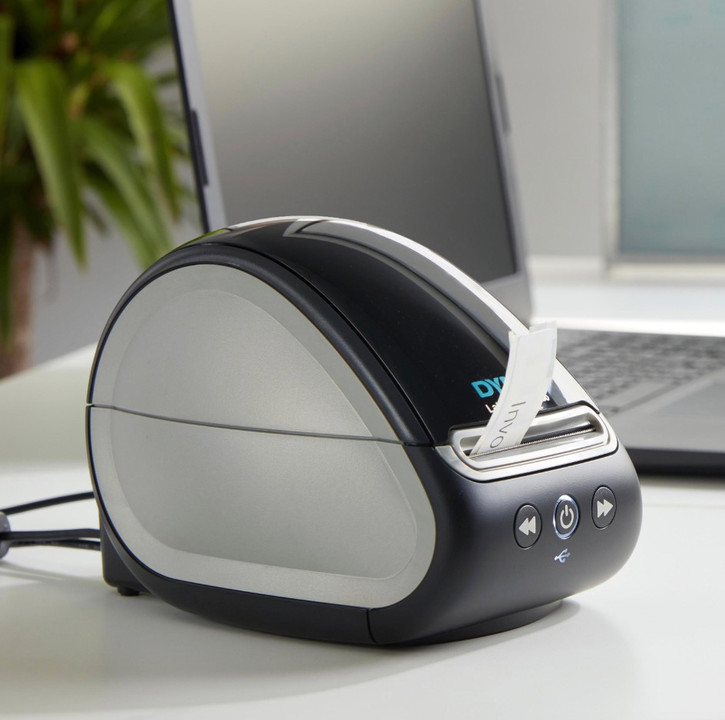
Why are you still paying for ink and toner just to print a simple shipping label? If the cost of traditional printer consumables is draining your office budget, you aren't alone. Most Australian businesses find the constant cycle of buying cartridges both expensive and inefficient. The dymo labelwriter 550, currently available for approximately A$120.99, offers a direct thermal solution that eliminates these recurring costs entirely.
At DymoOnline, we've provided expert Dymo solutions since 2009, and we understand the confusion surrounding the new RFID label recognition technology. You'll learn exactly how to master this system to ensure a "set and forget" workflow that prevents wasted labels from poor alignment. This guide covers everything from the initial setup using DYMO Connect for Desktop v1.4.6.37 to meeting the new 2026 Australian packaging regulations, including evolving compostable labelling mandates. By the end, you'll have the professional-looking results your organisation requires with the peace of mind that comes from using genuine products.
Key Takeaways
- Eliminate the ongoing expense of ink, toner, and ribbons by transitioning to high-speed direct thermal printing technology.
- Master the automatic label recognition system on the dymo labelwriter 550 to view remaining label counts and prevent frustrating alignment errors.
- Understand the critical role of the RFID chip in genuine Dymo labels for protecting your thermal print head from premature wear.
- Streamline your organisational workflow with a simple guide to hardware assembly and the latest DYMO Connect software integration.
- Leverage expert Dymo solutions and reliable local support from Australia’s original dedicated specialist store since 2009.
What is the Dymo LabelWriter 550 and How Does it Work?
The dymo labelwriter 550 represents the current benchmark for desktop labelling across Australia. It's a high-speed, direct thermal printer engineered to handle the rigorous demands of professional office environments and busy home setups. Unlike traditional printers that rely on a constant supply of expensive consumables, this device uses precision heat technology to produce crisp, smudge-proof labels for addresses, files, and barcodes. It's a dedicated solution that stays ready on your desk, removing the need to swap paper in your main printer or waste entire sheets of labels for a single print job.
If you examine the Dymo Corporation history, you'll see the 550 series is the definitive evolution of the legacy LabelWriter 450. While the 450 served as a reliable workhorse for over a decade, the 550 introduces advanced internal sensors and improved print speeds. It connects via a standard USB cable, ensuring it's ready to work with modern PC and Mac operating systems without complex driver installations. The hardware is designed to be a "set and forget" asset for your business, providing a seamless bridge between your digital records and physical organisation.
- Direct thermal printing: No ink, toner, or ribbons required.
- High-speed output: Prints up to 62 labels per minute.
- Precision sensors: Automatically detects label size and type.
- Universal compatibility: Works with the latest DYMO Connect for Desktop software.
The Magic of Direct Thermal Printing
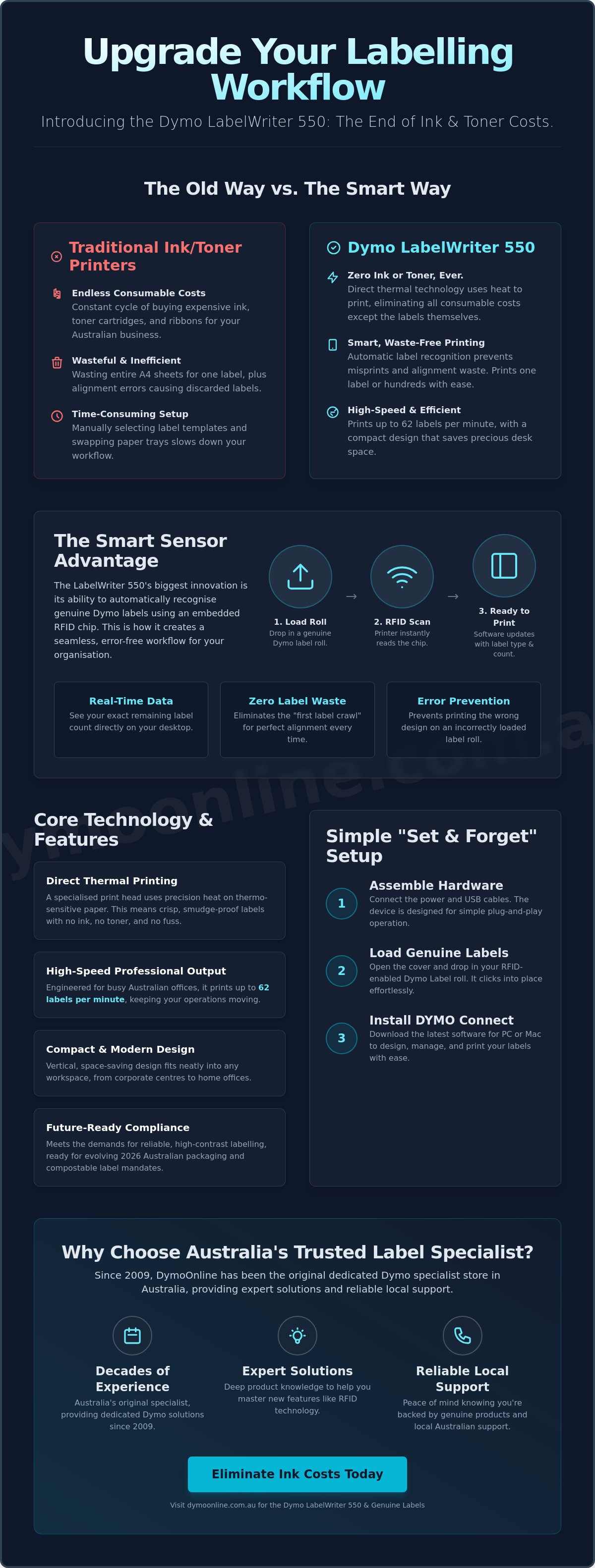
Direct thermal technology is the engine of the dymo labelwriter 550. Inside the chassis, a specialised thermal print head applies heat to heat-sensitive paper, triggering a chemical reaction that turns the paper black in specific areas. This process is entirely physical; there are no liquids to leak or ribbons to tear. For Australian businesses, the cost-benefit is clear. You eliminate the hidden costs of inkjet maintenance and the frustration of running out of toner mid-job. In 2026, direct thermal technology is defined as the most reliable, ink-free method for producing high-contrast, durable professional labels at scale.
Compact Design for Modern Workspaces
Modern Australian workspaces, from corporate centres in Sydney to home offices in Melbourne, require equipment that performs without cluttering the desk. The 550 series features a compact, vertical design that occupies minimal real estate. It's built with high-grade plastics designed for heavy daily use, reflecting the "safe pair of hands" reliability DymoOnline has championed since 2009. The printer sits comfortably on centre-aligned workstations and doesn't interfere with your keyboard or monitor placement. This thoughtful design ensures your labelling workflow remains organised and efficient, regardless of your office size.
Automatic Label Recognition: The Smart Sensor Advantage
The most significant technical leap in the dymo labelwriter 550 is the introduction of Radio Frequency Identification (RFID) technology within the printer chassis. This smart sensor allows the hardware to "talk" to the label roll the moment it's dropped into the carriage. By reading a small chip embedded in the genuine label spool, the printer identifies the exact size, type, and colour of the labels currently loaded. This isn't just a minor convenience; it's a fundamental shift in how labelling workflows operate in a professional Australian office.
In older models, users often struggled with the "first label crawl," where the printer would feed a blank label to find the correct alignment point. This resulted in thousands of wasted labels across a printer's lifespan. The 550 series solves this by knowing exactly where the first label starts before you even hit print. While the technical community has discussed the implications of DYMO Label Printer DRM, the practical benefit for most businesses is a reliable, waste-free experience that protects the longevity of the thermal print head.
- Instant Recognition: The software identifies the roll type automatically.
- Zero Waste: No more sacrificial labels used for alignment.
- Real-time Data: View your exact label count on your desktop.
- Error Prevention: The system won't let you print a shipping label on an address-sized roll.
No More Guesswork with Label Sizes
Manual dropdown menus are a thing of the past. When you load a roll of multi-purpose or shipping labels, the DYMO Connect software updates its canvas instantly to match those specific dimensions. This ensures that your text and barcodes are always perfectly centred and within the printable margins. You don't need to memorise product codes or manually measure rolls; the dymo labelwriter 550 handles the technical configuration so you can focus on the task at hand. It's a level of automation that provides a "set and forget" workflow for any organisation.
Monitoring Your Consumables
There's nothing more frustrating than starting a bulk mail-out of 200 envelopes only to run out of labels at number 143. The 550 series provides a live visual indicator in the software interface, showing you exactly how many labels remain on the current roll. This transparency allows for better planning and ensures you never face unexpected downtime. If you notice your count is getting low, you can quickly re-order genuine Dymo labels from a trusted specialist to ensure your supplies arrive before the roll hits zero. This proactive monitoring is essential for maintaining a well-oiled administrative machine.
The Genuine Label Requirement: Why Quality Matters
The dymo labelwriter 550 introduces a requirement that has sparked significant discussion among long-term users: the machine exclusively operates with authentic Dymo labels. While this marks a shift from the legacy 450 series, the change is designed to maintain the integrity of the entire printing system. For an Australian business, a label printer is a tool for daily productivity, and using non-genuine supplies often creates a false economy through increased maintenance and hardware failure.
One of the primary reasons for this requirement is the protection of the thermal print head. Generic labels often utilise inferior adhesives that can "bleed" or seep from the edges when the printer's head applies heat. This residue accumulates on the internal rollers and the delicate print head, leading to frequent paper jams and poor print quality. The RFID chip in every genuine roll ensures the printer knows exactly what material is loaded, allowing the system to calibrate the precise amount of heat required and preventing the print head from overheating.
- System Integrity: RFID technology ensures only compatible, high-quality stock is used.
- Heat Management: The printer adjusts temperature based on the specific label type.
- Adhesive Stability: Genuine labels are tested to prevent "ooze" that causes internal jams.
- Warranty Security: Protects your hardware investment under Australian support standards.
Protecting Your Investment
Using third-party labels in a high-speed machine like the dymo labelwriter 550 often leads to hidden costs that far outweigh any initial savings. When adhesive build-up occurs, it requires manual cleaning or, in severe cases, a complete print head replacement. By ensuring that the printer only uses tested, high-quality materials, you're effectively choosing a "set and forget" maintenance path. The link between the RFID chips and print head health is simple: the chip provides the thermal instructions that prevent the hardware from working harder than necessary.
Superior Print Results Every Time
Australia's climate presents unique challenges for thermal paper. From the high humidity of Queensland to the intense summer heat in Western Australia, labels must remain legible and stuck fast to their surfaces. Genuine Dymo stock features a superior thermal coating that produces deep black text and sharp barcodes that won't fade under office lights or during transit. You can find more information on why genuine Dymo labels outperform generic alternatives to see how original stock maintains its adhesive strength and legibility over time.
Sticking to genuine supplies also safeguards your warranty and support options. Australian businesses rely on the "safe pair of hands" provided by specialists like DymoOnline. If you encounter a technical issue, having a machine that has only ever run original labels makes the troubleshooting process straightforward and ensures your support remains valid under professional standards.
Setting Up Your LabelWriter 550 in Australia
Setting up your dymo labelwriter 550 is a straightforward process designed to get your organisation running within minutes. Start by unboxing the unit and connecting the included power adapter to a standard Australian wall socket. Connect the USB cable to your computer, but wait to switch the printer on until the software is ready. This specific sequence ensures your operating system recognises the hardware correctly the first time, avoiding common driver conflicts that can stall your workflow.
Once the hardware is positioned, you'll need to load your first roll of genuine labels. Open the top cover and place the spool into the carriage, ensuring the labels feed from the bottom of the roll. Because this model uses RFID technology, the printer will automatically detect the label type and display it in your software. There's no need for manual calibration or "button-pressing" to align the paper; the smart sensors handle the positioning for you, ensuring every print is perfectly centred.
- Power Connection: Use the provided AC adapter for stable thermal performance.
- USB Integration: Connect directly to a port on your PC or Mac, avoiding unpowered hubs.
- RFID Loading: Ensure the label roll is seated firmly so the sensor can read the chip.
- Software Sync: Launch DYMO Connect to verify the hardware is "Online".
Software Installation and Connectivity
The dymo labelwriter 550 requires DYMO Connect for Desktop, with version v1.4.6.37 being a widely tested stable release for modern environments. It's fully compatible with Windows 10 or 11 and recent macOS versions. If your computer doesn't immediately recognise the device, try a different USB port or restart the software. For a detailed walkthrough, you can read our guide on how to install Dymo LabelWriter 550 software and drivers to ensure a smooth integration with your existing system.
Creating Your First Label
After the software is active, you'll see a digital representation of your loaded label roll on the screen. You can choose from dozens of pre-built templates for shipping, filing, or visitor badges. If you're managing a large organisation, you can import data directly from Excel or Outlook to print hundreds of addresses in a single batch. Customise your labels by adding your company logo or changing fonts to match your brand identity. If you need to top up your supplies, you can buy genuine Dymo labels with same-day dispatch to major Australian metros.
Why DymoOnline is Australia’s Trusted Label Specialist
Choosing where to purchase your dymo labelwriter 550 is just as important as the hardware itself. DymoOnline stands as Australia’s original dedicated store, providing expert Dymo solutions since 2009. As an Australian owned and operated business under Mega Thing Pty Ltd, we offer a level of administrative transparency and local accountability that global resellers simply cannot match. When you buy from us, you're accessing a deep knowledge base built over 15 years of specialised service. We pride ourselves on being a stable, long-term partner for your organisational needs rather than just a faceless reseller.
We understand that administrative downtime costs your business money. That's why we maintain a high-efficiency logistics chain featuring same-day dispatch for major metropolitan areas across the country. Whether you're based in a Melbourne corporate centre or a remote industrial site in Western Australia, our nationwide shipping ensures your equipment arrives ready for immediate deployment. We only stock genuine Dymo products, giving you the peace of mind that your investment is protected by original quality standards and full local support. This commitment to authenticity ensures your thermal print heads remain in peak condition for years to come.
- Established Heritage: Serving Australian businesses as the original dedicated specialist since 2009.
- Expert Support: Professional advice from a team that speaks the specific language of the Dymo ecosystem.
- Fast Fulfilment: Same-day dispatch for major metro orders to keep your organisation moving.
- Local Accountability: Proudly Australian owned and operated by Mega Thing Pty Ltd with transparent business practices.
The DymoOnline Difference
Our role extends beyond being a simple retailer; we're a reliable specialist partner for both home users and large-scale industrial clients. We don't just sell the dymo labelwriter 550, we know how it integrates into various Australian workflows and how to troubleshoot specific local requirements. Buying from an established local business provides the security of knowing that expert help is only a phone call or email away. This "safe pair of hands" approach is the reason thousands of organisations trust us for their practical everyday labelling needs. We provide the stability and expertise required to turn a simple purchase into a long-term organisational solution.
Ready to Organise Your Workspace?
Upgrading to the 550 series is a strategic move for any organisation looking to eliminate ink costs and streamline label production. For corporate clients, healthcare facilities, and government departments, we offer volume-based wholesale pricing to help manage large-scale rollouts efficiently. Our team is ready to assist you in selecting the right combination of hardware and labels to suit your specific industry standards and regulatory requirements. It's time to move toward a more efficient, waste-free labelling workflow. You can Buy the Dymo LabelWriter 550 today from DymoOnline and experience the benefits of a truly automated, professional labelling system.
Master Your Labelling Workflow
Transitioning to the dymo labelwriter 550 is a strategic investment that pays dividends through reduced consumable costs and increased administrative speed. By embracing the automatic label recognition system, you ensure every print is perfectly aligned without the waste associated with legacy models. Using genuine labels is the most reliable way to protect your thermal print head and maintain your warranty under professional Australian support standards. Since 2009, DymoOnline has served as Australia’s original dedicated store, providing expert Dymo solutions and nationwide shipping from local warehouses. Our team is here to help you move beyond the frustration of ink and toner to a professional, "set and forget" system. We take pride in being a stable partner for your organisational needs, ensuring you have the tools to meet the 2026 packaging regulations with confidence. You're just one step away from a more efficient, high-performance office environment.
Order your Genuine Dymo LabelWriter 550 from Australia’s experts
Your journey toward a more organised and productive workspace starts today.
Frequently Asked Questions
Does the Dymo LabelWriter 550 require ink or toner?
No, the dymo labelwriter 550 does not require ink, toner, or ribbons to operate. It utilises advanced direct thermal printing technology, where a heated print head reacts with specialised heat-sensitive paper to create text and images. This system eliminates the ongoing cost of physical ink cartridges and ensures your labels never smudge or streak during the printing process.
Can I use my old labels from a LabelWriter 450 in the new 550 model?
You can only use older labels if they are genuine Dymo stock that includes the necessary RFID chip. Most labels manufactured before the release of the 550 series do not have this chip and won't be recognised by the new sensors. To avoid downtime, it's best to verify that your current rolls are compatible with the 550 series hardware before attempting to load them.
How do I fix a label recognition error on the Dymo 550?
Start by ensuring you have loaded a genuine Dymo roll into the carriage correctly. If the error persists, remove the roll and check that the RFID chip on the spool is clean and properly aligned with the internal sensor. Restarting your DYMO Connect software often refreshes the connection and clears the "Invalid Label" message if the hardware is seated correctly.
Is the Dymo LabelWriter 550 compatible with Windows 11?
Yes, the dymo labelwriter 550 is fully compatible with Windows 11 and recent versions of macOS. For the most stable Australian office setup, we recommend installing DYMO Connect for Desktop v1.4.6.37. This version provides the necessary drivers to ensure your operating system communicates perfectly with the printer's RFID sensors and thermal print head without requiring manual configuration.
What is the difference between the LabelWriter 550 and the 550 Turbo?
The primary difference between these two models is the maximum printing speed. The standard 550 model prints up to 62 labels per minute, whereas the Turbo version is 45 percent faster, reaching up to 90 labels per minute. Additionally, the Turbo model offers expanded connectivity options, including a LAN port for shared network printing, which is not available on the standard USB-only model.
Where can I download the Dymo LabelWriter 550 software in Australia?
You can download the official software directly from the Dymo support portal or via the expert resource links provided at DymoOnline. Always ensure you are downloading "DYMO Connect for Desktop" rather than the mobile-only version. Using the official Australian source ensures you receive the correct regional settings for standard label sizes and local time formats used in your organisation.
Can I print shipping labels with the Dymo 550?
Yes, you can print standard Australian shipping labels, such as the popular 54mm x 101mm format, using this machine. It's an excellent solution for eBay, Etsy, and small business logistics. However, if your carrier requires the larger 4x6 inch (104mm x 159mm) international shipping labels, you should consider the LabelWriter 5XL, which is designed for those wider dimensions.
What happens if I try to use generic labels in my Dymo 550?
The printer will refuse to print and will display an error message in the software interface. Because the 550 series uses an RFID sensor to verify the authenticity of the roll, non-genuine labels lack the chip required to "unlock" the print head. Beyond the software lockout, generic adhesives often cause build-up on the internal rollers, which can lead to permanent hardware damage over time.
General Information
This article is provided as general information only to help customers compare and choose DYMO label makers, label printers, label tapes, label rolls, shipping labels, address labels, barcode labels and related labelling supplies. Product details, specifications, compatibility, availability, pricing and suitability may vary. Always check the individual product page, manufacturer information, printer model compatibility and label size requirements before purchasing or using a product.
Latest News
Dymo 4XL Driver Download & Install Guide Australia (2026)
Imagine you have a surge of orders ready for Australia Post, but your printer is suddenly unrespon...
Best DYMO Barcode Printers: 2026 Australian Expert Guide
A single unreadable barcode can halt an entire Australian supply chain, costing your business prec...
DYMO Printer Drivers: 2026 Australian User Guide
Why does your computer suddenly claim your LabelWriter doesn't exist the moment you have fifty urg...
Genuine DYMO D1 Labels: The Ultimate Australian Buyer’s Guide
A single jammed cassette or a set of peeling labels can cost your business far more in lost produc...
Dymo Rhino vs Panduit Label Makers: The Best Choice for Australian Trades in 2026
You might assume that spending significantly more on a high-end label maker guarantees a better re...
Small Business Label Printer Australia: The 2026 Guide to Automated Labelling Systems
Imagine spending your Monday morning handwriting fifty delivery addresses, only to have several parc...