


Your DYMO LabelWriter 550 relies on a precise digital handshake to function, making the setup of your dymo labelwriter 550 software an essential step for any Australian workplace. It's common to feel frustrated when legacy software fails to recognise your device or when "Label Not Detected" errors halt your daily workflow. You need a reliable system that handles local address formats and barcodes without constant troubleshooting or manual configuration.
This guide explains how to download, install, and master the DYMO Connect for Desktop platform. We'll walk through the critical installation order required for Windows and macOS to ensure your printer and labels synchronise perfectly. As specialists in the local market, DYMOOnline provides the expertise needed to maximise the efficiency of your labelling tasks and maintain a professional standard for your small business, warehouse, or home office.
Key Takeaways
- Successful setup requires installing the dymo labelwriter 550 software before plugging in the USB cable to ensure the correct drivers are applied to your computer.
- Utilise the Automatic Label Recognition feature to instantly identify label size and colour, helping to minimise setup time and material waste in your workplace.
- Resolve common "Label Not Detected" errors with expert guidance from DYMOOnline to ensure your hardware and software are correctly synchronised for seamless printing.
- Master the updated DYMO Connect interface to organise professional layouts that suit Australian business requirements, from shipping labels to barcode systems.
Downloading and Installing DYMO Connect for the LabelWriter 550
The LabelWriter 550 series introduces a more integrated ecosystem than its predecessors, requiring a specific digital foundation to operate. To fully utilise your hardware, you must install the dymo labelwriter 550 software correctly. Unlike legacy versions like DYMO Label Software v8, the modern DYMO Connect platform is engineered to communicate with the printer's internal sensors. This handshake is what enables Automatic Label Recognition. As documented in the Dymo Corporation History, the brand has consistently evolved its hardware, and the 550 series represents the current standard in precision labelling for Australian workplaces.
Step-by-Step Installation for Windows and Mac
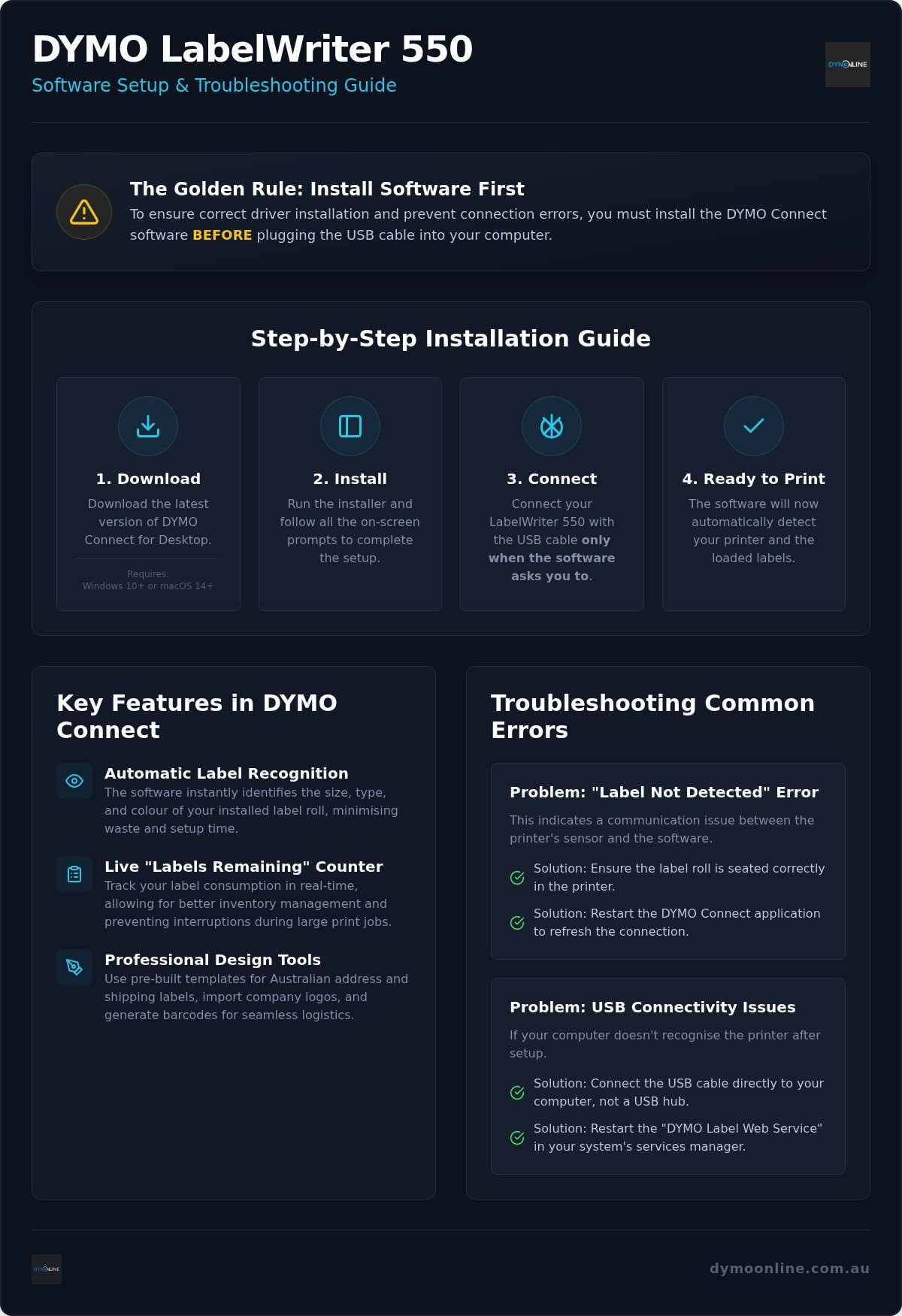
Ensuring a smooth setup depends on one critical rule: install the software before you connect the USB cable. If you plug in the printer too early, your computer might assign a generic driver that limits functionality or causes connection errors. Follow these steps for a successful installation:
- Navigate to the DYMO software page at DYMOOnline to download the latest version of DYMO Connect for Desktop.
- Check your system requirements. For version 1.6.1, you'll need Windows 10 or later, or macOS 14 or later.
- Run the installer and follow the prompts. Only connect your labelwriter printer when the software specifically asks you to do so.
- Once connected, the software will automatically recognise the device and any loaded rolls.
Regularly checking for software updates helps to minimise bugs and ensures you can access the latest design templates. This proactive approach keeps your office or warehouse running efficiently without technical interruptions.
Maximising Efficiency with Automatic Label Recognition
The dymo labelwriter 550 software transforms the labelling process from a manual chore into an automated, precision workflow. Once a roll is loaded, the software utilizes sensors to identify the exact size, type, and colour of the labels. The visual interface on your computer screen immediately updates to mirror the physical roll, providing a 1:1 layout that removes the guesswork from your design. This synchronisation ensures that what you see on the screen is exactly what prints, helping Australian businesses minimise material waste and avoid the frustration of misaligned text.
A significant advantage for high-volume environments, such as busy warehouses or medical administration offices, is the "remaining labels" counter. This feature tracks consumption in real time, displaying a precise count of how many labels are left on the current roll. It allows your team to manage inventory effectively and plan for replacements before a critical print run is interrupted. This level of transparency is essential for maintaining a steady operational rhythm without the need for manual stocktakes.
Designing Professional Labels for Australian Businesses
Creating polished outputs is straightforward with the integrated design tools. You can choose from a variety of pre-built templates for DYMO address labels and shipping formats that comply with local standards. The software allows you to import Australian business logos and customise fonts to maintain brand consistency across all your logistics and correspondence. For those managing inventory, the barcode generator is a powerful tool. It simplifies the creation of scannable codes that meet Global Supply Chain Standards, ensuring your products are ready for local or international distribution. If you have specific questions about label compatibility for your industry, you can contact our specialist team for tailored advice.
Troubleshooting Software and Connection Errors
When the dymo labelwriter 550 software displays a "Label Not Detected" error, it typically points to a communication breakdown between the printer's internal sensor and the application. The 550 series utilises a precision sensor to verify the media before printing. If the software cannot read the roll's data, it will halt the print queue to prevent damage or misaligned outputs. This issue is often resolved by ensuring the roll is seated correctly or by restarting the application to refresh the sensor's connection.
To resolve USB connectivity issues between your PC and the LabelWriter 550, follow this practical checklist:
- Connect the USB cable directly to a port on your computer, avoiding unpowered USB hubs.
- Restart the DYMO Label Web Service through your system's services manager if the software fails to communicate with the hardware.
- Verify that you're using the latest version of DYMO Connect for Desktop to maintain driver compatibility.
For deeper hardware-related issues, consult the Dymo Troubleshooting Guide for expert solutions tailored to Australian businesses.
The Role of Authentic Labels in Software Performance
The dymo labelwriter 550 software requires specific RFID tags located in the core of the roll to activate its recognition features. Third-party labels lack these tags, which often leads to software errors and prevents the printer from identifying the label size or quantity. This system is designed to ensure the media matches the technical specifications of the print head. To ensure seamless software integration and performance, check your DYMO label rolls for authentic branding before loading them into your machine. Using authentic supplies helps you organise your tasks efficiently and avoids the technical downtime associated with unsupported media.
Optimise Your Labelling Workflow Today
Establishing a reliable labelling system starts with the correct installation of your dymo labelwriter 550 software. By following the precise setup order and utilising the Automatic Label Recognition features, you can significantly reduce material waste and technical downtime in your business. Remember that maintaining high standards in your warehouse or office requires the synchronisation of genuine hardware and supplies. This ensures your designs remain professional and your print queues stay clear of sensor-related errors.
As a specialist Australian supplier, DYMOOnline provides expert knowledge and nationwide shipping from local warehouses to support your operational needs. If you require further assistance with software configurations or choosing the right consumables for your environment, our team is ready to help. Contact our Australian support experts for professional guidance tailored to your specific requirements. We're here to ensure your labelling operations run smoothly every day.
Frequently Asked Questions
Does the DYMO LabelWriter 550 work with the old DYMO Label Software v8?
No, the LabelWriter 550 is not compatible with the legacy DYMO Label Software v8. You must use the modern dymo labelwriter 550 software, known as DYMO Connect for Desktop, to operate this printer. This specific software version is required to communicate with the hardware's internal sensors and enable the Automatic Label Recognition technology that defines the 550 series.
How do I update my DYMO Connect software to the latest version?
To update your software, open the DYMO Connect application on your computer and select the "Check for Updates" option within the help or settings menu. Alternatively, you can visit the software page at DYMOOnline to download the latest installer directly. Keeping your dymo labelwriter 550 software current ensures you have the latest drivers and design features for your Australian business needs.
Why is my DYMO software saying "No Label Detected" when the roll is inside?
This error typically occurs if the printer cannot read the RFID tag inside the label roll. Ensure you're using genuine DYMO labels, as third-party alternatives lack the necessary chips for the 550 series to recognise them. If the roll is authentic, try re-seating it firmly on the spool and restarting the software to refresh the sensor's connection to the hardware.
Can I use DYMO Connect on a tablet or mobile device with the 550?
The standard LabelWriter 550 model is a USB-only device and doesn't support direct connection to tablets or mobile devices. DYMO Connect for mobile requires a network-connected printer, such as the LabelWriter 550 Turbo or 5XL. For the standard 550, you must use a Windows or macOS desktop computer to design and print your labels effectively in your workplace.
How do I import a CSV or Excel list into the software for bulk labelling?
You can import bulk data by selecting the "Import Data" feature within the DYMO Connect interface. Browse for your CSV or Excel file, then map the specific columns to the corresponding text fields on your label layout. This process allows Australian warehouses and offices to organise high-volume print runs, such as shipping addresses or inventory barcodes, with minimal manual data entry.

Article by
DymoOnline Team
The DYMOOnline Team provides practical guidance for Australian businesses, warehouses, retailers, offices, schools, healthcare workplaces and home users who rely on accurate, efficient labelling. DYMOOnline specialises in DYMO label makers, DYMO label printers, label tapes, label rolls, shipping labels, address labels, barcode labels and labelling accessories, helping customers choose the right labelling products for organisation, mailing, inventory, filing, pricing and workplace efficiency.
General Information
This article is provided as general information only to help customers compare and choose DYMO label makers, label printers, label tapes, label rolls, shipping labels, address labels, barcode labels and related labelling supplies. Product details, specifications, compatibility, availability, pricing and suitability may vary. Always check the individual product page, manufacturer information, printer model compatibility and label size requirements before purchasing or using a product.


