


Imagine an Australian office manager trying to print fifty shipping labels on a handheld tape maker while the courier waits at the door. It's a recipe for frustration that often stems from a simple misunderstanding of equipment. You likely already know that DYMO offers reliable tools for every organisational task, but choosing between the dymo labelwriter vs labelmanager series isn't always straightforward when you're facing a deadline.
This guide helps you distinguish between high-volume desktop roll printers and versatile handheld tape makers. You'll discover the practical differences in software integration, print speeds, and label compatibility to ensure your business stays organised. Whether you're managing a warehouse or a medical administration centre, we'll provide the clarity needed to select a solution from the DYMOOnline range that fits your specific volume and workflow requirements.
Key Takeaways
- Understand the functional divide between high-speed desktop thermal printers and portable tape makers for efficient workplace organisation.
- Compare the dymo labelwriter vs labelmanager series to determine whether your workflow requires bulk roll-fed printing or durable, custom-length tapes.
- Discover which models excel in specific Australian settings, such as medical clinics needing visitor badges or maintenance teams requiring on-site identification.
- Evaluate the practical benefits of sophisticated software integration versus the versatility of standalone, handheld labelling devices.
Desktop Power vs Portable Versatility: The Fundamental Difference
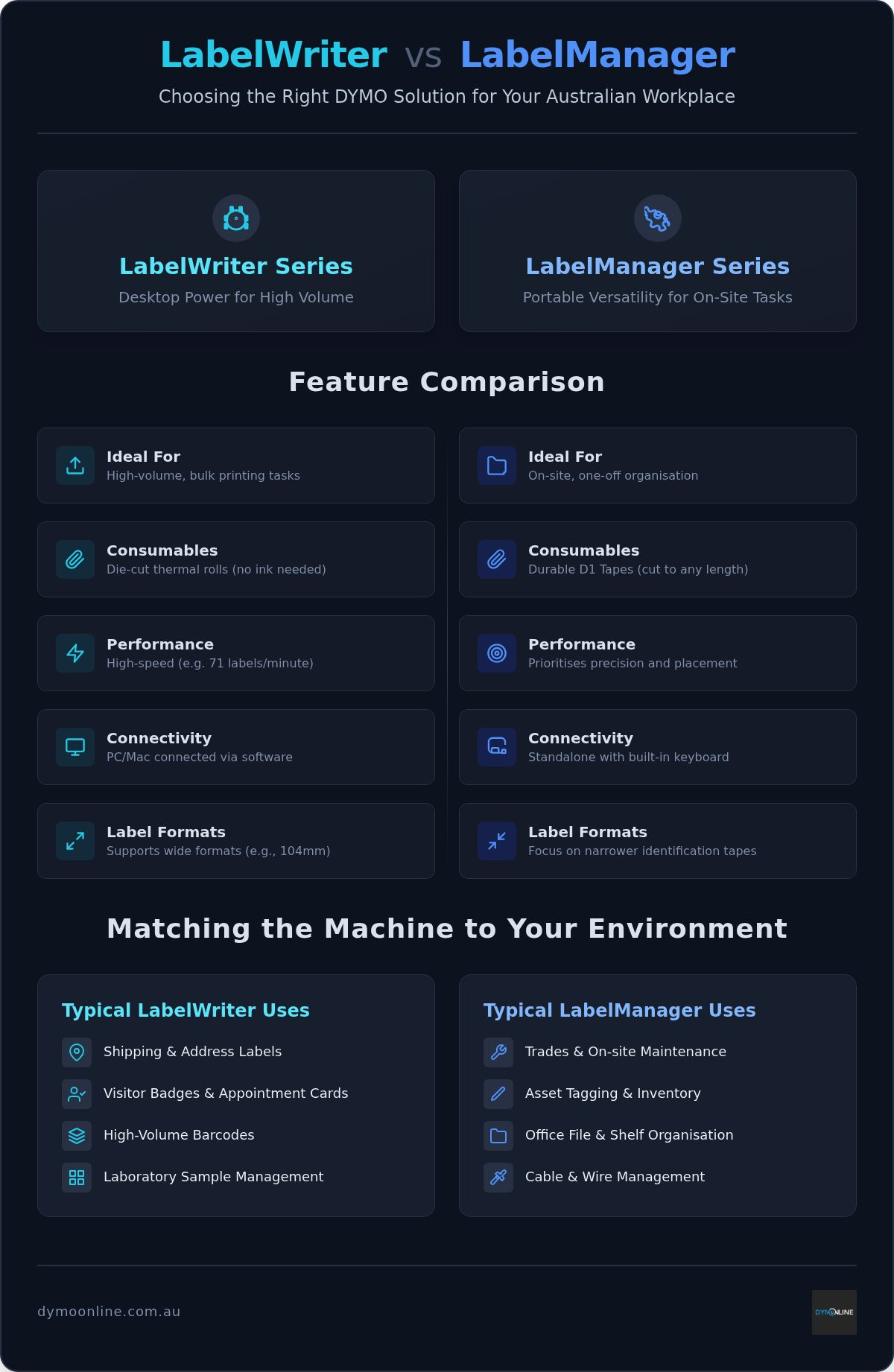
Choosing between the dymo labelwriter vs labelmanager requires an assessment of your physical workspace. The LabelWriter series consists of stationary thermal printers designed for a fixed location. These machines sit on a desk and connect directly to a computer to handle high-speed output. If you're processing hundreds of address labels or shipping documents, the roll-fed system provides the necessary efficiency for a streamlined workflow.
The LabelManager family focuses on portability and immediate identification. These devices are often handheld, allowing you to move through a warehouse or office to label items where they sit. If your task involves walking between storage racks or maintenance rooms, a portable unit is far more effective than a desktop model. Reviewing the DYMO Corporation history highlights how the brand developed these distinct paths to solve specific organisational challenges.
Thermal Rolls vs D1 Tapes: Understanding the Consumables
Consumables define the utility of each range. LabelWriters use die-cut rolls, which are pre-sized for tasks like visitor badges or barcodes. Modern units like the 550 series use labels with RFID technology for automatic recognition. Because they use direct thermal technology, they don't require ink or toner. This reduces long-term maintenance costs for Australian businesses.
LabelManagers utilise continuous D1 Standard Tapes. These allow you to cut labels to any length, making them appropriate for marking folders, shelving, or electrical equipment. D1 tapes are designed for durability in various environments, ensuring that identifying marks remain clear over time. When evaluating the dymo labelwriter vs labelmanager trade-off, consider whether your environment demands this level of physical versatility.
- LabelWriter: Suited for bulk mail-outs and high-volume shipping.
- LabelManager: Suited for one-off organisation and asset management.
Performance and Volume: Comparing Features for Australian Workplaces
When evaluating the dymo labelwriter vs labelmanager, the primary metric is throughput. A LabelWriter 550 Turbo is engineered for high-volume environments where time is a critical resource. These machines can print up to 71 labels per minute, making them ideal for large-scale mail-outs or laboratory samples. In contrast, the LabelManager series prioritises precise placement for one-off tasks like marking office binders or electrical cables.
Size requirements also dictate the choice. The LabelWriter 5XL supports wide formats up to 104mm, easily accommodating standard shipping labels used across Australian e-commerce networks. Handheld LabelManagers are typically limited to narrower tapes, focusing on clear identification within tight spaces rather than bulk logistics and transport documentation.
Software Integration vs Standalone Labelling
Efficiency in Australian small businesses often depends on software automation. The LabelWriter series integrates with DYMO Connect software to facilitate complex database printing. This allows you to import data from Excel to maximise productivity during recurring tasks. If your workflow requires high-speed automation, this computer-connected approach is superior for maintaining accuracy across hundreds of items.
Conversely, the LabelManager 160 offers a standalone experience with its built-in keyboard. You don't need a PC or Mac to create professional labels on the fly. This independence is invaluable for on-site maintenance or quick office organisation. If you're unsure which performance level matches your staff's needs, speak with our specialist team for tailored advice.
Matching the Machine to Your Environment: Real-World Use Cases
In an Australian medical clinic or school office, the LabelWriter serves as the standard for visitor badges and appointment cards. These environments require high-resolution text that remains legible for administrative records and security compliance. When comparing the dymo labelwriter vs labelmanager for these settings, the desktop model's ability to pull data directly from patient or student management software ensures accuracy without the need for manual typing.
Conversely, trades and maintenance professionals often work in environments where a desktop unit is impractical. For on-site identification of switchboards, data racks, or heavy machinery, a handheld LabelManager or a specialised Rhino industrial tool is essential. These devices use rugged tapes that withstand the physical demands of a workshop or construction site. For Australian e-commerce businesses, the LabelWriter 5XL remains the preferred choice for printing wide-format shipping labels, ensuring compatibility with major local courier networks.
Standout DYMO Models for Office and Industrial Tasks
The LabelManager 210D is a versatile option for general office organisation, featuring a large screen and familiar keyboard layout. It's ideal for labelling files and storage boxes where portability is occasionally required. For businesses focused on inventory management, the LabelWriter 550 provides high-resolution barcode printing. This model uses automatic label recognition to track how many labels remain on a roll, helping to minimise downtime during busy periods. You can browse the full collection of DYMO machines to find the specific tool that matches your operational scale and environment.
Identifying the Right Labelling Tool for Your Business
Choosing between the dymo labelwriter vs labelmanager depends entirely on your operational environment. If your daily tasks involve high-speed shipping or medical administration from a fixed desk, the LabelWriter series provides the necessary automation and volume. For those requiring on-site organisation or asset tracking in a warehouse, the handheld LabelManager range offers unmatched physical versatility. Both systems deliver professional results when matched to the correct application.
DYMOOnline provides specialist Australian support to help you navigate these technical differences. With nationwide shipping from local stocks, you can secure the right equipment without long delays. Our team offers expert guidance on label compatibility to ensure your chosen machine fits your specific workflow perfectly. If you're ready to improve your workplace efficiency, contact our experts today to discuss your requirements. Investing in the right tool today will streamline your organisational tasks for years to come.
Frequently Asked Questions
Can I use LabelWriter labels in a LabelManager machine?
No, you cannot use LabelWriter labels in a LabelManager machine because the physical housing and feeding mechanisms are completely different. LabelWriter printers are designed to handle die-cut rolls, while LabelManager devices use continuous tape cassettes. These consumables are not interchangeable, as the internal sensors and print heads are specifically calibrated for their respective roll or tape formats to ensure clarity.
Do I need to buy ink or toner for these DYMO printers?
No, you don't need to buy ink or toner for these devices. Both the LabelWriter and LabelManager series utilise direct thermal printing, a process where the print head applies heat to heat-sensitive labels or tapes. This thermal technology eliminates the mess and expense of traditional ink cartridges, meaning the only recurring requirement for your Australian business is the purchase of DYMO labels or tapes.
Which DYMO model is better for printing shipping labels for Australian couriers?
The LabelWriter 5XL is the preferred model for printing shipping labels used by Australian couriers. It supports wide-format labels up to 104mm, which is the standard size for most domestic freight and logistics providers. In the dymo labelwriter vs labelmanager comparison for e-commerce, the 5XL stands out because it produces the large, high-resolution barcodes required for successful parcel scanning and delivery.
Can I connect a LabelManager to my computer to print labels?
Yes, certain models like the LabelManager 420P can connect to your computer via USB. This connectivity allows you to use DYMO Connect software to access more fonts, graphics, and advanced design tools. While standalone models like the LabelManager 160 are perfect for quick tasks on the go, a PC-connected unit is superior for businesses that need to organise complex filing systems or manage inventory.

Article by
DymoOnline Team
The DYMOOnline Team provides practical guidance for Australian businesses, warehouses, retailers, offices, schools, healthcare workplaces and home users who rely on accurate, efficient labelling. DYMOOnline specialises in DYMO label makers, DYMO label printers, label tapes, label rolls, shipping labels, address labels, barcode labels and labelling accessories, helping customers choose the right labelling products for organisation, mailing, inventory, filing, pricing and workplace efficiency.
General Information
This article is provided as general information only to help customers compare and choose DYMO label makers, label printers, label tapes, label rolls, shipping labels, address labels, barcode labels and related labelling supplies. Product details, specifications, compatibility, availability, pricing and suitability may vary. Always check the individual product page, manufacturer information, printer model compatibility and label size requirements before purchasing or using a product.
