
Typing on an awkward keypad can nearly double the time your team spends organising folders and stock. Investing in a practical DYMO LabelManager label maker brings order to busy operations, yet sorting through portable battery handhelds and rechargeable desktop models often creates unnecessary hesitation. You already know that clear, legible organisation keeps daily workflows running smoothly, but working with mismatched hardware only adds to administrative clutter.
In this guide, you will discover how to choose the right DYMO LabelManager model and D1 tape for your workplace labelling needs. We review keyboard layouts, power options, and cassette compatibility across standard and heavy-duty tasks, helping you select dependable tools tailored to Australian offices, warehouses, and classrooms.
Key Takeaways
- Learn how daily print volume dictates whether a portable handheld unit or a desktop dymo labelmanager label maker provides the most practical solution.
- Compare standalone models with advanced units like the LabelManager 280P and 420P that feature computer connectivity for multi-line formatting.
- Match D1 cassette widths ranging from 6mm to 19mm to specific workplace items, ensuring clear identification across slim file tabs, cables, and storage shelving.
- Maximise labelling longevity by pairing standard polyester tapes with indoor office filing or durable cassettes suited to harsh Australian conditions.
What to Consider Before Choosing a DYMO LabelManager
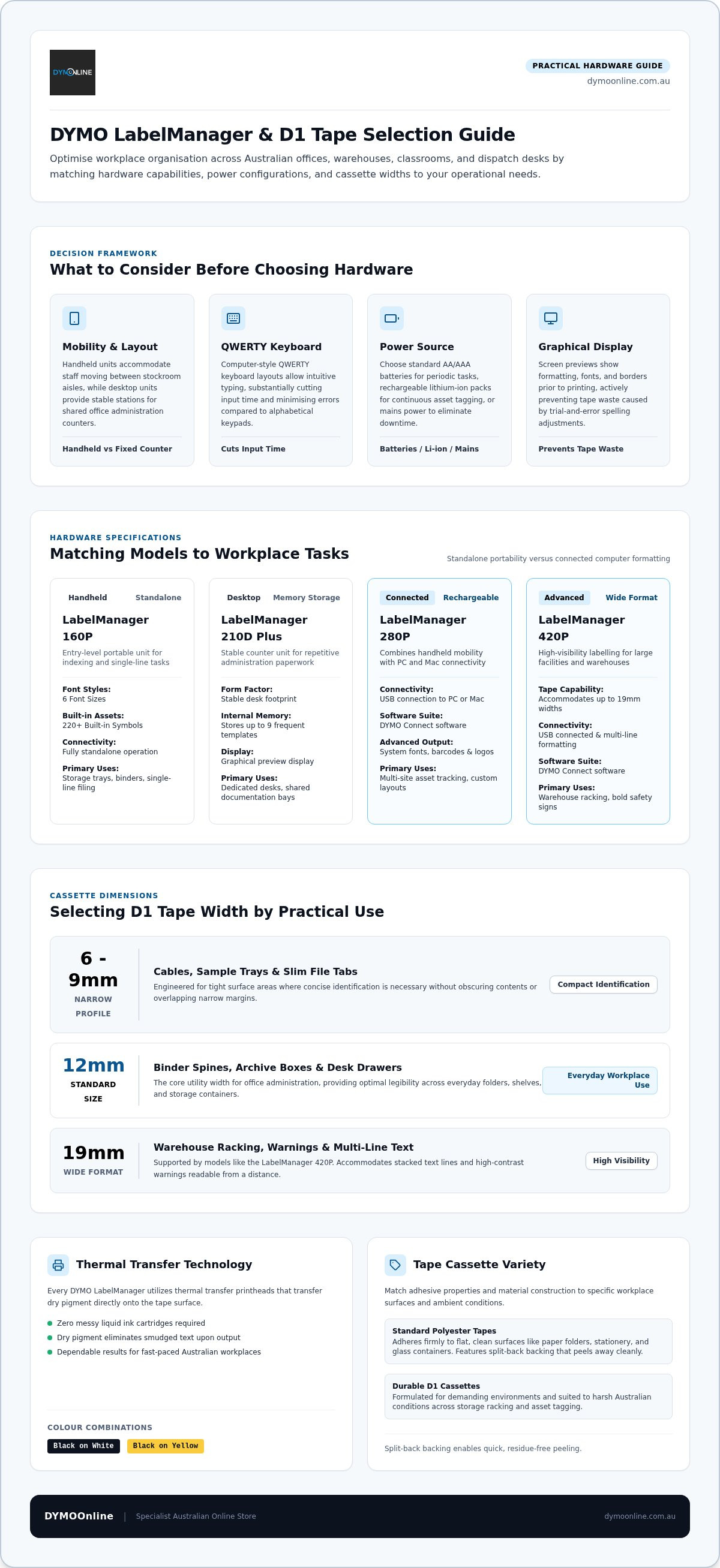
Selecting the right hardware begins with auditing your daily printing demands. Handheld units suit stockrooms and archive bays where staff move constantly between aisles. In contrast, heavier desktop units serve central administration counters where multiple users share a fixed workstation. Tape width requirements should guide your choice immediately, as entry models accommodate widths from 6mm up to 12mm, while advanced machines support 19mm supplies for high-visibility warehouse signage.
Keyboard layout directly impacts productivity. Choosing a dymo labelmanager label maker with a computer-style QWERTY keyboard allows staff to type intuitively, cutting input time substantially compared to alphabetical keypads. As detailed in documented Dymo Corporation history, refining ergonomics has long been central to thermal labelling equipment. Ensuring familiar key placement minimises input errors across fast-paced medical clinics and school administration offices.
Comparing Power Options and Portability for Workplace Use
Power configurations determine how freely your team can operate across facilities. Handheld models running on standard AAA or AA batteries offer grab-and-go convenience for periodic jobs, though frequent battery changes can disrupt busy shifts. Units equipped with rechargeable lithium-ion packs deliver consistent operating runtime for prolonged asset-tagging sessions without consumable battery waste. If you run a high-volume dispatch desk or sorting station, pairing your unit with a dedicated mains power adaptor eliminates downtime entirely. You can explore hardware options across the DYMO LabelManager collection at DymoOnline to match specific charging requirements with your operational layout.
Matching DYMO LabelManager Models to Your Daily Tasks
Every operational environment presents unique labelling requirements. Selecting the ideal dymo labelmanager label maker depends on whether your team handles simple, repetitive sorting or complex asset tracking. Display screen capabilities make a notable difference in daily efficiency. Models with clear graphical displays let users preview formatting, fonts, and borders prior to printing, which actively prevents costly tape waste caused by trial-and-error spelling or layout adjustments.
For dedicated desks handling administrative paperwork, the LabelManager 210D Plus offers a stable footprint and stores up to nine frequent templates in memory. Those managing larger facilities often look toward the LabelManager 420P, which supports tape widths up to 19mm for high-contrast shelving labels. Workplaces seeking tailored solutions can browse dedicated office administration equipment to streamline documentation across shared filing areas.
Entry-Level Handhelds Versus Advanced Connected Label Makers
Entry-level units serve admirably for independent, portable tasks. The portable LabelManager 160P operates entirely standalone, featuring six font sizes and over 220 built-in symbols for indexing storage trays and binders. Reviewing our LabelManager 160 guide offers practical advice for getting clean results on single-line filing jobs without computer intervention.
In contrast, advanced devices like the LabelManager 280P and 420P bridge handheld mobility with desktop computer connectivity. Connecting your dymo labelmanager label maker via USB to a PC or Mac allows staff to design custom layouts using DYMO Connect software. This functionality unlocks system fonts, high-resolution company logos, and detailed barcodes, giving multi-site businesses full control over asset tracking accuracy.
Selecting the Right D1 Tape Types for Clear Results
Thermal transfer technology makes every dymo labelmanager label maker dependable across fast-paced workplaces. Because the printhead transfers dry pigment directly onto the tape surface, you never deal with messy liquid ink cartridges or smudged text. Matching tape dimensions to your storage items ensures clean, readable results:
- 6mm and 9mm: Fit neatly onto narrow file tabs, cables, and sample trays.
- 12mm: Handles standard binder spines, desk drawers, and archive boxes.
- 19mm: Accommodates multi-line text and bold warnings across warehouse racking.
Selecting sharp colour combinations, such as black text on white or high-visibility yellow tape, maximises legibility across shared storage areas and diminishes sorting errors.
Choosing Between Standard Polyester and Heavy-Duty D1 Tapes
Surface texture dictates whether standard or durable tape suits your task. Standard polyester cassettes adhere firmly to flat, clean surfaces like paper folders, glass containers, and stationery. For everyday filing and desktop organisation, selecting the D1 standard tape range gives you crisp print quality alongside split-back tape backing that peels away cleanly without leaving gummy residue.
When labelling rough, textured plastic bins or workshop machinery, switch to durable D1 tapes. These cassettes feature an industrial-grade adhesive that resists lifting on curved surfaces exposed to moisture and UV exposure. Equipping your dymo labelmanager label maker with the appropriate material grade protects your asset markings against daily wear and tear.
Upgrade Your Workplace Labelling Today
Selecting the right dymo labelmanager label maker simplifies records management across every department. When you align keyboard layouts and power options with your daily operations, routine filing and asset identification become faster and far more consistent. Matching your tasks with suitable D1 tape widths and adhesive grades ensures that archive cartons, storage bins, and office equipment remain clearly readable over time.
As a dedicated specialist Australian supplier, DymoOnline maintains extensive stock of LabelManager hardware, D1 cassettes, and office accessories backed by reliable nationwide dispatch and experienced local support. Ready to bring effortless clarity to your workplace systems? Explore workplace labelling solutions at DymoOnline and equip your team with practical tools designed to streamline daily administration.
Frequently Asked Questions
What is the difference between a DYMO LabelManager and a LabelWriter?
A DYMO LabelManager label maker uses continuous D1 tape cassettes and thermal transfer technology to produce durable, laminated strips for files, shelving, and assets. In contrast, DYMO LabelWriter units are dedicated desktop printers that use direct thermal technology on pre-cut paper or synthetic label rolls, making them ideal for high-speed shipping labels, address tags, and appointment badges.
Can I connect a DYMO LabelManager to my PC or Mac computer?
Yes, selected models support computer connectivity. While compact handheld units like the 160P operate strictly as standalone devices, models such as the LabelManager 280P and 420P connect directly to PC and Mac systems via USB. Using DYMO Connect software, you can import spreadsheet data, utilise local computer fonts, and generate barcodes for professional administrative and asset-tracking projects.
What surfaces are DYMO D1 tapes designed to stick to?
Standard DYMO D1 tapes adhere securely to smooth, clean surfaces including paper, polished wood, glass, metal, and flat plastic. Their semi-strong adhesive holds firmly while peeling away without sticky residue. For textured plastics, powder-coated shelving, or challenging workshop items, durable D1 tapes offer stronger industrial-grade adhesion that resists temperature shifts, moisture, and UV exposure.
How do I choose the correct tape width for my label maker?
Check your item's surface area and verify your dymo labelmanager label maker's maximum tape capacity. Narrow 6mm and 9mm tapes suit slim folder tabs and wire flags. Standard 12mm tapes fit lateral filing spines and desk storage trays. If your tasks require large warnings or multi-line text across warehouse racking, choose a 19mm-capable model like the 420P.

Article by
DymoOnline Team
The DYMOOnline Team provides practical guidance for Australian businesses, warehouses, retailers, offices, schools, healthcare workplaces and home users who rely on accurate, efficient labelling. DYMOOnline specialises in DYMO label makers, DYMO label printers, label tapes, label rolls, shipping labels, address labels, barcode labels and labelling accessories, helping customers choose the right labelling products for organisation, mailing, inventory, filing, pricing and workplace efficiency.
General Information
This article is provided as general information only to help customers compare and choose DYMO label makers, label printers, label tapes, label rolls, shipping labels, address labels, barcode labels and related labelling supplies. Product details, specifications, compatibility, availability, pricing and suitability may vary. Always check the individual product page, manufacturer information, printer model compatibility and label size requirements before purchasing or using a product.


