
The Complete Guide to the DYMO LabelManager 160: Portable Labelling for Australian Offices

A cluttered desk isn't just an eyesore; it's a direct drain on your daily productivity and mental clarity. Most Australian professionals have felt that specific frustration when they can't find a critical client file or identify a tangled mess of power cables behind the workstation. The DYMO LabelManager 160 is designed to solve these exact headaches, offering a portable and reliable way to bring order to any workspace without the need for complex software or expensive ink cartridges.
We understand that you want tools that work right out of the box and withstand the demands of a busy office or warehouse. This guide will help you master the DYMO LabelManager 160 by exploring its expert features, such as its six font sizes and over 200 built-in symbols. You'll learn how to choose the correct D1 tapes for lasting durability and get your labelling system running efficiently from day one with help from the specialists at DYMOOnline. We'll cover everything from basic setup to advanced applications, ensuring you have the confidence to create professional labels that stay stuck, even in tough Aussie conditions.
Key Takeaways
- Understand how the dymo label manager 160 provides a portable, battery-powered solution for organising files, cables, and equipment in any Australian work environment.
- Explore the technical advantages of the large LCD preview screen and the library of 228 symbols that allow for high levels of professional customisation.
- Compare the handheld portability of the LM160 against the desktop-style utility of the 210D to determine which model best fits your specific administrative requirements.
- Learn why using genuine DYMO D1 tapes is essential for maintaining print head health and ensuring labels remain durable in diverse environmental conditions.
- Identify practical applications across retail, medical, and home office sectors to maximise the efficiency and clarity of your labelling system.
What is the DYMO LabelManager 160? An Overview of Portable Professionalism
The dymo label manager 160 represents a fundamental shift from complex, stationary printing to agile, handheld organisation. It is a thermal label maker, which means it uses heat to transfer text onto specialised tape. This technology completely eliminates the need for expensive ink or toner cartridges. For Australian businesses, this model bridges the gap between basic home equipment and high-end industrial machines. Looking back at the Dymo Corporation history, the brand has consistently focused on making professional-grade tools accessible to the everyday user. This specific model continues that tradition by providing a rugged, battery-operated solution that thrives in environments ranging from medical clinics to busy retail stockrooms.
To better understand how this device functions in a real-world setting, watch this helpful video:
One of the most practical features of the dymo label manager 160 is the computer-style QWERTY keyboard. Unlike older handheld models that used alphabetical layouts, this familiar design allows for rapid text entry and high accuracy. When you're in the middle of a major stocktake or preparing for a new school term, typing speed is a critical factor. The layout ensures that any staff member can pick up the device and start creating labels immediately without a steep learning curve. It's a no-nonsense tool designed for people who value their time and require professional results without the fuss.
The Core Philosophy of the LabelManager Range
The entire LabelManager range is built on the foundation of immediate utility. You don't need a PC connection, a wireless network, or a complicated software suite to get professional results. It is about picking up the device, typing your text, and printing. The LM160 incorporates one-touch smart keys that allow you to bold text, change font sizes, or add underlines instantly. This focus on durability and simplicity makes it a reliable partner for both modern office spaces and light industrial environments where speed is essential.
Who is the LM160 Best Suited For?
This model is a versatile choice for several Australian sectors. Small business owners use it to organise shelving and create uniform price tags that build customer trust. In the home office, it's the perfect solution for categorising tax files or managing the cable spaghetti behind the workstation. Australian educators and administrative staff find it invaluable for labelling student supplies and managing high-volume classroom storage. It provides a level of clarity that handwritten notes cannot match, ensuring that every item in your workspace has a clearly identified home. If you need a reliable source for these machines, the experts at DymoOnline can provide the specialist guidance required to select the right tapes for your specific application.
Key Features and Technical Specifications of the LM160
The dymo label manager 160 is engineered for precision and efficiency in high-pressure work environments. At the heart of its design is a large, easy-to-read LCD display that provides a real-time preview of your label before you commit to printing. This feature is vital for reducing waste, as it allows you to spot spelling errors or formatting issues instantly. Unlike basic models that require a "print and see" approach, this visual feedback loop ensures that every label meets your specific standards for clarity and professional presentation from the very first attempt. You can verify the text size and style on screen, which is essential for maintaining consistency across a large-scale filing project.
Customisation is another area where this device excels. It features a library of 228 symbols and clip-art images, ranging from common office icons to safety markers and arrows. This variety allows you to standardise your filing systems or equipment tags beyond simple text, making them more intuitive for staff to navigate. The unit is fully compatible with 6mm, 9mm, and 12mm D1 Standard Tapes, giving you the flexibility to choose the right width for everything from slim document spines to wide storage bins. Thermal printing technology ensures that these labels remain legible without the smudging often associated with traditional ink systems, which is particularly useful in Australian environments where humidity can affect standard paper labels.
Formatting Flexibility and Style Options
Achieving a professional look doesn't require graphic design experience. The LM160 offers six font sizes, eight text styles, and four distinct box options to help you categorise your items logically. While the previous section highlighted the speed of the QWERTY keyboard, the internal software provides the depth needed for detailed organisation. The formatting keys provide one-touch access to bolding, italics, underlining, and vertical text. These shortcuts allow you to highlight critical information on a shipping label or file folder in seconds. By using these built-in styles, you can create a cohesive look across your entire organisation, which helps both staff and clients navigate your space more effectively.
Portability and Power Requirements
Weight and ergonomics are critical for users who need to carry their labeller across a warehouse or school campus. The dymo label manager 160 is designed for comfortable one-handed operation, fitting naturally in the palm of your hand. It is powered by six AAA batteries, making it truly independent of wall outlets and perfect for mobile work. To help conserve power in the field, the device includes an auto-power off function that shuts the unit down after a period of inactivity. If your work is primarily desk-based, you can also use an optional AC adapter to save on battery costs. If you need assistance choosing the right power configuration for your team, feel free to speak with our Australian support team at DymoOnline for expert advice on accessories and tape compatibility.
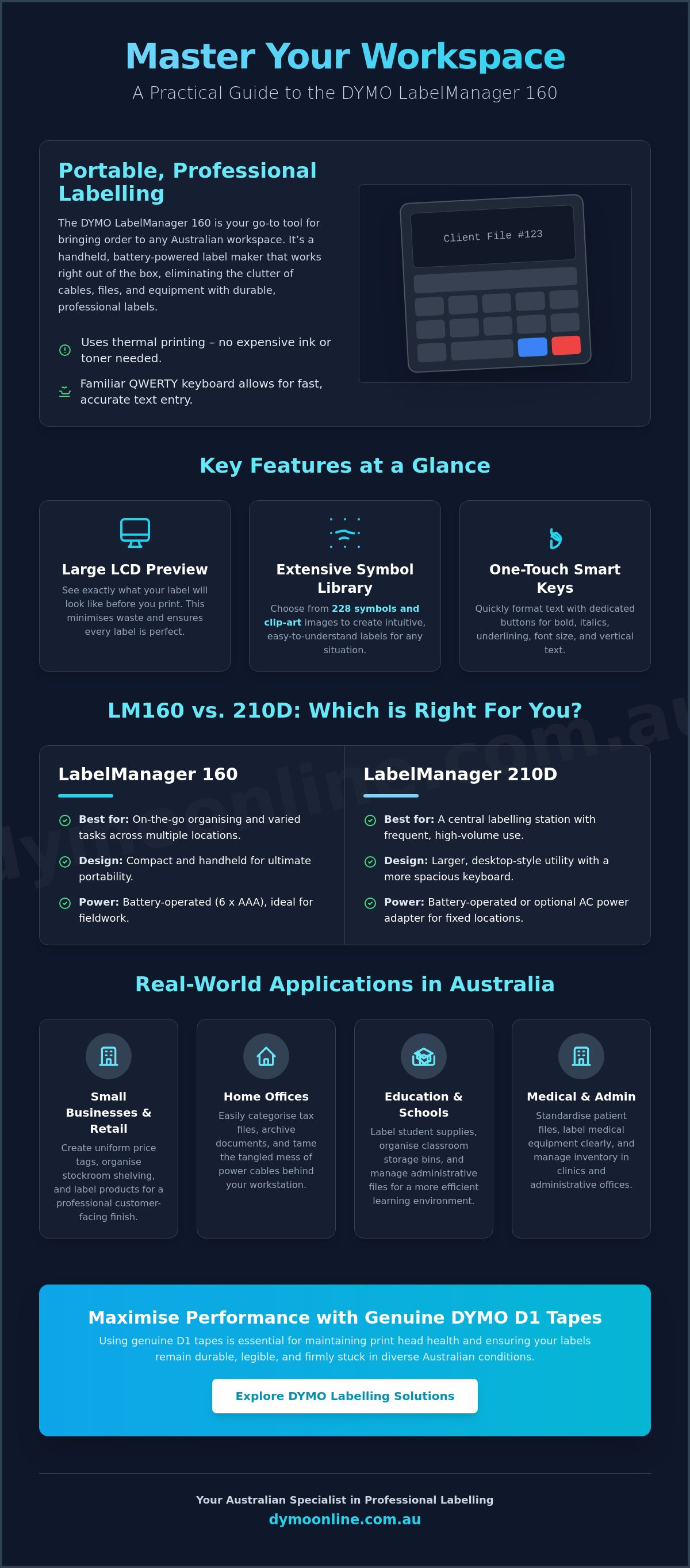
DYMO LabelManager 160 vs 210D: Which Handheld Should You Choose?
Selecting the right labeller involves balancing immediate functionality with your long-term administrative requirements. While the dymo label manager 160 and the 210D share compatibility with the same D1 tape widths, their physical forms and internal capabilities target different user behaviours. The LM160 is a vertical, handheld device designed for mobile use. In contrast, the 210D features a wider, desktop-style orientation that mimics a traditional workstation setup. For Australian budget-conscious buyers, the dymo label manager 160 offers an exceptional price-to-performance ratio, providing all the essential professional features without the added cost of advanced memory storage.
Memory capacity is a primary differentiator between these two models. The LM160 is built for "on-the-fly" tasks; it saves your last printed label so you can quickly produce duplicates, but it doesn't store a library of custom templates. The 210D allows for more saved labels, which is a significant advantage if you frequently print the same asset tags or address formats. If your workflow involves moving between different areas of a warehouse or school campus, the slim profile of the LM160 makes it the more practical companion for one-handed operation. It's about choosing between the speed of a mobile tool and the template convenience of a stationary one.
When to Stick with the LM160
This model is the ideal choice for straightforward labelling projects that don't require complex data management. If you're organising a new filing system, labelling pantry containers, or marking electrical cables, the LM160 provides everything you need. It's the most cost-effective entry point for those starting a new organisational project. Because it's lightweight and compact, it fits easily into a drawer or a toolkit, making it perfect for users who prioritise a mobile work culture and need to produce professional results without a desk-bound setup.
When to Consider an Upgrade
You might find an upgrade necessary if your daily tasks involve high-volume, recurring labelling where saved templates would save significant time. Larger screens or a wider variety of font and box options found in higher-tier models can also assist with more complex formatting for retail displays or industrial signage. If you find that your needs are outgrowing the basic professional features of an entry-level device, you can explore more advanced options in our Dymo LabelManager category. Choosing between these models ultimately comes down to whether you value the extreme portability of a handheld unit or the template storage of a desktop-style marker.
Practical Labelling Applications Across Australia
The dymo label manager 160 serves as a practical solution for the diverse organisational needs of the Australian workforce. In retail environments, clear communication is essential for both staff and customers. Shop owners utilise this device to create uniform shelf labelling and price tags that maintain a professional aesthetic. It is equally effective for back-of-house operations, such as identifying staff pigeon-holes or marking specific bays in a stockroom. This level of order reduces the time spent searching for items during a busy shift, allowing your team to focus on customer service rather than inventory logistics.
Hospitality and education sectors also benefit from the rapid utility of thermal labelling. In a commercial kitchen, identifying food storage containers with date and content labels is a critical part of food safety protocols. The labels withstand the temperature fluctuations of a cool room without peeling. Similarly, Australian educators find the device invaluable for marking student resources, library shelves, and shared classroom supplies. Employing the dymo label manager 160 in a library setting ensures that books and media are easily categorised, making the return process more efficient for both students and staff.
Home Organisation and Pantry Styling
Modern Australian homes are increasingly adopting professional-grade tools to manage household chaos. Using 12mm D1 tapes allows you to create clear, legible labels for spice jars and storage tubs, transforming a cluttered pantry into an organised space. This utility extends to the garage, where labelling toolboxes and hardware bins ensures every screw and bolt has a designated home. For the home network, identifying router cables and power adapters prevents the frustration of accidentally unplugging the wrong device during maintenance. It is a simple way to bring professional-level clarity to your personal environment.
Professional and Industrial Uses
In technical and administrative settings, the requirements for durability are much higher. For electrical and data management, using DYMO D1 Durable labels on patch panels and circuit breakers provides long-term identification that won't fade. Asset tracking is another vital application; labelling laptops, monitors, and shared office equipment simplifies the audit process for IT departments. Additionally, maintaining OH&S compliance is easier when you can print clear warning or instruction labels for shared office machinery. If you need help determining which tape type is best for your specific industrial application, get in touch with our specialist team for technical guidance.
Maximising Performance with Genuine DYMO D1 Tapes
To ensure the longevity of your dymo label manager 160, the choice of consumables is as important as the hardware itself. Using DYMO D1 standard tapes is critical for maintaining the health of the thermal print head. Non-genuine or generic alternatives often use inferior adhesives that can leak or leave a sticky residue inside the machine, leading to frequent jams and potential mechanical failure. Genuine tapes are specifically engineered to pass through the internal cutters cleanly, preserving the sharp output you expect from a professional tool. It's a simple case of protecting your investment through authentic supplies that won't compromise the printer's internal mechanisms.
Correct installation of the tape cassette is an effective way to prevent wastage and mechanical stress. Always ensure the tape is pulled taut across the guide before snapping the cassette into place. This prevents the "birdnesting" that occurs when loose tape catches on the internal rollers. Once applied, these labels are built to withstand the unique Australian environment. Whether it's the high humidity of the northern states or the intense UV exposure in the west, genuine D1 tapes use industrial-grade materials designed to resist fading and peeling over time. They remain legible and attached, even in demanding office or light industrial settings where standard paper labels would quickly fail.
Choosing the Right Tape Width and Colour
Selecting the appropriate width depends on your specific application. While we've noted the compatibility with various sizes, you should use 6mm tapes for slim items like document spines or laboratory vials, while 12mm tapes provide maximum visibility for larger storage bins or signage. Colour coding is another powerful organisational strategy. By assigning different tape colours to specific departments, such as red for safety equipment or blue for IT assets, you create an intuitive visual system that staff can understand at a glance. All D1 tapes feature an "Easy-Peel" split backing, allowing for rapid application without the frustration of picking at the edges during a busy workday.
The DymoOnline Advantage for Australian Customers
When you source your supplies from an Australian-owned and operated specialist, you gain access to expert knowledge that generic retailers cannot provide. DymoOnline ensures that every product is an authentic item, backed by local support and a deep understanding of the DYMO ecosystem. We offer national shipping with efficient delivery options for major metropolitan areas, ensuring your office remains productive. For those who need to maintain a professional standard, the peace of mind that comes with genuine products is invaluable. Explore our full range of DYMO accessories to complement your dymo label manager 160 and keep your organisational systems running smoothly.
Step Into a More Organised Workspace Today
The dymo label manager 160 provides a level of professional clarity and handheld portability that is difficult to match in a modern office environment. By integrating this tool into your daily operations, you gain the ability to standardise your filing systems, track assets accurately, and maintain clear communication across your entire team. We've seen how the combination of over 200 built-in symbols and the familiar QWERTY keyboard allows for rapid, precise labelling without the need for complex software or stationary setups. It's a practical solution for those who value efficiency and immediate results.
To ensure the best long-term performance, always choose genuine DYMO products that are engineered to withstand Australian humidity and UV levels. At DymoOnline, we provide only authentic machines and accessories, backed by specialist Australian support and reliable nationwide shipping from Mega Office Supplies. If you're ready to transform your office efficiency and eliminate clutter, get in touch with our team to discuss the right labelling supplies for your specific environment. Taking that first step toward a more structured workspace is a small investment that pays dividends in daily productivity and peace of mind.
Frequently Asked Questions
What tape does the DYMO LabelManager 160 use?
The dymo label manager 160 uses DYMO D1 tapes, which are available in 6mm, 9mm, and 12mm widths. These tapes are designed for various surfaces and environments, including standard plastic, flexible nylon, and permanent polyester. Using the correct width ensures your labels fit perfectly on everything from slim file spines to larger storage containers. Always ensure you're using genuine D1 cassettes to maintain the integrity of the internal cutting mechanism.
How do I change the batteries in my DYMO LM160?
To change the batteries, first turn the device over and remove the back battery compartment cover. This model requires six AAA alkaline batteries to operate at full capacity. Ensure you insert them according to the polarity markings inside the compartment. If you don't plan to use the device for an extended period, it's a good idea to remove the batteries to prevent any potential leakage from damaging the internal components.
Can I use an AC adapter with the LabelManager 160?
Yes, the dymo label manager 160 is compatible with an optional AC power adapter, which is sold separately. Using an adapter is a practical choice if you primarily use the device at a fixed workstation or desk. It eliminates the ongoing cost of replacing AAA batteries and ensures consistent print power for high-volume labelling tasks. You can find compatible DYMO AC adapters through specialist retailers like DymoOnline to ensure technical compatibility.
Why is my DYMO LabelManager 160 not printing clearly?
Poor print quality is usually caused by low battery power or a dirty print head. If the text appears faded or streaky, try replacing all six AAA batteries with fresh alkaline ones. If the issue persists, carefully clean the print head using a cotton bud dipped in a small amount of isopropyl alcohol. This removes any adhesive buildup or dust that might be interfering with the thermal transfer process during printing.
How do I insert symbols or special characters on the LM160?
You can insert symbols by pressing the dedicated "Symbols" key on the QWERTY keyboard. Once the symbol menu appears on the LCD screen, use the navigation keys to scroll through the 228 available options, which include punctuation, currency, and office icons. Press "OK" to select the desired character. This feature allows you to create more professional and descriptive labels for specific tasks; for example, marking electrical hazards or identifying currency files.
Is the DYMO LabelManager 160 compatible with a Mac or PC?
The dymo label manager 160 is a standalone, portable device and does not offer PC or Mac connectivity. It's designed for immediate, on-the-spot labelling using its built-in keyboard and display. If you require a device that connects to a computer for importing data or using custom fonts, you might consider higher-tier models in the LabelWriter or LabelManager ranges. For most everyday office and home tasks, the standalone functionality of the LM160 is more than sufficient.
How do I fix a tape jam in my DYMO label maker?
To fix a tape jam, turn the power off and open the back cover of the device to remove the tape cassette. Carefully pull out any jammed tape from the exit slot and ensure the tape path is clear of any adhesive residue. Before reinserting the cassette, check that the tape is pulled taut across the guide. If the tape is loose, it's more likely to catch on the internal rollers and cause another jam.
Where can I buy genuine DYMO D1 tapes in Australia?
You can purchase genuine DYMO D1 tapes directly from DymoOnline, a specialist Australian online store. Buying from a local specialist ensures you receive authentic products designed for your specific machine, along with professional advice on tape compatibility. We offer nationwide shipping from Mega Office Supplies, providing a reliable supply chain for businesses and home users across Australia. Using genuine tapes protects your printer's warranty and ensures the best possible print results.
General Information
This article is provided as general information only to help customers compare and choose DYMO label makers, label printers, label tapes, label rolls, shipping labels, address labels, barcode labels and related labelling supplies. Product details, specifications, compatibility, availability, pricing and suitability may vary. Always check the individual product page, manufacturer information, printer model compatibility and label size requirements before purchasing or using a product.
Latest News
DYMO D1 vs LetraTag: Choosing the Right Labelling System for Your Needs in 2026
You've just spent an hour carefully organising your home office files, only to realise the new tape...
How to Clean a DYMO Print Head: Maintenance Guide
Imagine you're preparing a batch of urgent shipping labels for an afternoon pickup, only to find eac...
DYMO Labels: A Complete Guide to Selecting the Optimal Labelling Solution
Last Wednesday, an operations manager discovered that hundreds of shipping labels had lost their gri...
Dymo 4XL Driver Download & Install Guide Australia (2026)
We agree that navigating the choice between DYMO Connect and the legacy Label Software feels unnec...
Best DYMO Barcode Printers: 2026 Australian Expert Guide
A single unreadable barcode can halt an entire Australian supply chain, costing your business prec...
DYMO Printer Drivers: 2026 Australian User Guide
Why does your computer suddenly claim your LabelWriter doesn't exist the moment you have fifty urg...