
How to Clean a DYMO Print Head: Maintenance Guide
Imagine you're preparing a batch of urgent shipping labels for an afternoon pickup, only to find each one emerging with faded streaks and illegible barcodes. It's a frustrating scenario that leads to wasted label rolls and mounting delays in a busy Australian warehouse or home office. You likely rely on your LabelWriter or LabelManager to keep your daily tasks organised, so seeing inconsistent print quality is incredibly disruptive. It's common to worry that blurry text means the hardware is failing or that attempting a fix might damage the sensitive thermal components.
This guide explains exactly how to clean dymo print head components safely using professional techniques that restore clarity. We'll cover the correct use of cleaning cards for the LabelWriter series and manual maintenance steps for your portable devices. By following these practical steps, you can maximise the lifespan of your printer and maintain professional labelling standards without the stress of equipment downtime.
Key Takeaways
- Learn to recognise the signs of print head contamination, such as vertical streaks or faded barcodes, before they lead to wasted DYMO label rolls.
- Follow a professional guide on how to clean dymo print head components using approved cleaning cards or isopropyl alcohol to restore professional print quality.
- Discover specific maintenance techniques tailored for different models, including the LabelWriter 5 series and portable LabelManager units.
- Understand how to maximise the lifespan of your hardware by implementing a routine cleaning schedule every time you replace your labelling consumables.
Identifying Print Head Issues and Preparing for Maintenance
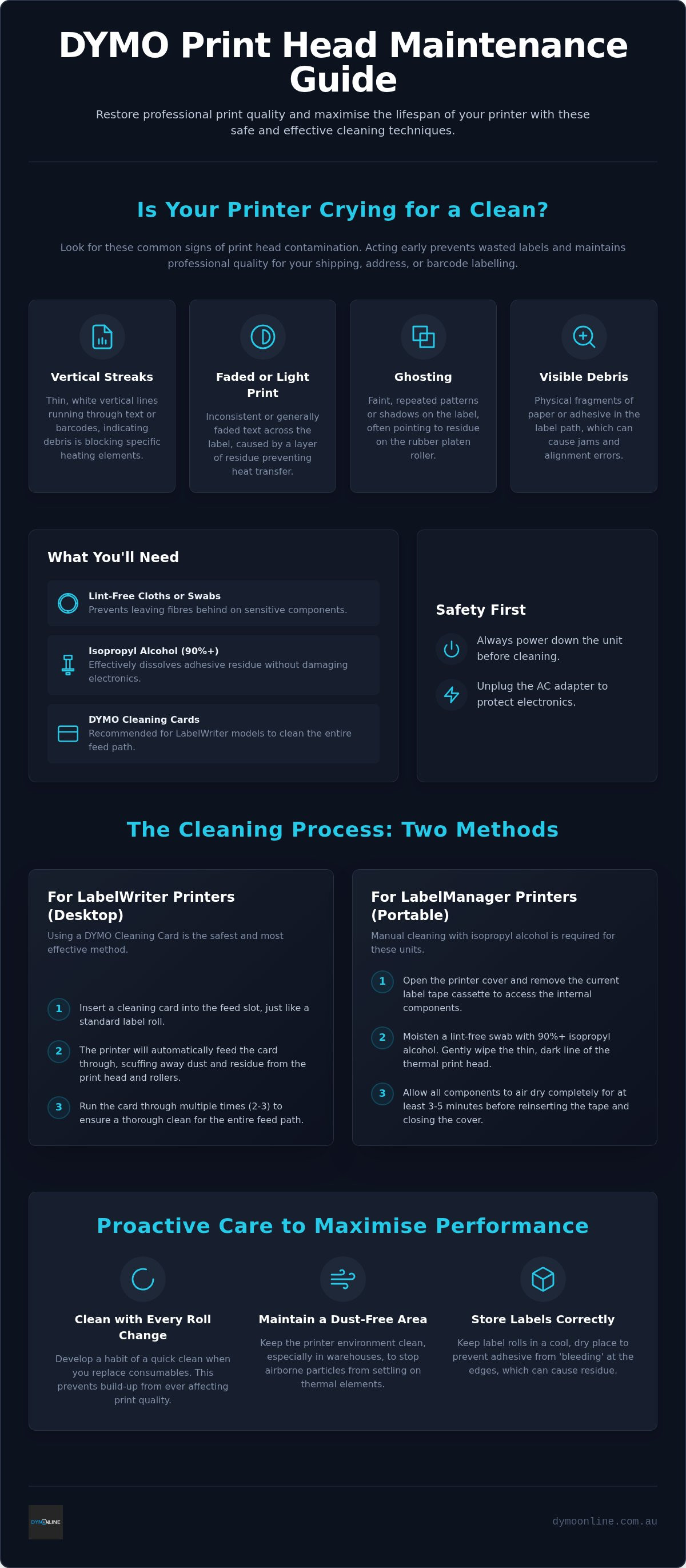
Maintaining a DYMO printer ensures your DYMO labels remain legible and professional. Most issues stem from the underlying thermal printing technology, which uses heat to create images on chemically treated paper. Over time, microscopic paper dust and adhesive residue accumulate on the print head. This creates an insulating layer that prevents heat from reaching the label, resulting in faded text or inconsistent ink density. If you notice thin, vertical white streaks running through your barcodes or text, it's a clear signal that debris is blocking specific heating elements.
Before learning how to clean dymo print head components, you must gather the correct supplies to avoid hardware damage. Use only lint-free cloths or cotton swabs and isopropyl alcohol with a concentration of 90% or higher. Alternatively, specialized DYMO cleaning cards are highly effective for the LabelWriter series. Safety is paramount; always power down the unit and unplug the AC adapter before you begin. This protects the sensitive electronics and prevents accidental short-circuits while you work inside the machine.
Signs Your DYMO Needs Immediate Cleaning
Routine inspections help you catch problems before they ruin expensive label rolls. Watch for these specific indicators:
- Ghosting: Repeated light patterns or faint shadows on the label often indicate residue on the rubber platen roller rather than the head itself.
- Physical Debris: Visible fragments of paper or adhesive in the label path can cause alignment errors or frequent jams.
- Density Issues: If prints are consistently light across the entire surface, consult our Dymo Troubleshooting Guide to ensure the issue isn't related to software settings or print density configurations.
Step-by-Step Guide to Cleaning Your DYMO Printer
Cleaning methods differ between handheld DYMO LabelManager units and desktop LabelWriter models. To begin manual cleaning, open the printer cover and remove the current label roll to access the internal track. You will see the thermal print head as a thin, dark line near the label exit point. Using a lint-free cloth or a dedicated cleaning swab moistened with 90% isopropyl alcohol, wipe the surface gently. When considering how to clean dymo print head components, precision helps prevent damage to the delicate glass coating. Avoid standard cotton buds, as they often leave behind tiny fibres that can interfere with the heating elements. Following printhead maintenance best practices, allow the internal components to air dry for at least three to five minutes before reinserting your labels.
Using DYMO Cleaning Cards for LabelWriter Printers
Desktop models like the LabelWriter 550 are often maintained with specialised DYMO cleaning cards to reach areas that are difficult to access manually. These cards scuff away dust and adhesive residue from the entire feed path, including the rollers and the head. Insert a card into the feed slot as you would a standard label and run it through the printer multiple times to ensure a deep clean. This method is effective for maintaining print quality in fast-paced Australian office environments where high-volume labelling is common. Knowing how to clean dymo print head surfaces with these cards reduces the risk of accidental damage from manual tools. If you still notice streaks on your prints after this process, get in touch with our team for expert support.
Proactive Care to Minimise Residue and Maximise Performance
Establishing a consistent maintenance schedule is the most effective way to ensure your labelling remains sharp and professional. Rather than waiting for print quality to degrade, develop a habit of performing a quick clean every time you replace a label roll. This proactive approach ensures that microscopic dust and adhesive buildup never reach a level that impacts performance. For those operating in Australian warehouses or industrial sites, keeping the printer environment free from excessive dust is vital. Airborne particles can easily enter the machine housing and settle on the sensitive thermal elements, leading to premature wear.
Proper storage of your consumables also plays a significant role in hardware longevity. Store your label rolls in a cool, dry place to prevent the adhesive from 'bleeding' at the edges. When adhesive seeps out due to heat or humidity, it sticks directly to the internal components, making the task of how to clean dymo print head surfaces much more difficult later. Additionally, keeping your printer firmware updated helps maintain the correct operating temperature. This prevents adhesive from baking onto the thermal elements, which simplifies the process of how to clean dymo print head components during your next routine service.
Selecting High-Quality Label Rolls for Clean Printing
The choice of media directly influences how often you need to perform maintenance. Using DYMO LabelWriter rolls ensures that the adhesive is specifically formulated for thermal technology. Non-standard labels often use inferior adhesives that melt at lower temperatures or require higher heat settings to produce an image. These factors lead to heavy residue buildup and can shorten the lifespan of the thermal head. For a deeper look at hardware care, refer to our Ultimate Guide to the Dymo LabelWriter 550 to understand how to keep your office standards high.
Maintain Professional Labelling Standards with Routine Care
Consistent maintenance is the most effective way to prevent faded text and wasted supplies. By understanding how to clean dymo print head components using isopropyl alcohol or specialised cleaning cards, you ensure your LabelWriter or LabelManager remains a reliable asset in your workspace. Remember that proactive care, such as cleaning with every roll change and choosing authentic DYMO labels, significantly extends the life of your hardware. Since 2009, DymoOnline has provided specialist Australian support to help businesses maintain peak efficiency. Whether you need maintenance accessories or new hardware, we offer nationwide delivery for all labelling supplies to every corner of the country. Taking these simple steps today prevents costly downtime tomorrow. Browse DYMO cleaning accessories and printers at DymoOnline to keep your operations running smoothly.
Frequently Asked Questions
Can I use a standard cotton bud and rubbing alcohol to clean my DYMO?
You can use isopropyl alcohol and a swab, though lint-free materials are preferred over standard cotton buds to avoid leaving tiny fibres. Ensure the alcohol concentration is 90% or higher to prevent moisture damage. When learning how to clean dymo print head surfaces manually, always apply gentle pressure and allow the unit to dry completely before reinserting your tapes.
How often should I use a cleaning card in my LabelWriter 550?
It's recommended to use a cleaning card once every one to two months, or after every ten DYMO label rolls consumed. In high-volume environments like Australian medical clinics or shipping hubs, you might need to perform this task more frequently. Regular use of cleaning cards scours the internal feed path and helps maximise the lifespan of your LabelWriter 550 hardware.
Why are there white lines running through my printed barcodes?
White vertical lines usually indicate that dust or adhesive is physically blocking the heating elements. This prevents heat from reaching your DYMO shipping labels. If you are unsure how to clean dymo print head components to fix this, using a cleaning card is the most efficient method. This process removes the debris and restores the professional density required for accurate barcode scanning.
Will cleaning the print head fix a 'label not recognised' error on the 5-series?
Cleaning the print head generally won't resolve a 'label not recognised' error on the LabelWriter 5 series. This specific error is typically related to the Automatic Label Recognition technology, which requires authentic DYMO label rolls equipped with an internal RFID chip. If you encounter this message, verify that you aren't using third-party or generic labels, as the 550 and 5XL models are designed for authentic consumables.

Article by
DymoOnline Team
The DYMOOnline Team provides practical guidance for Australian businesses, warehouses, retailers, offices, schools, healthcare workplaces and home users who rely on accurate, efficient labelling. DYMOOnline specialises in DYMO label makers, DYMO label printers, label tapes, label rolls, shipping labels, address labels, barcode labels and labelling accessories, helping customers choose the right labelling products for organisation, mailing, inventory, filing, pricing and workplace efficiency.
General Information
This article is provided as general information only to help customers compare and choose DYMO label makers, label printers, label tapes, label rolls, shipping labels, address labels, barcode labels and related labelling supplies. Product details, specifications, compatibility, availability, pricing and suitability may vary. Always check the individual product page, manufacturer information, printer model compatibility and label size requirements before purchasing or using a product.
Latest News
How to Clean a DYMO Print Head: Maintenance Guide
Imagine you're preparing a batch of urgent shipping labels for an afternoon pickup, only to find eac...
DYMO Labels: A Complete Guide to Selecting the Optimal Labelling Solution
Last Wednesday, an operations manager discovered that hundreds of shipping labels had lost their gri...
Dymo 4XL Driver Download & Install Guide Australia (2026)
We agree that navigating the choice between DYMO Connect and the legacy Label Software feels unnec...
Best DYMO Barcode Printers: 2026 Australian Expert Guide
A single unreadable barcode can halt an entire Australian supply chain, costing your business prec...
DYMO Printer Drivers: 2026 Australian User Guide
Why does your computer suddenly claim your LabelWriter doesn't exist the moment you have fifty urg...
Genuine DYMO D1 Labels: The Ultimate Australian Buyer’s Guide
A single jammed cassette or a set of peeling labels can cost your business far more in lost produc...