
Could a single device solve the daily frustration of misplaced files and unidentifiable cables in your workplace? Most Australian office managers know the struggle of deciphering messy handwriting or dealing with inconsistent filing systems across different departments. It's a drain on productivity that often goes unnoticed until a critical asset goes missing or a shipping error occurs. Finding the right office label maker shouldn't be a matter of guesswork.
This 2026 guide provides a clear path to selecting a labelling solution that brings professional order to your environment. We'll examine the technical differences between thermal rolls and durable tapes, ensuring you understand printer compatibility and adhesive types. You'll learn how to streamline your shipping and filing processes while maintaining a consistent look across every department in your business. By the end of this article, you'll have the specialized knowledge required to identify the most efficient tools for your specific administrative requirements.
Key Takeaways
- Understand the functional differences between desktop thermal printers and portable tape machines to ensure your hardware matches your physical workspace requirements.
- Learn how thermal printing technology removes the ongoing requirement for ink or toner, helping to minimise maintenance and operational downtime.
- Determine the right office label maker by assessing your required printing volume and the specific durability needs of your administrative or asset labels.
- Implement standardised labelling protocols to organise filing systems effectively and streamline visitor management processes in professional environments.
Understanding Office Label Maker Technologies for Australian Workplaces
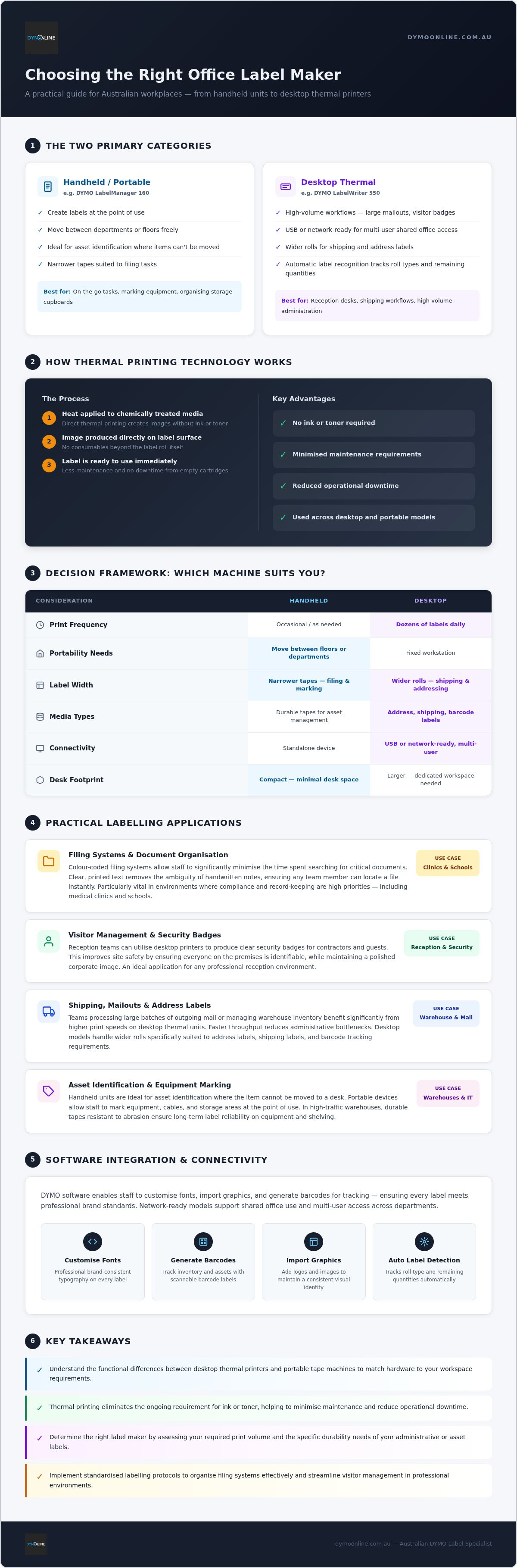
Selecting the right office label maker requires a clear understanding of the two primary categories available to Australian businesses. These include desktop thermal printers and portable tape-based machines. Most professional models utilise direct thermal printing, a process that uses heat to create images on chemically treated media. This approach is central to modern label printer technologies because it eliminates the need for ink or toner. For busy administration teams, this means less maintenance and no downtime caused by empty cartridges.
Environmental factors are critical. A standard climate-controlled office might prioritise aesthetics for filing; however, a high-traffic warehouse requires labels that resist abrasion. Matching the machine to the physical demands of the workspace ensures long-term reliability.
Handheld vs Desktop: Finding Your Office Workflow
Portable units like the DYMO LabelManager 160 are excellent for on-the-go tasks such as marking equipment or organising storage cupboards. These handheld devices allow staff to create labels at the point of use. It's an ideal choice for asset identification where the item cannot be moved to a desk. In contrast, desktop solutions are better suited for high-volume workflows like large mailouts or printing visitor badges at reception.
When evaluating office label maker options, consider this simple framework:
- Frequency: If you print dozens of labels daily, a desktop thermal printer is more efficient.
- Portability: Choose a handheld unit if you need to move between different departments or floors.
- Label Width: Desktop machines typically handle wider rolls for shipping, while portable units focus on narrower tapes for filing.
Key Considerations Before Selecting Your Office Label Maker
Choosing an office label maker involves more than comparing upfront costs. You must first identify the daily volume of labelling required to determine if a high-speed printer is necessary for your efficiency. Teams processing large batches of outgoing mail or managing warehouse inventory will find that faster print speeds significantly reduce administrative bottlenecks. Smaller offices might prioritise versatility over raw output speed.
It's also vital to evaluate the range of media your business needs. This can vary from standard address labels for general correspondence to specialised durable tapes for asset management and equipment identification. Selecting the right office label maker also requires assessing the physical footprint of the device. Many Australian workstations have limited desk space, so a compact unit that sits comfortably alongside existing peripherals helps maintain a tidy and professional environment. For businesses looking to further optimise their space with dedicated quiet zones or meeting areas, you can check out Workpod for modular office solutions.
Connectivity and Software: Integrating with Modern Systems
Modern workflows often demand USB or network-ready models that support shared office use and multi-user access. By utilising DYMO software, staff can easily customise fonts, import graphics, or generate barcodes for tracking. This software integration ensures that every label produced meets your brand's professional standards. For a detailed look at advanced features like automatic label recognition, our DYMO LabelWriter 550 guide illustrates how the latest technology tracks roll types and remaining quantities. If you aren't sure which model fits your current infrastructure, contact our specialist support for a tailored recommendation.
Practical Labelling Applications to Organise Your Workplace
Administrative efficiency in Australian medical clinics or schools depends on the speed of information retrieval. By using an office label maker to colour-code filing systems, staff can significantly minimise the time spent searching for critical documents. Clear, printed text removes the ambiguity often found with handwritten notes, ensuring that any team member can locate a file instantly. This level of organisation is particularly vital in environments where compliance and record-keeping are high priorities.
Visitor management is another area where a dedicated office label maker adds professional value. Reception teams can utilise desktop printers to produce clear security badges for contractors and guests. This process improves site safety by ensuring everyone on the premises is identifiable while maintaining a polished corporate image. Shared spaces, such as breakrooms and kitchens, also benefit from clear instructions. Labelling cupboards for specific supplies and marking expiry dates on shared items helps maintain a tidy, hygienic environment for all employees.
Professional Asset Management and Shipping Solutions
IT departments and office managers require a robust system for tracking hardware. Implementing a consistent asset tagging system for laptops, monitors, and furniture ensures that equipment remains identifiable throughout its lifecycle. Using durable labels prevents tags from peeling or fading in high-use environments. For businesses with high-volume logistics requirements, wide-format solutions are essential. The LabelWriter 5XL handles larger rolls, making it a reliable choice for Australian shipping and warehouse applications.
If your business requires industry-specific labelling for medical administration or specialised warehouse use, contact the DymoOnline team. Our specialists provide tailored advice to help you select the right hardware and consumables for your specific professional environment.
Optimising Your Workplace Organisation for 2026
Identifying the right office label maker is a foundational step toward achieving a structured and productive workplace. By matching thermal printing technology to your specific volume requirements and environmental conditions, you can ensure that your labelling remains clear and durable. Whether you are managing complex filing systems or high-volume shipping, the correct hardware minimises administrative friction and maintains a professional standard across every department.
Since 2009, our team has provided specialised expertise in DYMO systems to businesses across the country. If you need assistance selecting the ideal configuration for your specific industry, contact our Australian specialist team for expert labelling advice. We offer specialist Australian support and fast nationwide shipping to help you implement your new organisational system without delay. Investing in reliable tools today ensures your office remains efficient well into the future.
Frequently Asked Questions
How do I choose between a LabelManager and a LabelWriter for my office?
Choosing between these ranges depends on your mobility and volume. A LabelManager is a handheld office label maker that uses durable D1 tapes, which is ideal for organising files and equipment on the go. Conversely, a LabelWriter is a desktop printer designed for high-volume tasks like shipping or visitor management. It handles paper rolls and connects directly to your computer.
Do modern office label makers require expensive ink or toner cartridges?
No, modern units use direct thermal printing technology to create images. This process uses heat-sensitive media instead of traditional ink or toner, which significantly reduces ongoing maintenance costs. Since you don't need to purchase or replace cartridges, your administrative staff can focus on tasks without worrying about printer downtime. It's an efficient solution for any busy Australian workplace looking to maximise productivity.
Can I print barcodes and logos with a standard office label maker?
Yes, you can easily incorporate barcodes and company logos using the included software. Desktop models connect to your workstation, allowing you to import graphics and generate various barcode types for asset tracking or retail applications. This feature ensures every label matches your professional branding. Handheld models often have built-in symbols, but computer-connected versions offer the highest level of customisation for complex requirements.
Is it possible to share a label printer across multiple computers in an office?
It's entirely possible to share your printer across a local network. Many advanced models feature built-in Ethernet or wireless connectivity, allowing multiple users to access the device from different workstations. If you choose a standard USB model, you can still share it through your operating system's printer sharing settings. This setup is effective for centralised reception areas or shared administrative hubs where several staff members need access.

Article by
DymoOnline Team
The DYMOOnline Team provides practical guidance for Australian businesses, warehouses, retailers, offices, schools, healthcare workplaces and home users who rely on accurate, efficient labelling. DYMOOnline specialises in DYMO label makers, DYMO label printers, label tapes, label rolls, shipping labels, address labels, barcode labels and labelling accessories, helping customers choose the right labelling products for organisation, mailing, inventory, filing, pricing and workplace efficiency.
General Information
This article is provided as general information only to help customers compare and choose DYMO label makers, label printers, label tapes, label rolls, shipping labels, address labels, barcode labels and related labelling supplies. Product details, specifications, compatibility, availability, pricing and suitability may vary. Always check the individual product page, manufacturer information, printer model compatibility and label size requirements before purchasing or using a product.