
The right workshop label maker depends on what you need to identify. A label for a cable may not suit a panel, equipment case or sign, so choose the machine and tape for the task rather than focusing on features alone.
It’s easy to compare keypads and overlook the consumable. Yet tape material and format affect whether a label suits the surface and application. This guide compares the Rhino 4200, Rhino 5200 and Rhino 6000+ for different workflows, from regular workshop labelling to electrical and data-installation jobs.
You’ll also find practical guidance on choosing between vinyl, flexible nylon, polyester, self-laminating labels and heat-shrink tubing, plus checks to make before buying. Considering the machine and tape together helps you select a setup that fits the work.
Key Takeaways
- Choose a workshop label maker around the job and workflow, whether you label cables, panels, equipment or workshop assets.
- Compare the Rhino 4200, 5200 and 6000+ by the scale and complexity of your labelling tasks.
- Match the tape material to the surface and application, then check that the specific consumable suits your chosen machine.
- Use a pre-purchase checklist to avoid choosing by machine features alone or overlooking the label’s intended surface.
Workshop label maker buying guide: start with the job you need to label
Start with the item you need to identify. Is it a cable or conduit, a flat panel, a piece of equipment or a workshop asset? The answer helps narrow down the label material and format. The volume of work and how you prefer to prepare labels will help you choose a machine.
Task-first selection means matching the label maker and consumable to the item, the surface and how often you’ll label it.
DYMO Rhino label makers use thermal-transfer printing. The printing process is one factor when comparing machines, but the tape must also suit the application and be compatible with the machine. DymoOnline’s Trades & Workshop range brings together Rhino models and industrial tape types to help you compare options.
Which workshop labelling tasks need different approaches?
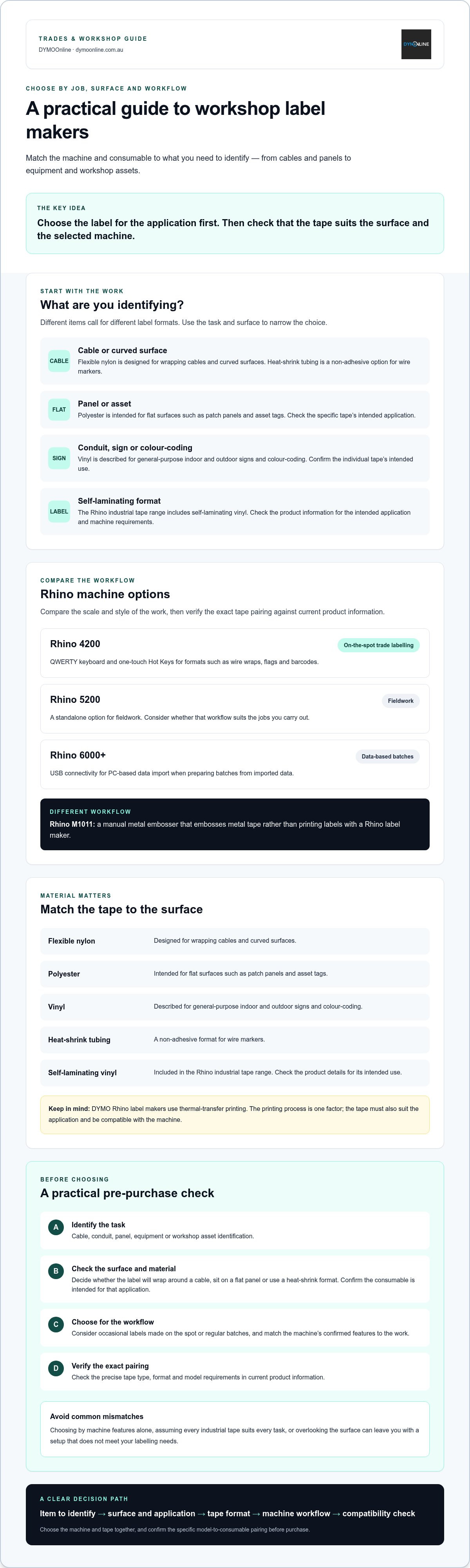
A flat patch panel and a curved cable need different label formats. Flexible nylon is designed for wrapping cables and curved surfaces, while polyester is intended for flat surfaces such as panels and asset tags. Heat-shrink tubing is a non-adhesive option for wire markers. For conduit, signs or colour-coding, check the specific tape’s intended use instead of choosing by appearance alone.
Before you buy, note:
- Task: cable, conduit, panel, equipment or asset identification.
- Surface and environment: whether the surface is flat or curved, and where the label will be used.
- Print format: check the label layout and width against the machine and consumable details.
- Frequency and workflow: occasional labels made on the spot or regular batches.
This assessment keeps the decision focused: match the application, work volume, material and workflow before settling on a workshop label maker. In engineering and fabrication spaces where managing tooling and machine parts is critical, clear identification keeps operations running smoothly; if you are looking to outfit your workshop with high-precision gear, visit Ridiculous Machine Tools.
Compare DYMO Rhino workshop label makers and tapes by application
For regular, on-the-spot trade labelling, the Rhino 4200 has a QWERTY keyboard and one-touch Hot Keys for formats such as wire wraps, flags and barcodes. The Rhino 5200 is a standalone option for fieldwork. If you prepare batches from imported data, the Rhino 6000+ offers USB connectivity for PC-based data import. Check current product information to confirm that the tape you need suits your selected model.
Choose tape for the application as well as the machine. Vinyl is described for general-purpose indoor and outdoor signs and colour-coding. Flexible nylon is designed for wrapping cables and curved surfaces, while polyester is intended for flat surfaces such as patch panels and asset tags. The Rhino industrial tape range also includes self-laminating vinyl and heat-shrink tubing. Heat-shrink tubing provides a non-adhesive format for wire markers.
Match the tape material and machine to the labelling surface
Before choosing a consumable, consider the surface and how the label will be applied. Cable wraps, flat panel labels and heat-shrink wire markers use different formats. Check the tape’s intended application and the printer’s requirements. For more detail, see the DYMO Rhino industrial labelling guide.
The manual Rhino M1011 metal embosser uses a different workflow: it embosses metal tape rather than printing labels with a Rhino label maker. For workplace signs, check the requirements that apply to your Australian workplace and the purpose of the sign.
Compare the machine workflow with the tape application to narrow your options. Then review the Trades & Workshop range to compare the available Rhino machines and tape types.
Choose your workshop label maker with a pre-purchase checklist
A compatibility check can help prevent a mismatch between machine and consumable. Before ordering a workshop label maker, identify the task, surface and label format, then verify the exact model-to-tape pairing against current product information. Don’t assume a tape will suit a machine just because it looks right for the job.
What should you confirm before ordering a DYMO workshop label maker?
- Intended labels: Decide whether you’re identifying cables, panels, equipment or workshop assets.
- Surface and material: Check whether the label will wrap around a cable, sit on a flat panel or use a heat-shrink format. Confirm the consumable is intended for that application.
- Model suitability: Match the machine’s confirmed features to your workflow, such as making labels on the spot or preparing batches from imported data.
- Consumables: Check the product information for the precise tape type and format required by the selected model.
Common purchasing mistakes include choosing by machine features alone, assuming every industrial tape suits every task and overlooking the surface. Any of these can leave you with a setup that doesn’t meet your labelling needs.
Once you’ve checked the pairing, review Rhino industrial tapes to compare consumable types. You can also compare the available machines and tapes in the Trades & Workshop label makers range from DymoOnline, a specialist Australian supplier.
Choose a Rhino setup that fits your workshop
Choose a workshop label maker by considering what you need to identify, how often you’ll label it and the surface the label must suit. Then check the machine and consumable pairing against current product information before ordering. This keeps the decision focused on the complete setup, not just the label maker.
DymoOnline’s Trades & Workshop range includes the Rhino 4200, Rhino 5200 and Rhino 6000+, alongside industrial consumables in several tape material types. Compare the machines by workflow, then narrow your tape choice by application and surface.
To compare the available options, browse DYMO Trades & Workshop labelling solutions from DymoOnline.
Frequently Asked Questions
Which DYMO label maker should I choose for workshop use?
Choose a model based on your workload and how you prepare labels. The Rhino 4200 has a QWERTY keyboard and one-touch Hot Keys for formats including wire wraps, flags and barcodes. The Rhino 5200 suits a standalone field workflow, while the Rhino 6000+ offers USB connectivity for importing data for batch printing. Check current product details before deciding.
Which DYMO tape is suitable for labelling cables?
Flexible nylon is designed for wrapping cables and curved surfaces, while heat-shrink tubing provides a non-adhesive format for wire markers. Consider how the label will sit on the cable and where it will be used. Before buying, check current product information to confirm the specific tape suits your task and selected Rhino model.
Can one workshop label maker handle every labelling task?
Not necessarily. The label maker and consumable need to suit the label format, surface and workflow. A cable wrap, flat panel label and heat-shrink wire marker, for example, call for different material approaches. Check the model’s supported consumables and the tape’s intended application rather than assuming one setup will cover every job.
What should I check before buying a DYMO Rhino label maker?
List what you’ll label, the surface or cable type, the label format and how often you’ll print. Then verify the exact machine-to-consumable pairing using current product information, including any format or width requirements. Don’t choose by machine features alone: confirm the tape suits the application and that the selected model supports it.
General Information
This article is provided as general information only to help customers compare and choose DYMO label makers, label printers, label tapes, label rolls, shipping labels, address labels, barcode labels and related labelling supplies. Product details, specifications, compatibility, availability, pricing and suitability may vary. Always check the individual product page, manufacturer information, printer model compatibility and label size requirements before purchasing or using a product.

