
Dymo Jewellery Price Tag Printing: A Specialty Guide
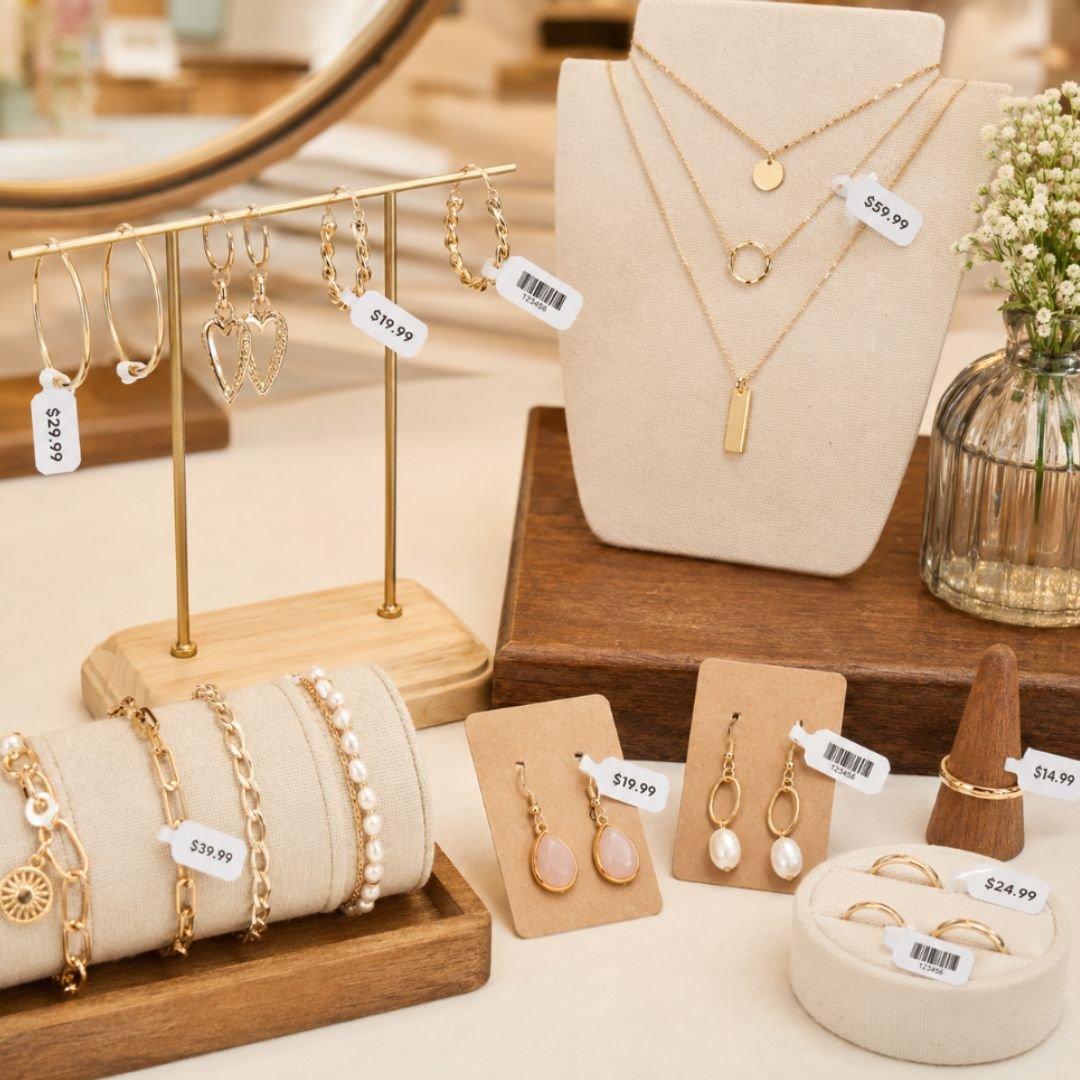
How many expensive label rolls has your business discarded this year because a printer couldn't align a tiny price tag correctly? It's a common frustration for Australian jewellers who find themselves battling sensor errors or adhesive residue that ruins delicate stock. Mastering dymo jewellery price tag printing extra labels requires a move away from trial and error toward a calibrated system of genuine supplies and correct software settings.
We understand that your time is better spent with customers than troubleshooting a jammed LabelWriter 550. This expert guide provides a practical roadmap to professional labelling, ensuring your tags are crisp, durable, and perfectly aligned every time. You'll learn the essential differences between rat-tail and dumbbell styles, the compatibility requirements for the latest DYMO hardware, and how to source a reliable supply of bulk labels from DYMOOnline. We'll show you how to configure Dymo Connect version 1.6 to eliminate waste and maintain a high-volume printing environment that supports your retail growth.
Key Takeaways
- Understand how direct thermal technology enables precise printing on 10mm x 19mm surfaces while eliminating the need for expensive ink or toner.
- Learn why the LabelWriter 5 series requires genuine supplies to avoid the "No Label" errors caused by Automatic Label Recognition sensors.
- Master the setup of DYMO Connect software to ensure your dymo jewellery price tag printing extra labels are perfectly aligned every time.
- Discover how to select solvent-resistant label materials that protect your delicate stock from adhesive residue and environmental damage.
- Identify the benefits of sourcing bulk label rolls from local Australian specialists to maintain stock levels during busy retail seasons.
Mastering Jewellery Price Tag Printing with DYMO
Precision labelling is a non-negotiable requirement for Australian boutique owners. When you're dealing with high-value items like rings or earrings, a generic sticker simply won't suffice. The challenge lies in fitting essential data like barcodes, prices, and branding onto a compact 10mm x 19mm surface without sacrificing legibility. Professional aesthetics build customer trust; a well-printed, perfectly aligned tag suggests a level of care and authenticity that reflects the quality of the jewellery itself.
DYMO utilizes thermal printing technology to achieve this level of detail. By using heat-sensitive paper instead of messy ink or toner, these printers produce crisp, smudge-proof text that survives frequent handling. This technology is at the heart of the Dymo LabelWriter series, providing a reliable solution for businesses that can't afford the downtime associated with cartridge replacements.
To better understand this concept and see how to set up your own small product tags, watch this helpful tutorial:
Efficiency is another major advantage of this ecosystem. Many jewellery-specific rolls use a "two-up" format, where labels are stacked horizontally. This design effectively doubles your output per roll, allowing you to print hundreds of tags in a single session. For retailers preparing for the Christmas rush or seasonal sales, having a consistent supply of dymo jewellery price tag printing extra labels is vital to keep operations running smoothly. It's about maintaining momentum in a fast-paced retail environment where every second counts.
The 10mm x 19mm Standard (30373/2191635)
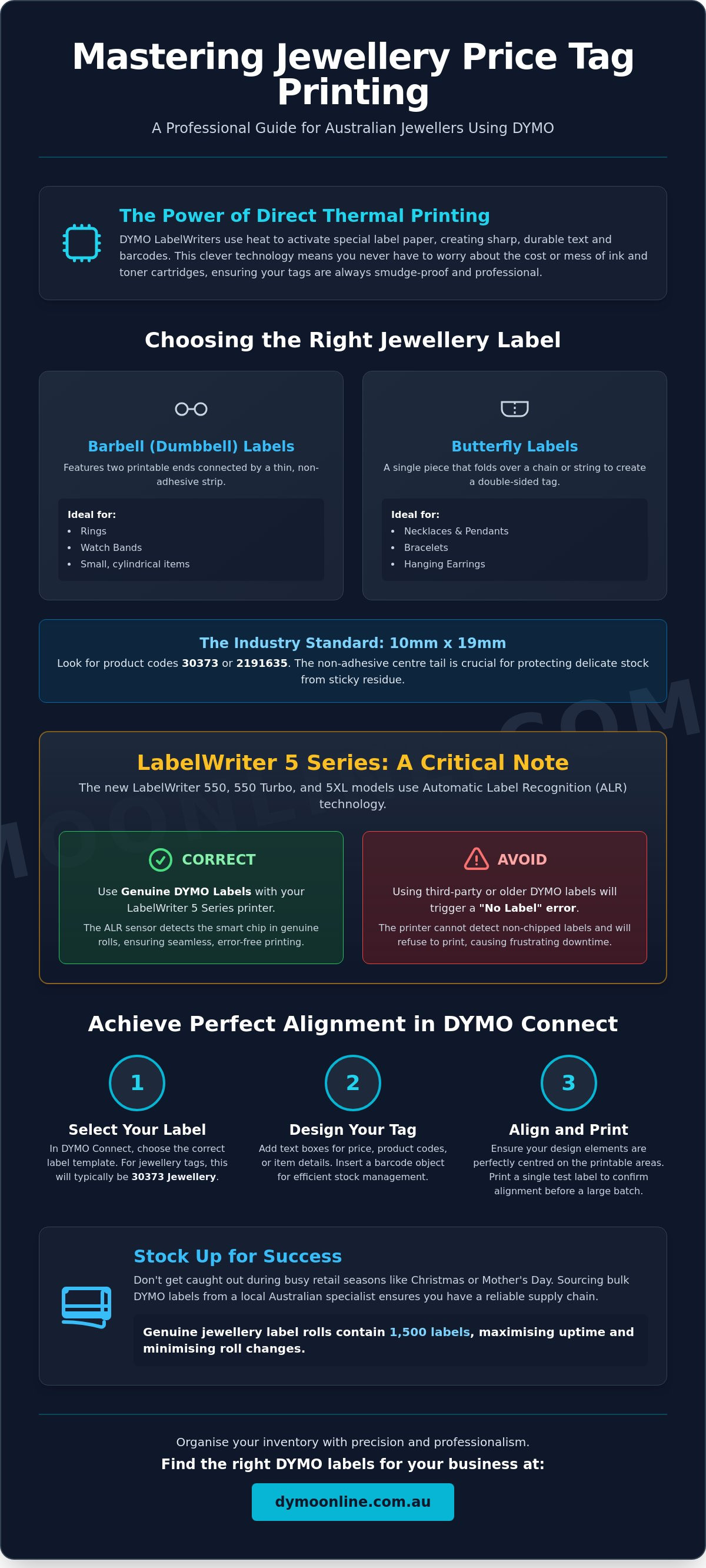
The 10mm x 19mm dimensions have become the industry standard for a reason. These labels, often referred to by product codes like 30373 or the newer 2191635, are designed to fit perfectly on ring shanks and earring posts. A critical feature is the non-adhesive centre tail. This strip ensures that no sticky residue touches the jewellery, preventing damage to delicate metals or gemstones. It's a small technical detail that makes a massive difference in maintaining the integrity of your stock and is fully compatible with the current LabelWriter series.
Barbell vs. Butterfly Labels: Which Do You Need?
Choosing the right shape depends on your specific inventory. Barbell labels, frequently called dumbbell tags, feature two circular or rectangular ends connected by a thin strip, making them ideal for rings and watch bands. Butterfly labels are better suited for hanging items like necklaces or bracelets, as they fold over the chain to create a clean, double-sided display. When selecting your labels, consider the material of your jewellery; some finishes may require specific adhesive strengths to ensure the tag stays secure without being difficult for the customer to remove.
Essential Label Types for Jewellery and Small Items
Selecting the correct label material is just as critical as the printer itself. Jewellery retailers often face environmental challenges that standard office labels can't handle. For instance, rings and necklaces are frequently handled, exposed to skin oils, and occasionally subjected to ultrasonic cleaning solutions. Using dymo jewellery price tag printing extra labels with specialized, solvent-resistant coatings ensures that your barcodes remain scannable and your price points stay legible throughout the product's shelf life.
Reliability during peak Australian retail periods, such as the Christmas season or Mother's Day, depends on your stock of extra labels. Most genuine DYMO jewellery rolls, such as the 2191635, provide 1500 labels per roll. This high-volume count is designed to minimise roll changes during busy shifts. You must also verify compatibility with your specific hardware; while the older LabelWriter 450 series was more flexible with various supplies, the newer LabelWriter 550 and 5XL models require genuine labels with internal sensors to function correctly.
Standard Paper vs. Durable Jewellery Labels
Standard paper labels are a practical choice for temporary price markdowns or short-term promotional displays. However, for items that remain in your display cases for extended periods, LabelWriter Durable labels offer far superior longevity. These labels resist the degrading effects of perfumes and cleaning chemicals often found in a showroom. When setting up your tags, following best practices for unit pricing ensures your customers have clear, transparent information, which is a hallmark of professional retail integrity.
Maximising Efficiency with Multi-Pack Rolls
High-volume businesses benefit from a lower cost-per-label by investing in LabelWriter Value Packs. These multi-packs are essential for larger jewellery chains that need to maintain consistent branding across multiple locations. If you're unsure which pack size best fits your monthly inventory turnover, you can reach out to our specialist team for tailored advice on your labelling requirements.
Direct sunlight in Australian storefronts can be harsh on thermal materials. To prevent your jewellery labels from fading, store your extra rolls in a cool, dark place until they're ready for use. For those managing a large inventory of loose stones or small components, integrating a Dymo Scale into your workflow allows for precise stocktakes by weight. This level of organisation transforms a simple labelling task into a robust inventory management system, giving you peace of mind that every piece of stock is accurately accounted for and professionally presented.
Why Genuine DYMO Extra Labels Matter for the LabelWriter 5 Series
The transition from the older LabelWriter 450 series to the current 550 and 5XL models introduced a significant shift in how consumables interact with the hardware. These newer machines are equipped with Automatic Label Recognition (ALR), a system that relies on an internal sensor to communicate with the label roll. For retailers managing dymo jewellery price tag printing extra labels, this means that the choice of supply is no longer just about the price per roll; it's a matter of hardware compatibility and operational uptime.
Generic labels lack the small RFID chips embedded in the cores of genuine DYMO rolls. Without this chip, the LabelWriter 5 series cannot verify the media, which inevitably leads to "No Label" errors and complete printing lockouts. For an Australian business, these interruptions often occur at the worst possible times, such as during a busy Saturday trade or seasonal stocktakes. Using authorised consumables ensures your printer remains functional and your workflow stays uninterrupted.
Understanding Automatic Label Recognition
Automatic Label Recognition is more than just a security feature. It's a tool designed to simplify the labelling process by automatically identifying the size, type, and colour of the labels you've loaded. When you insert a roll of 10mm x 19mm jewellery tags, the software instantly adjusts the template to match. This eliminates the need for manual alignment and the wasteful "test prints" that used to plague older systems. If you encounter issues with the printer not detecting your roll, refer to our Dymo Troubleshooting Guide for expert solutions tailored to the Australian market.
Protecting Your Print Head from Residue
Jewellery labels are unique because they require a balance between strong adhesion on the "wings" and a completely adhesive-free centre tail. Low-quality generic alternatives often suffer from adhesive bleed, where the glue oozes from the edges of the label during the printing process. This sticky residue can quickly gum up the print head, leading to faded text, vertical streaks, or permanent hardware damage. The cost of a replaced print head far outweighs the savings of generic labels.
Genuine DYMO labels are engineered for clean removal and thermal stability. This precision engineering protects the internal components of your LabelWriter while ensuring your high-value stock isn't marred by stubborn adhesive marks. Maintaining your equipment with authorised supplies is also a critical factor in preserving your warranty, providing peace of mind that your investment is protected by the manufacturer's standards. By choosing genuine extra labels, you prioritise the longevity of your equipment and the professional presentation of your brand.
Step-by-Step Template: Setting Up Your Price Tags in DYMO Connect
Configuring your software is the final step in achieving a zero-waste printing environment. While the hardware handles the physical output, DYMO Connect for Desktop manages the precise alignment required for the 10mm x 19mm jewellery format. Using the correct software settings ensures that your dymo jewellery price tag printing extra labels are utilized efficiently, preventing the common issue of text drifting off the edge of the tag during high-volume print runs.
For Australian retailers managing extensive inventory, the ability to import data is a significant advantage. Instead of typing each price and SKU manually, you can link a CSV or Excel file directly to your template. This workflow is particularly useful for seasonal stocktakes or when preparing new collections for display. It maintains data integrity and allows you to print hundreds of unique tags in a single session with minimal manual intervention.
Configuring the Jewellery Label Template
To begin, launch the latest version of the software. If you haven't updated your system recently, follow our support.dymo.com software download guide to ensure you have the most stable release for your LabelWriter 550 or 5XL.
- Step 1: Open DYMO Connect and navigate to the "Labels" sidebar. Select the "Specialty" category to filter the available templates.
- Step 2: Locate and select the 30373 or 2191635 template from the visual list. These templates are pre-configured with the exact dimensions and non-adhesive centre tail boundaries.
- Step 3: If your roll features the "two-up" horizontal layout, ensure the orientation is set correctly in the print settings. This allows the software to recognise that it is printing two tags side-by-side, doubling your output speed.
Designing for Readability
The limited surface area of a jewellery tag requires a strategic approach to design. We recommend using a clean, sans-serif font at a size between 6pt and 8pt. This keeps the price and SKU legible without overcrowding the small 10mm x 19mm space. Utilise the "Auto-fit" text feature within DYMO Connect; this tool automatically scales your text to fit the designated box, which is essential for preventing clipping on longer SKU codes.
Barcode readability is equally important. When printing barcodes on such a small surface, ensure you use a high-density format like Code 128 or a compact QR code if your point-of-sale system supports it. Avoid placing the barcode too close to the edges of the tag, as the slight curve of a ring shank can make it difficult for scanners to read if the code is distorted. If you require assistance with template customisation for a specific retail application, contact our technical support team for professional guidance on your labelling setup.
Sourcing High-Volume Extra Labels for Your Australian Business
Sourcing dymo jewellery price tag printing extra labels from a local specialist is a strategic decision for any Australian jeweller. When peak periods like the end-of-year holidays or Valentine's Day approach, waiting for international shipments isn't a viable option. Local sourcing ensures same-day or next-day despatch from warehouses located in major centres like Sydney, Melbourne, and Brisbane. This speed is essential for maintaining inventory flow during high-turnover months when stock levels can deplete rapidly and without much warning.
While physical jewellery tags are essential for individual items, many modern Australian retailers also utilise electronic shelf labels from ESLtags, Corp. to manage their broader store displays and promotional pricing with greater agility.
Scaling your retail operation requires a shift from standard retail purchasing to more efficient wholesale models. Larger jewellery chains and high-volume independent boutiques often find that retail pricing for individual rolls isn't sustainable for their bottom line. By utilising Bulk Dymo options, you can significantly reduce your operational costs through tiered pricing structures. This approach allows you to plan for monthly or quarterly recurring orders, ensuring you never face a printing lockout due to depleted supplies during a busy trade session.
The Advantage of Specialist Australian Support
Purchasing through an authorised Australian specialist provides more than just a product; it secures local support and valid Australian warranties. DYMOOnline, with orders fulfilled by Mega Office Supplies, offers a level of national reliability that general office resellers often cannot match. You gain access to expert advice on essential Dymo Accessories, such as cleaning cards and replacement print heads, which are vital for keeping your retail counter operational. This local expertise is invaluable when you're troubleshooting specific jewellery labelling challenges unique to the Australian market.
Planning Your Labelling Budget
Calculating your annual label usage is the most effective way to maximise bulk discounts. It's important to consider the hidden costs associated with "cheap" or generic alternatives, such as printer downtime, label waste during alignment, and potential damage to high-value stock from adhesive residue. These expenses often far outweigh the initial savings of non-genuine supplies. To protect your hardware and maintain your brand's professional image, you should secure your supply of genuine jewellery labels here.
To maintain a professional jewellery labelling ecosystem, ensure you have the following components ready for your next stocktake:
- A compatible LabelWriter 550 or 5XL printer with Automatic Label Recognition.
- The latest version of DYMO Connect software for precise template alignment.
- A consistent supply of genuine 10mm x 19mm jewellery labels in barbell or butterfly formats.
- A dedicated storage area to protect thermal rolls from the intense Australian heat and direct sunlight.
Scaling Your Jewellery Business with Professional Labelling
Achieving a professional finish on your jewellery tags is a matter of combining the right hardware with high-quality consumables. By mastering the 10mm x 19mm format and utilising the Automatic Label Recognition features of the LabelWriter 5 series, you eliminate the waste and frustration often associated with small-scale printing. A streamlined workflow in DYMO Connect ensures your barcodes and prices remain crisp, protecting your brand's reputation for quality and attention to detail.
Investing in a reliable system for dymo jewellery price tag printing extra labels is a commitment to both operational efficiency and retail growth. As an official Australian DYMO specialist, we provide the expert support you need for the latest LabelWriter 5 series technology. You can rely on our national same-day despatch to keep your retail counters stocked during your busiest trading periods. If you're ready to upgrade your inventory management or need specific guidance on bulk rolls, browse genuine DYMO jewellery labels and extra label rolls or contact our team for assistance. We're here to help you organise your boutique with precision and peace of mind.
Frequently Asked Questions
Can I use a Dymo LabelManager for jewellery price tags?
No, you cannot use a LabelManager for this specific task because it's designed for continuous D1 tapes rather than die-cut rolls. Jewellery price tags are specialty items specifically engineered for the LabelWriter series. While LabelManager tapes are excellent for shelf labelling and general organisation, they lack the non-adhesive centre tail required to protect rings and earrings from sticky residue.
How do I stop my Dymo printer from skipping jewellery labels?
Skipping usually occurs due to a dirty internal sensor or incorrect software settings. Ensure you've selected the correct template in DYMO Connect, such as the 30373 or 2191635, to match your physical roll. If the printer continues to skip, use a DYMO cleaning card to remove dust from the sensors that detect the gaps between labels. Accurate alignment is essential for high-volume dymo jewellery price tag printing extra labels.
Why does my LabelWriter 550 say "Out of Labels" when the roll is full?
This error typically indicates that the printer cannot detect the RFID chip found in genuine rolls. The LabelWriter 550 requires authentic labels to function correctly. If you're using third-party supplies, the Automatic Label Recognition system will block the print job and display an "Out of Labels" or "No Label" error message even if the roll is physically present in the machine.
Are Dymo jewellery labels waterproof for ultrasonic cleaning?
Standard paper jewellery labels aren't designed for immersion in ultrasonic cleaning solutions. While they're water-resistant to a degree, prolonged exposure to chemicals and vibrations can cause the thermal print to fade or the adhesive to fail. For items requiring frequent cleaning, we recommend using durable synthetic versions of these labels which offer much higher resistance to oils, perfumes, and cleaning solvents.
What is the difference between the 30373 and 2191635 jewellery labels?
The primary difference is the internal RFID chip required for the newer LabelWriter 5 series hardware. The 30373 was the standard code for older 450 series printers, while the 2191635 is the updated version designed for the 550 and 5XL models. Both maintain the same 10mm x 19mm dimensions and non-adhesive centre tail, but only the 2191635 is compatible with the latest Automatic Label Recognition technology.
Can I print barcodes on the 10mm x 19mm jewellery tags?
Yes, you can print barcodes on these small tags, provided you use a high-density format like Code 128. Because the surface area is only 10mm x 19mm, you must ensure the barcode is clearly defined and not placed too close to the edges. DYMO Connect software includes tools to scale barcodes automatically, making it easier to fit essential data on your dymo jewellery price tag printing extra labels without compromising scannability.
How do I clean the adhesive residue off my Dymo print head?
You can clean the print head using a specialised DYMO cleaning card or a lint-free cloth lightly dampened with isopropyl alcohol. Gently wipe the print head to remove any built-up glue or thermal dust that can cause streaks or faded text. Regular maintenance is essential for jewellery retailers, as the small size of the tags increases the likelihood of adhesive bleed if the printer isn't cleaned every few roll changes.
Where can I download the jewellery label template for Dymo Connect?
You don't need to download a separate file, as the jewellery templates are built directly into the DYMO Connect for Desktop software. Simply open the application, select "Labels," and filter by the "Specialty" category to find the 10mm x 19mm layout. If the template is missing, ensure you're running the latest version of the software, which you can update via the official support site to maintain compatibility with your printer.

Article by
DymoOnline Team
The DYMOOnline Team provides practical guidance for Australian businesses, warehouses, retailers, offices, schools, healthcare workplaces and home users who rely on accurate, efficient labelling. DYMOOnline specialises in DYMO label makers, DYMO label printers, label tapes, label rolls, shipping labels, address labels, barcode labels and labelling accessories, helping customers choose the right labelling products for organisation, mailing, inventory, filing, pricing and workplace efficiency.
General Information
This article is provided as general information only to help customers compare and choose DYMO label makers, label printers, label tapes, label rolls, shipping labels, address labels, barcode labels and related labelling supplies. Product details, specifications, compatibility, availability, pricing and suitability may vary. Always check the individual product page, manufacturer information, printer model compatibility and label size requirements before purchasing or using a product.
Latest News
Asset Tag Printer: 2026 Australian Buying Guide
When an expensive piece of portable equipment goes missing from a job site or office, the real cos...
Asset Labelling Solutions for Australian Schools: The 2026 Buying Guide
Imagine walking into a classroom at the end of term only to find that dozens of new student laptop...
The Ultimate Guide to Professional Archive Box Labelling Systems
Imagine the frustration of an urgent compliance audit where the only thing standing between you an...
How to Print Address Labels from Excel: A Step-by-Step Guide for Australian Businesses
How much time did your team spend this week manually typing customer addresses into a template, on...
The Truth About Dymo Labels: Myth-Busting Genuine vs Generic in 2026
On a busy Monday morning, an Australian business owner discovers their printer has ground to a hal...
Best Address Label Printer for Mac in Australia: 2026 Buying Guide
Updating your macOS shouldn't feel like a gamble with your office hardware, yet many Australian prof...