
Best Address Label Printer for Mac in Australia: 2026 Buying Guide
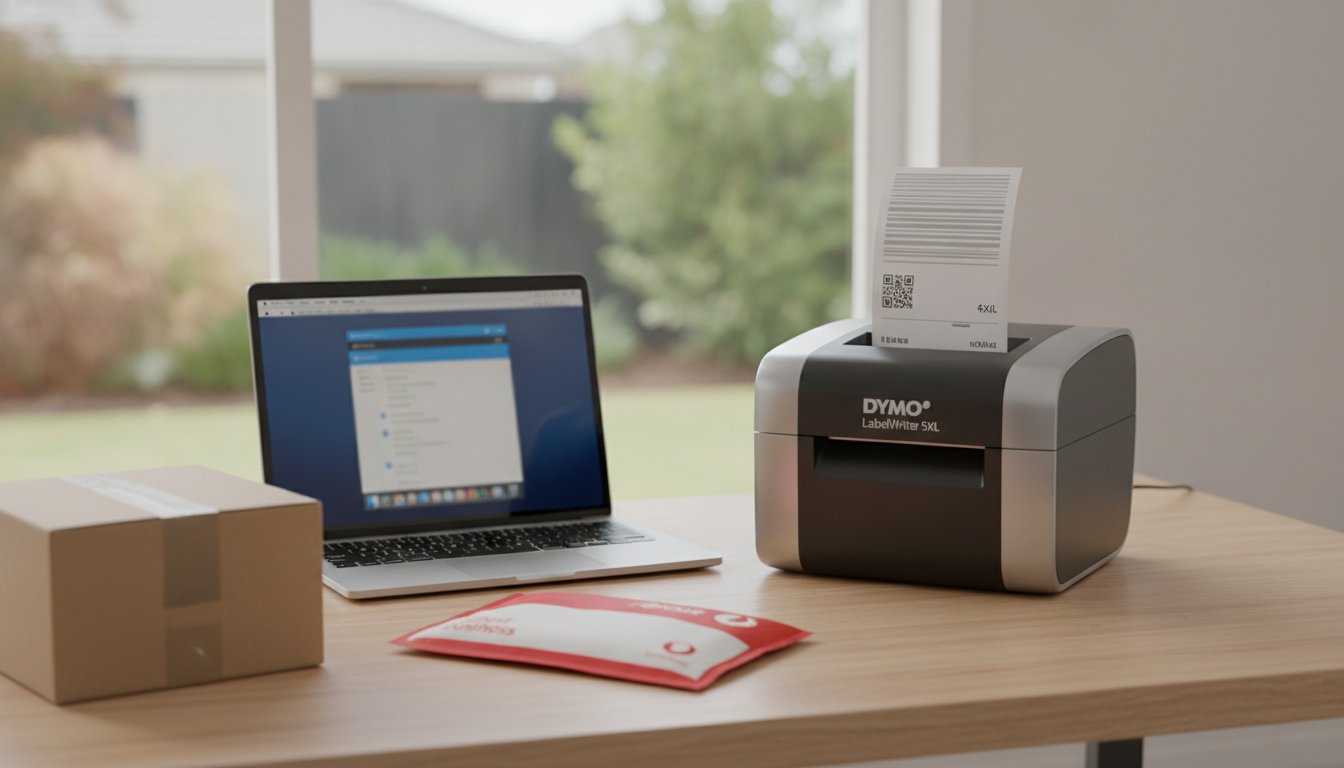
Updating your macOS shouldn't feel like a gamble with your office hardware, yet many Australian professionals find their shipping workflow halted by driver errors the moment a new version drops. If you've ever struggled with a "plug-and-play" device that refuses to recognise your M2 or M3 chip, you know that finding a reliable address label printer for mac is about more than just hardware specs. It's about finding an ecosystem that respects the way Apple users work, ensuring your labels look professional without the constant need for technical troubleshooting.
We understand that you need a solution that just works, allowing you to focus on getting orders out the door rather than fighting with clunky software. This guide will help you choose a macOS-compatible setup that streamlines your Australian shipping and organisation with high-quality, thermal-printed results. We will review the latest DYMO 5-Series models, ensure your setup is ready for macOS Tahoe and the upcoming Golden Gate update, and show you how to achieve a seamless, ink-free labelling system for your business or home office.
Key Takeaways
- Learn how to select an address label printer for mac that provides native support for Apple Silicon and the latest macOS Tahoe updates.
- Discover why the DYMO LabelWriter 5-Series uses Automatic Label Recognition technology to simplify your daily labelling tasks and ensure accuracy.
- Compare the high-speed LabelWriter 550 Turbo with the wide-format 5XL to determine which model best suits your Australian shipping requirements.
- Find out how to streamline your workflow by integrating Mac-native software with local courier services such as Australia Post MyPost Business.
- Understand the importance of using genuine DYMO labels to maintain consistent print quality and protect your hardware investment over the long term.
What to Look for in an Address Label Printer for Mac
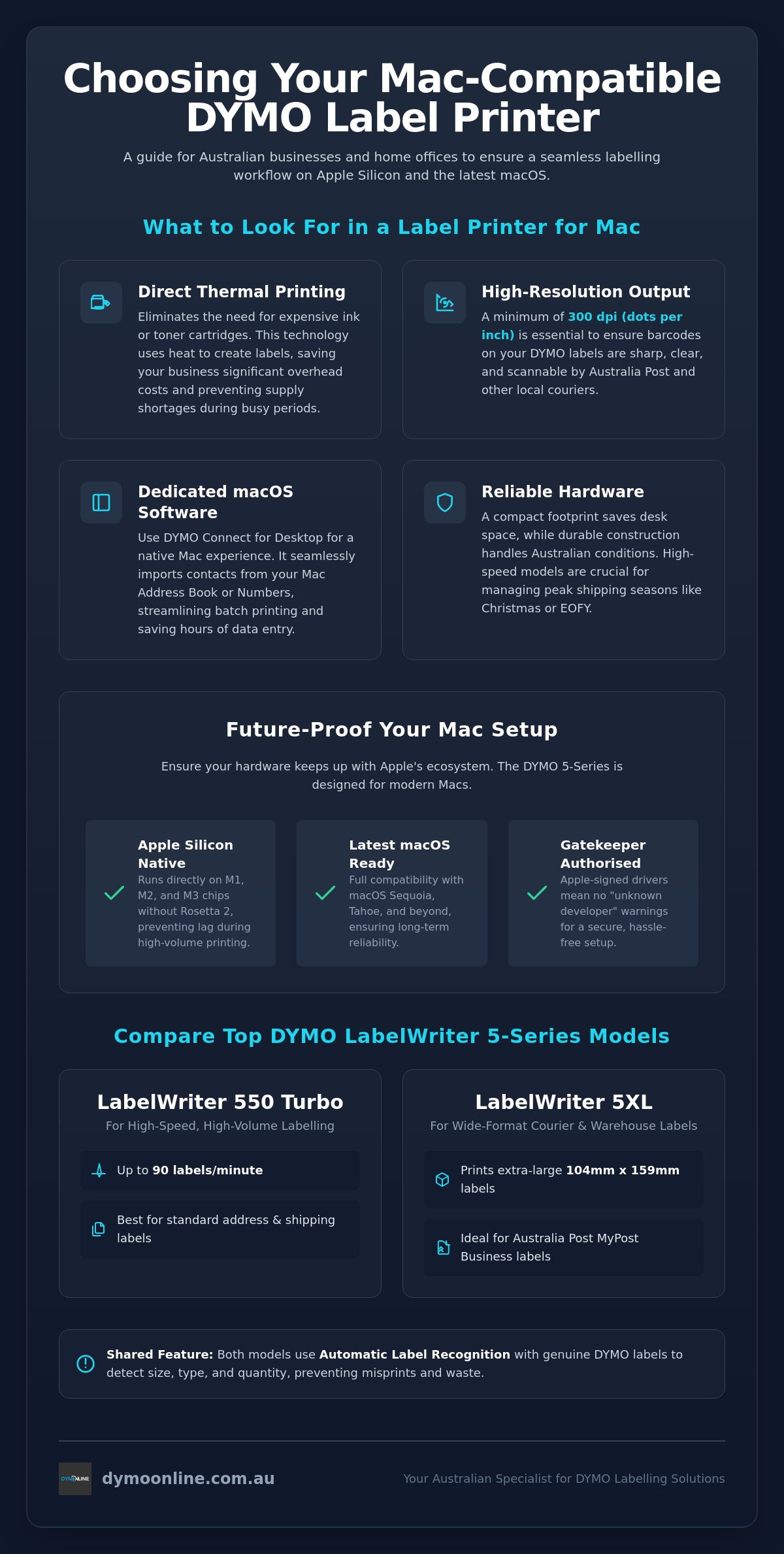
Selecting an address label printer for mac requires looking beyond basic hardware specifications. The most critical feature for any Apple user is the underlying print technology. Modern devices like the DYMO LabelWriter series utilise direct thermal printing, which uses heat-sensitive paper to create images. Understanding how thermal printing works is essential because it eliminates the need for expensive ink or toner cartridges. This saves your business significant overhead costs while ensuring you never run out of supplies in the middle of a busy dispatch run.
Beyond the mechanics, resolution is vital for professional results. For Australian shipping, you need a minimum of 300 dpi (dots per inch) to ensure that barcodes on DYMO labels remain scannable by Australia Post and other local couriers. Connectivity also plays a major role; with modern MacBooks favouring USB-C ports, selecting a printer that offers native compatibility or stable wireless networking will save you from the hassle of unreliable dongles and adapters. A seamless connection ensures your print jobs reach the device without delay, maintaining a steady workflow.
To better understand this concept, watch this helpful video:
Software: The Make-or-Break Factor
Many users mistakenly believe that any printer with a basic Mac driver will suffice. However, relying on generic drivers or AirPrint often leads to formatting headaches and wasted label rolls. Dedicated software like DYMO Connect for Desktop is designed to follow macOS design conventions, providing a fluid user experience that feels native to the system. One of the greatest advantages for Mac users is the ability to import contacts directly from the Mac Address Book or Numbers. This integration transforms a manual task into a streamlined process, allowing you to print high volumes of addresses without repetitive data entry.
Hardware Reliability for Australian Workspaces
Australian home offices and warehouses often deal with space constraints and varied climates. A compact footprint is essential to keep your desk organised without sacrificing functionality. Reliability also means durability; your printer must handle the heat and humidity found in many Australian regions without the internal components failing. Speed is the final pillar of a good workflow. Current models like the LabelWriter 550 Turbo can produce up to 62 labels per minute. This efficiency is crucial during peak periods like EOFY or the Christmas season when shipping volumes increase significantly.
Technical Compatibility: macOS Sequoia and Apple Silicon
The transition to Apple Silicon has redefined how peripheral devices communicate with your system. For anyone seeking a reliable address label printer for mac, ensuring native support for M1, M2, and M3 chips is no longer optional. Unlike older hardware that relies on Rosetta 2 to translate Intel-based code, current models like the LabelWriter 550 series are designed to run natively on the ARM architecture. This prevents the lag and occasional "app not responding" errors that plague legacy hardware during high-volume print runs. As we move toward macOS Golden Gate (version 27) in late 2026, which is expected to drop support for Intel-based Macs entirely, investing in hardware with native Silicon drivers is essential for future-proofing your workspace.
Security protocols in macOS Sequoia (version 15) and the newer macOS Tahoe (version 26) have also become more stringent regarding driver signing. Genuine hardware is pre-authorised by Apple's Gatekeeper, which means you won't encounter the frustrating "unknown developer" warning during your initial setup. This level of integration ensures that your printer software can access the necessary system permissions to communicate with your hardware without manual workarounds. When aligning your setup with Australia Post's shipping label recommendations, having a system that recognises your device immediately ensures that your labels meet the precise formatting and scannability standards required for local mail.
Native App Support vs. Web-Based Printing
While web-based printing tools offer convenience, native desktop applications like DYMO Connect provide a clear speed advantage on macOS. These apps are optimised to utilise your Mac's processing power, allowing for instantaneous label rendering. For a busy Australian warehouse or home office, this means your printer starts the moment you click print. Native apps also offer robust offline functionality, ensuring that your dispatch process isn't halted by a temporary internet outage. They receive automatic updates that keep pace with Apple's frequent system changes, maintaining a stable connection year-round.
Connectivity Solutions for Modern Macs
Modern MacBooks have moved exclusively to USB-C, while many professional label printers still utilise the robust USB-B or USB-A standard. To maintain a stable connection, we recommend using a high-quality USB-C to USB-A adapter or a dedicated dock rather than cheap, unpowered hubs. For studios with multiple team members, setting up your address label printer for mac on a local Australian network via Ethernet or Wi-Fi allows for seamless sharing across multiple devices. This eliminates the need to swap cables constantly and keeps your creative or administrative space organised. If you're unsure which connection method suits your specific office layout, it's best to speak with our technical team for tailored advice.
Comparing Top DYMO LabelWriter Models for Mac
When selecting an address label printer for mac, the decision usually rests on your specific volume requirements and the dimensions of the items you ship. The current 5-Series lineup has simplified the user experience through Automatic Label Recognition. This technology uses a small RFID chip embedded in each genuine label roll to communicate directly with your Mac. It informs the software of the exact label type loaded and the remaining quantity, which prevents the alignment errors and wasted labels that often occur with older or generic hardware. This level of automation is particularly beneficial for professionals who need to switch between different label sizes throughout the day.
The 5-Series hardware is built to integrate seamlessly with the modern Apple ecosystem. As noted in PCMag's guide to the best label makers, the combination of reliable hardware and intuitive software is what separates professional tools from basic consumer gadgets. For Australian businesses, this means choosing a model that can handle the specific demands of local courier formats while maintaining the high-resolution output required for scannable barcodes. Whether you are running a boutique online store or a busy medical administration office, there is a model designed to fit your specific output needs.
The LabelWriter 550 Series: Professional Addressing
The standard LabelWriter 550 serves as an excellent entry point for an Australian home office or small retail environment. It provides crisp, 300 dpi resolution for standard envelope and small parcel addressing. However, for businesses managing extensive mailing lists or frequent dispatch cycles, the LabelWriter 550 Turbo is the superior choice. It prints up to 62 labels per minute, making it approximately 20% faster than the previous 450 model. This speed ensures your workflow remains efficient even during peak periods. You can browse the DYMO LabelWriter range to find the model that matches your daily print volume.
The LabelWriter 5XL: Beyond Simple Addresses
E-commerce sellers using Mac hardware often require more than just a standard address label printer for mac. The LabelWriter 5XL is the specialised solution for wide-format requirements, accommodating the standard 104mm x 159mm shipping labels used by Australia Post and other major local couriers. This model maintains the same native Apple Silicon compatibility as the rest of the 5-Series but offers the physical width needed for large-scale warehouse labelling and inventory management. If your business has grown beyond standard envelopes, you should explore the LabelWriter 5XL to streamline your bulk shipping processes.
Organising Your Mac Workflow for Australian Shipping
An efficient shipping process in Australia relies on more than just hardware; it is about how your address label printer for mac interacts with the tools you use every day. For many local businesses, this starts with Australia Post MyPost Business. By using the DYMO Connect app, you can take label data directly from your browser or shipping platform and format it for immediate printing. This eliminates the need for manual copy-pasting, which is where most shipping errors occur. The software allows you to save custom templates, ensuring your return address and branding remain consistent across every parcel you send.
If you handle high-volume mailouts, you can easily import address data from Excel or Apple’s native Numbers app. By saving your data as a CSV file, you can use the DYMO Connect software to map fields like "Name" and "Postcode" to specific areas on your label. This automation allows you to print hundreds of labels in minutes, ensuring every parcel is ready for collection without delay. This native integration is a significant advantage for users who want to avoid the technical hurdles of third-party drivers that often fail after a macOS update.
For business documents and invoices where you might want to skip the manual printing and folding process altogether, Postal Methods provides a cloud-based solution to send physical mail directly from your Mac, perfectly complementing your local label printing setup.
E-commerce Integration on macOS
Australian e-commerce sellers often manage multiple platforms like Shopify, eBay, and Etsy simultaneously. When you use a dedicated address label printer for mac, you can print shipping labels directly from these platforms using the system print dialogue. For those using StarTrack or other local couriers that provide labels in PDF format, the DYMO software allows you to "snapshot" the label area and scale it perfectly to fit your roll. This flexibility is essential for maintaining a fast-paced dispatch environment. For more detailed information on managing larger parcels, see our guide to wide-format shipping with the 5XL.
Professional Address Formatting
To ensure your mail reaches its destination without delay, your labels must meet Australian postal standards. This includes using clear, sans-serif fonts and maintaining proper spacing between the suburb, state, and postcode. With the DYMO Connect app, you can easily add your business logo or a QR code to your LW Address Labels without compromising the clarity of the delivery details. This professional touch builds trust with your customers and helps your brand stand out in a crowded letterbox. If you need assistance setting up your specific workflow or choosing the right label size for your courier, feel free to contact our Australian support team for expert guidance.
Why Genuine DYMO Hardware Suits the Australian Mac User
Choosing a genuine address label printer for mac ensures that your labelling system remains a reliable asset rather than a technical liability. While generic alternatives may offer a lower entry price, they often lack the precision-engineered print heads required for consistent thermal transfer. Genuine DYMO hardware is designed to maintain a stable connection with macOS, preventing the communication dropouts that frequently occur with third-party devices after a system update. By using hardware specifically built for the DYMO Connect ecosystem, you protect your investment from the hardware failures and software glitches that can halt a busy Australian dispatch line.
The 5-Series printers offer an additional layer of security through smart label sensing. This technology allows the printer to identify the exact size and type of label loaded, which minimises the risk of print errors and jammed rolls. For an Australian business owner, this means less time spent clearing paper paths and more time focusing on operations. When you source your hardware from DymoOnline, you benefit from our status as a specialist Australian supplier since 2009. We offer same-day dispatch from our local warehouses, ensuring that your office or warehouse experiences minimal downtime when you need to upgrade or replace your equipment.
The Specialist Advantage
Purchasing from an Australian specialist provides a level of security that generic global marketplaces cannot match. We understand the specific requirements of the local market, from the durability of adhesives in the Australian heat to the formatting standards required by our domestic couriers. Genuine labels are tested to ensure they survive the rigours of the Australian postal system without peeling or fading. If you do encounter technical hurdles, having access to local expertise is invaluable. You can refer to our troubleshooting your DYMO on Mac guide for quick fixes to common connectivity and alignment issues.
Long-term Value and Support
A genuine address label printer for mac offers superior long-term value through robust warranty support and environmental efficiency. Thermal printing technology is inherently more sustainable than traditional inkjet systems because it eliminates the need for plastic ink cartridges that eventually end up in landfill. This makes it an ideal choice for Australian businesses looking to reduce their environmental footprint while maintaining a professional image. Our team provides dedicated assistance for Mac users, ensuring your hardware is correctly configured for your specific version of macOS. If you require further guidance on printer suitability or network setup, you can contact our team for specialised Mac support tailored to your business needs.
Future-Proof Your Mac Shipping Workflow
Selecting the right hardware for your business is about more than just speed; it's about ensuring long-term compatibility with the evolving Apple ecosystem. Native support for Apple Silicon and the latest macOS updates prevents the technical bottlenecks that often disrupt professional dispatch environments. By choosing a genuine address label printer for mac, you gain access to Automatic Label Recognition and precision thermal technology, which effectively eliminates the hidden costs of ink and wasted supplies.
DymoOnline has served as a specialist Australian supplier since 2009, offering expert knowledge and nationwide shipping from local warehouses. We provide only genuine DYMO products to ensure your home office or warehouse remains operational without the risks associated with third-party alternatives. If you're ready to upgrade your setup or require technical guidance on specific hardware integration, you can Shop the best Mac-compatible label printers at DymoOnline and speak with our team. We look forward to helping you organise a more efficient and professional workspace.
Common Questions About Using DYMO on Mac
Is the DYMO LabelWriter 550 compatible with the latest macOS?
Yes, the LabelWriter 550 series is fully compatible with the current macOS Tahoe and the upcoming macOS Golden Gate. To ensure a stable connection, you must use the latest version of DYMO Connect for Desktop. This software provides the necessary architecture to support the 5-series automatic label recognition features. It is the most reliable way to manage your labelling tasks on a modern Apple system without encountering driver errors.
Do I need a special adapter to connect a DYMO printer to my MacBook Air?
You will likely need a USB-C to USB-A adapter if you are using a modern MacBook Air. Most DYMO printers come with a standard USB-A cable, but Apple's current laptops exclusively feature USB-C ports. We recommend using a high-quality, powered adapter or a dedicated docking station. This ensures the printer receives a consistent data signal, which helps prevent the device from randomly disconnecting during large print runs.
Can I print Australia Post shipping labels from my Mac using a DYMO?
Yes, you can print official shipping labels by using the LabelWriter 5XL model. This specific printer is designed to handle the 104mm x 159mm dimensions required by Australia Post MyPost Business and other local couriers. While the smaller 550 models are excellent for standard envelopes, the 5XL is the essential choice for e-commerce sellers who need to print large, scannable barcodes directly from their Mac browser or shipping platform.
Does DYMO Connect software work natively on M1 and M2 Mac chips?
Yes, the current DYMO Connect for Desktop software is built to run natively on Apple Silicon. This means it works seamlessly on M1, M2, and M3 chips without requiring Rosetta 2 translation. Using a native address label printer for mac ensures that the software launches quickly and handles high-resolution graphics with ease. This native support is critical for maintaining a fast, efficient workflow in a professional Australian office environment.
Why is my Mac not recognising my DYMO LabelWriter?
This issue often stems from strict security permissions in modern macOS versions. First, ensure your printer is connected directly to your Mac rather than an unpowered USB hub. You should then check your System Settings to ensure the DYMO software has been granted the necessary "Privacy & Security" permissions. If the device still isn't recognised, a clean reinstallation of the DYMO Connect software usually resolves any lingering driver communication conflicts.
Can I import my Mac Contacts list directly into the labelling software?
Yes, the DYMO Connect software features a built-in integration for the Mac Contacts app. You can easily select individual entries or entire groups to populate your label templates instantly. This feature is a significant time-saver for Australian small businesses that need to send out monthly invoices or seasonal marketing materials. It eliminates the risk of manual typing errors and ensures your address formatting remains consistent across every piece of mail.
Do I need to install drivers for DYMO on macOS Sequoia?
Yes, you must install the DYMO Connect for Desktop package to get the correct drivers for macOS Sequoia. While some printers offer basic functionality via AirPrint, a dedicated driver is required to access advanced features like smart label sensing and custom resolution settings. Installing the official software ensures your Mac can accurately detect the remaining labels on your roll and provides a much more stable printing experience for daily office tasks.
What is the best DYMO label size for Australian standard envelopes?
The Large Address Label (89mm x 36mm) is the standard choice for DL and C6 envelopes in Australia. This size provides ample space for four lines of text plus a small company logo while staying within Australia Post's preferred clear zones. Using this specific size ensures your mail is processed efficiently by automated sorting machines. It remains the most popular option for Australian professionals who value a clean and legible presentation for their outgoing correspondence.

Article by
DymoOnline Team
The DYMOOnline Team provides practical guidance for Australian businesses, warehouses, retailers, offices, schools, healthcare workplaces and home users who rely on accurate, efficient labelling. DYMOOnline specialises in DYMO label makers, DYMO label printers, label tapes, label rolls, shipping labels, address labels, barcode labels and labelling accessories, helping customers choose the right labelling products for organisation, mailing, inventory, filing, pricing and workplace efficiency.
General Information
This article is provided as general information only to help customers compare and choose DYMO label makers, label printers, label tapes, label rolls, shipping labels, address labels, barcode labels and related labelling supplies. Product details, specifications, compatibility, availability, pricing and suitability may vary. Always check the individual product page, manufacturer information, printer model compatibility and label size requirements before purchasing or using a product.
Latest News
Best Address Label Printer for Mac in Australia: 2026 Buying Guide
Updating your macOS shouldn't feel like a gamble with your office hardware, yet many Australian pr...
Choosing the Best 4x6 Thermal Shipping Label Printer in Australia: 2026 Buying Guide
Last Monday, a business owner named Sarah discovered that a simple calibration error on a generic...
Choosing the Right DYMO LabelWriter 550 Labels: A Specialist Guide for Australian Businesses
Imagine you've just unboxed a new LabelWriter 550 Turbo, ready to streamline your warehouse shippi...
Comprehensive Guide to the DYMO LabelWriter 550: The Professional Choice for Australian Offices
How much time does your team lose wrestling with misaligned labels or discovering the printer has...
DYMO LabelWriter 550 Software: The Complete Australian Guide for 2026
You've just unboxed your new printer, but instead of a crisp shipping label, you're staring at a "...
DYMO Rhino 5200: The Expert Guide to Industrial Labelling in Australia (2026)
Imagine finishing a complex switchboard installation in the 40-degree Queensland heat, only to ret...