
Comprehensive Guide to the DYMO LabelWriter 550: The Professional Choice for Australian Offices
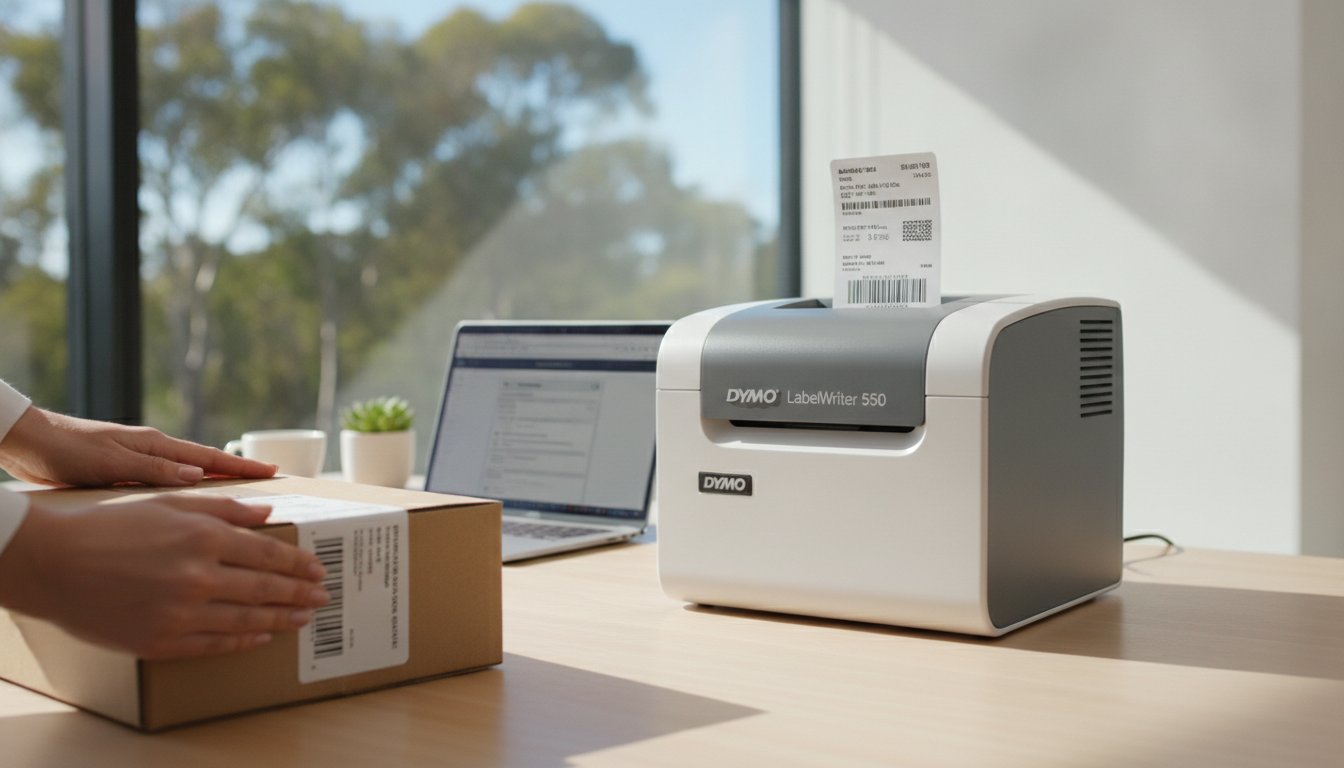
How much time does your team lose wrestling with misaligned labels or discovering the printer has run dry just as a courier arrives? It's a common frustration in busy Australian workplaces, but the DYMO LabelWriter 550 aims to make these labelling interruptions a thing of the past. By moving away from traditional ink and toner, this device uses direct thermal printing technology to deliver crisp results without the ongoing cost of cartridges or the mess of ribbon replacements.
You likely value efficiency and want to avoid the "trial and error" approach that often leads to a bin full of wasted label rolls. This guide will help you discover how the DYMO LabelWriter 550 revolutionises workplace organisation with smart automation and a sophisticated sensor system that tracks your supplies. As specialists at DymoOnline, we provide this guide to offer a clear breakdown of the new RFID compatibility requirements, the transition to DYMO Connect software, and how to maximise your output with zero maintenance costs.
Key Takeaways
- Understand how ink-free thermal printing and speeds of up to 62 labels per minute can significantly streamline your daily administrative tasks.
- Learn how the dymo labelwriter 550 uses Automatic Label Recognition technology to identify the exact size and type of labels currently loaded.
- Identify why genuine DYMO labels are essential for the 550 series and how they help prevent common alignment errors and label waste.
- Get practical guidance on transitioning to the latest DYMO Connect for Desktop software to access advanced design and customisation features.
- Discover the benefits of sourcing your equipment from local specialists who provide expert support tailored to the Australian business market.
Understanding the DYMO LabelWriter 550: A New Standard for Australian Businesses
The dymo labelwriter 550 marks a technological update to the Australian office landscape. For over a decade, the 450 series served as the standard for reception desks and warehouse stations across the country. However, as digital workflows and despatch volumes have increased, the hardware required a shift toward automation and real-time data tracking. This new model introduces a sensor-based system that changes how users interact with their labelling equipment, moving away from manual calibration toward a more integrated, software-driven experience that suits the modern professional environment.
The Shift from the 450 to the 550 Series
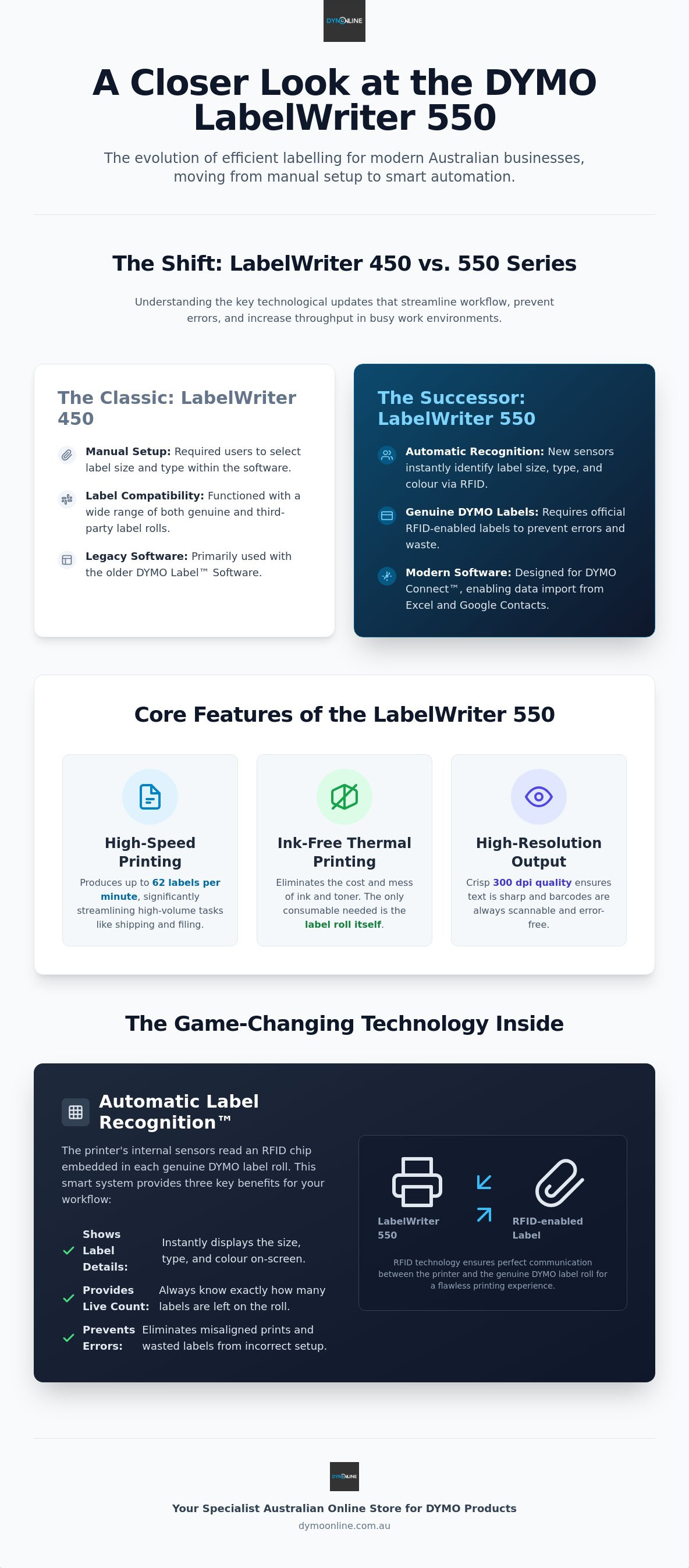
The decision to redesign the most popular office printer in the world was driven by the need for increased throughput and better error prevention. Australian warehouses and despatch centres now operate under tighter deadlines, requiring equipment that can keep pace with rapid order fulfilment. The 550 meets this by delivering print speeds of up to 62 labels per minute, allowing for faster processing of outgoing parcels. A key technical change involves Dymo's proprietary label technology, which uses RFID chips to communicate directly with the printer. This ensures the machine is always correctly configured for the loaded media, eliminating the driver conflicts that occasionally hampered the older 450 models on modern Windows and macOS systems.
Direct Thermal Printing Technology Explained
At the core of the dymo labelwriter 550 is a direct thermal print head that creates crisp text and graphics without the need for ink, toner, or ribbons. This technology works by applying heat to chemically treated paper, which reacts to form the image. For Australian businesses, this eliminates the recurring "razor and blade" costs associated with traditional inkjet or laser printers. By removing the need for consumables beyond the label rolls themselves, maintenance-free operation becomes a reality for busy staff. This is particularly beneficial in high-volume environments like medical centres or retail hubs, where downtime for cartridge changes can disrupt patient care or customer service. The result is a cleaner, more efficient labelling process that reduces physical waste and lowers the total cost of ownership over the device's lifespan.
Key Features and Technical Specifications of the 550 Series
The dymo labelwriter 550 is built for high-performance environments where administrative downtime is unacceptable. It delivers print speeds of up to 62 labels per minute, allowing your team to process shipping labels and file folders in rapid succession. High-resolution output at 300 dpi means your barcodes and company logos will always look professional and remain easy to scan. This precision is particularly important for medical centres and warehouses that rely on error-free data tracking. Its compact footprint is purposefully designed to fit onto crowded Australian reception desks where space is at a premium.
Automatic Label Recognition™: The Game Changer
Internal sensors represent a major shift in how these printers operate. The machine instantly identifies the size, type, and colour of the labels you've loaded, adjusting the software settings automatically. You can see a real-time count of how many labels remain on the roll. This prevents the common office headache of running out of labelling supplies in the middle of a critical task. This system uses an RFID-based 'razor-and-blades' pricing strategy to ensure the printer only functions with genuine DYMO supplies. While this move toward a closed ecosystem is a departure from previous models, it serves a practical purpose. It eliminates the "trial and error" printing and misaligned text that often occur with inferior, third-party alternatives.
Connectivity and Software Integration
The dymo labelwriter 550 offers simple USB connectivity for a "plug and play" setup. Once connected, you'll use the DYMO Connect for Desktop software to manage your labelling tasks. This modern interface allows you to import data directly from Microsoft Excel or Google Contacts, which is a massive time-saver for bulk mailouts or inventory updates. The software provides a unified experience across various DYMO LabelWriter machines, making it easier for staff to move between different workstations without relearning the system. If you're unsure about how to migrate your existing label templates to the new 550 series, you can contact our support team for technical advice.
The Importance of Automatic Label Recognition and Genuine DYMO Labels
While previous generations of printers allowed for a variety of third-party supplies, the dymo labelwriter 550 introduces a technological shift that prioritises accuracy through its Automatic Label Recognition system. This feature relies on a smart sensor that detects a small RFID chip embedded in every genuine DYMO label roll. This isn't merely a software check; it's a hardware-level integration that ensures the printer knows exactly which size, type, and colour of label is loaded before you even hit the print button. This communication between the roll and the machine ensures the correct alignment every time, meaning you won't have to deal with the frustration of text being cut off or labels feeding through incorrectly.
Why Genuine Labels Matter for Your Warranty
Thermal printing relies on direct contact between the print head and the label surface. Genuine DYMO supplies are engineered specifically for this equipment, with high-quality adhesives designed to withstand the heat of the thermal process. In the varied Australian climate, inferior labels often suffer from "adhesive oozing," where the glue melts and seeps into the internal mechanics. This leads to sticky residue on the rollers and can eventually cause the thermal print head to fail prematurely. Using non-genuine alternatives can lead to costly repairs that may not be covered under your warranty. Sourcing genuine LW standard labels is a reliable way to protect your investment and maintain the longevity of your hardware. These authentic rolls are tested to ensure they don't leave behind damaging debris or cause paper jams that disrupt your workflow.
Sustainability and Labelling Efficiency
Efficiency in a modern office isn't just about speed; it's about reducing resource waste. Every misfed label or alignment error caused by a generic roll represents unnecessary physical waste and lost productivity. The dymo labelwriter 550 helps minimise this by ensuring the first label is always printed correctly. There is also a clear environmental benefit to choosing authentic supplies. Genuine DYMO paper labels are FSC-certified, meaning they are sourced from responsibly managed forests. They are also BPA-free, which is an important consideration for staff safety and environmental health. By choosing the correct supplies, you are maximising the lifespan of your printer and ensuring that your office labelling practices remain as sustainable as possible. This combination of smart technology and high-quality materials ensures that your labelling workflows remain consistent, professional, and environmentally conscious over the long term.
Setting Up Your LabelWriter 550 for Maximum Efficiency
Setting up the dymo labelwriter 550 is a straightforward process designed to get your office operational within minutes. Once you have unboxed the unit, connect it to a stable power outlet and use the provided USB cable to link the device to your PC or Mac. It's essential to install the latest version of DYMO Connect for Desktop before plugging in the USB cable. This ensures the necessary drivers are correctly recognised by your operating system, preventing connectivity delays. This software serves as the central hub for all your design tasks, allowing you to manage everything from simple address labels to complex asset tracking tags with a few clicks.
To engage the Automatic Label Recognition feature, place your genuine DYMO label roll onto the spool and feed it into the entry slot. The printer will automatically detect the roll type and display the remaining label count within the software interface. When creating your first template, the software allows you to drag and drop elements such as QR codes, graphics, and date stamps. This level of customisation is vital for Australian schools and home offices that need to maintain a consistent organisational system across all their outgoing mail and internal storage.
Optimising Workflows in Different Sectors
The versatility of the 550 series allows it to adapt to the specific requirements of various Australian industries. In retail environments, the printer excels at generating fast price tags and inventory stickers that stay legible under shop floor lighting. Medical administration teams rely on the device for clear patient file labelling and specimen tracking, where accuracy is non-negotiable for safety. For logistics and e-commerce, the printer handles shipping labels for local couriers with ease, ensuring that every parcel despatched from your warehouse is professional and easily scannable by delivery partners.
Troubleshooting Common Setup Issues
If your printer does not recognise the label roll upon installation, ensure the roll is pushed firmly into the feeding mechanism and that the RFID chip on the spool is clean. Occasionally, software connection errors may occur on newer versions of Windows 11 or macOS. If a restart of the DYMO Connect software doesn't resolve the issue, you should check for available firmware updates through the official DYMO utility. For more complex technical hurdles or hardware errors, our Dymo troubleshooting guide provides expert solutions tailored for Australian businesses. If you require specific advice on integrating these printers into your existing office network, contact our support team for professional guidance.
Why Source Your DYMO LabelWriter 550 from DymoOnline?
Selecting the right supplier for your dymo labelwriter 550 is a final step in ensuring long-term office efficiency. While general retailers stock a wide variety of hardware, DymoOnline is a specialist Australian provider with a focus solely on the DYMO ecosystem. This means our team possesses the technical depth required to support your transition to the newer 550 series, particularly regarding the RFID label requirements discussed earlier. As part of Mega Thing Pty Ltd, our orders are fulfilled by Mega Office Supplies, which provides a stable logistical backbone for every purchase. We maintain local warehouses to facilitate nationwide shipping, helping you avoid supply shortages during peak periods.
Our seniority in the market allows us to provide specific guidance on whether the standard 550, the high-speed 550 Turbo, or the wide-format 5XL is the most appropriate fit for your volume requirements. This helps Australian businesses avoid the trial and error often associated with purchasing from generalist stores that lack specialised product knowledge.
The DymoOnline Specialist Advantage
Since 2009, we have served as a senior expert in the Australian market, helping diverse sectors from medical administration to industrial warehousing. Unlike generalist retailers, we offer access to bulk pricing for larger labelling projects and maintain a comprehensive inventory of genuine supplies. This ensures that your hardware is paired with the correct media to prevent the adhesive issues mentioned in previous sections. By focusing on a single brand ecosystem, we provide a level of after-sales support that general retailers cannot match.
Next Steps for Your Office Organisation
To complete your workstation, you can browse our range of DYMO accessories. If you require technical advice on network integration or high-volume supply contracts, contact our Australian-based team. For a more detailed breakdown of hardware capabilities, you can also refer to our ultimate guide to the Dymo LabelWriter 550.
Streamlining Your Workplace Labelling Workflow
The dymo labelwriter 550 is more than just a hardware upgrade; it's a strategic tool for any Australian business aiming to eliminate administrative friction. By adopting direct thermal technology and smart sensors, you can significantly reduce the time spent on manual adjustments and the costs associated with ink or toner. While the transition to a closed label ecosystem is a change from older models, the benefits of perfect alignment and automated tracking provide a level of reliability that generic alternatives simply can't match.
As an official Australian DYMO specialist, DymoOnline provides the expert local support and genuine products you need to maintain a productive office. Since we only supply genuine items, you can be confident that your thermal print heads are protected from the damage often caused by inferior adhesives. Whether you're managing a medical clinic or a high-volume warehouse, choosing the right labelling partner ensures your equipment remains operational for years to come.
If you have questions about printer compatibility or need advice on the best labelling solution for your specific industry, our team is ready to help. Contact our specialist support team today to discuss your requirements. We're here to help you build a more organised and efficient workplace.
Frequently Asked Questions
Does the DYMO LabelWriter 550 work with non-genuine labels?
No, the 550 series only functions with genuine labels. This is due to the Automatic Label Recognition technology that uses a smart sensor to detect an RFID chip embedded in the roll. If you attempt to use third-party or older non-RFID labels, the printer won't recognise them and will refuse to print. This system ensures your printer settings are always optimised for the specific roll you've loaded.
What is the difference between the LabelWriter 550 and the 550 Turbo?
The primary difference is the printing speed. The standard 550 model prints up to 62 labels per minute, while the 550 Turbo is significantly faster, reaching up to 90 labels per minute. This makes the Turbo model a better choice for high-volume Australian warehouses or medical facilities where time is a critical factor. Both models share the same RFID sensor technology and high-resolution 300 dpi output.
Do I need to buy ink or toner for the LabelWriter 550?
You don't need to purchase ink or toner for this device. The dymo labelwriter 550 utilises direct thermal printing technology, which uses heat to create text and graphics on specially treated paper. This eliminates the ongoing costs associated with traditional ink cartridges. It also means you'll never have to deal with messy ribbon replacements or smudged ink during a busy workday.
Is the LabelWriter 550 compatible with Windows 11 and macOS?
Yes, the printer is fully compatible with both Windows 11 and the latest versions of macOS. It connects via a standard USB port and requires the DYMO Connect for Desktop software to function. This modern software provides a stable interface that is much more reliable than the drivers used for older legacy models. Always ensure you've installed the latest software version from the official site before connecting your printer.
Can I use my old LabelWriter 450 labels in the new 550 model?
You cannot use older LabelWriter 450 labels in the new model unless they are the newer genuine rolls that include the RFID chip. The 550 series requires these chips to identify the label type and count. Most older rolls manufactured before the release of the 550 series lack this technology. Using these older supplies will cause the machine to display an error, so it's best to stock up on the current genuine range.
How many labels per minute can the DYMO 550 print?
The standard dymo labelwriter 550 can print up to 62 labels per minute. This speed is measured based on a standard four-line address label. While this is efficient for most small businesses and home offices, those requiring even higher output should consider the Turbo model. The 5XL model also exists for those needing to print much larger four by six inch shipping labels at high speeds.
What software do I need to use with the LabelWriter 550?
You need to use the DYMO Connect for Desktop software, as the older DYMO Label Software v8 is not compatible with the 550 series. This modern application allows you to import data from Excel and Google Contacts, which is helpful for bulk mailouts. It also features advanced design tools for adding QR codes and custom logos. The software is a free download and is essential for managing the printer's smart sensor features.
Where can I buy genuine DYMO labels in Australia?
You can purchase the full range of genuine labels directly from DymoOnline. As a specialist Australian supplier, we maintain stock in local warehouses to ensure fast nationwide shipping. This helps your business avoid downtime caused by running out of supplies. Buying from a specialist also ensures you receive expert advice on which label rolls are best suited for your specific office or industrial application.

Article by
DymoOnline Team
The DYMOOnline Team provides practical guidance for Australian businesses, warehouses, retailers, offices, schools, healthcare workplaces and home users who rely on accurate, efficient labelling. DYMOOnline specialises in DYMO label makers, DYMO label printers, label tapes, label rolls, shipping labels, address labels, barcode labels and labelling accessories, helping customers choose the right labelling products for organisation, mailing, inventory, filing, pricing and workplace efficiency.
General Information
This article is provided as general information only to help customers compare and choose DYMO label makers, label printers, label tapes, label rolls, shipping labels, address labels, barcode labels and related labelling supplies. Product details, specifications, compatibility, availability, pricing and suitability may vary. Always check the individual product page, manufacturer information, printer model compatibility and label size requirements before purchasing or using a product.
Latest News
Comprehensive Guide to the DYMO LabelWriter 550: The Professional Choice for Australian Offices
How much time does your team lose wrestling with misaligned labels or discovering the printer has...
DYMO LabelWriter 550 Software: The Complete Australian Guide for 2026
You've just unboxed your new printer, but instead of a crisp shipping label, you're staring at a "...
DYMO Rhino 5200: The Expert Guide to Industrial Labelling in Australia (2026)
Imagine finishing a complex switchboard installation in the 40-degree Queensland heat, only to ret...
The Ultimate Guide to the DYMO LetraTag LT-100H Label Maker: Australia’s Home Organisation Favourite
How much time do you spend each week rummaging through identical pantry containers or hunting for...
DYMO Jewellery Price Tag Printing: The Comprehensive 2026 Guide for Australian Retailers
What if the very tags meant to display your prices are actually damaging your precious metals and...
DYMO Rhino Industrial 4200: The Essential Guide for Australian Trades
A label that peels off in the harsh Australian sun or loses its grip in a dusty warehouse isn't ju...