
Choosing the Best 4x6 Thermal Shipping Label Printer in Australia: 2026 Buying Guide
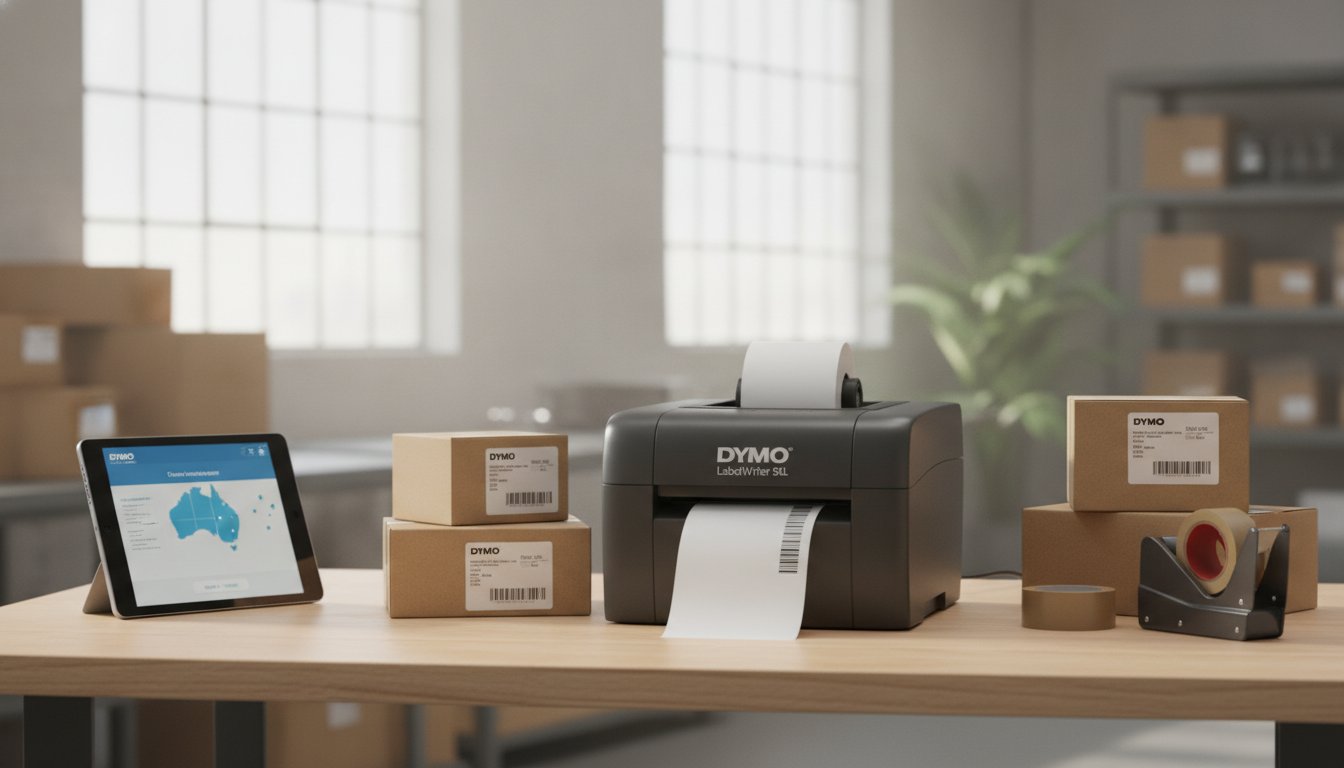
Last Monday, a business owner named Sarah discovered that a simple calibration error on a generic printer meant a missed courier collection and a backlog of frustrated customers. It’s a stressful scenario that many local businesses face when their hardware isn't quite up to the task of high-volume dispatch. When searching for the best 4x6 thermal shipping label printer australia has to offer, reliability is paramount, especially when you need to print 100x150mm labels for Australia Post MyPost Business or StarTrack without fail.
We agree that your labelling workflow should be a "set and forget" part of your day, not a constant source of technical troubleshooting. This 2026 buying guide promises to help you select a reliable wide-format printer that offers professional, smudge-free results while protecting your hardware from the hidden costs of non-genuine supplies. We will preview the essential technical specifications to look for, from print head durability to seamless software integration, ensuring you have access to local Australian support to keep your operations running smoothly.
Key Takeaways
- Understand why 100x150mm is the universal standard for Australian logistics and why precise A6 sizing is required by major carriers like Australia Post and StarTrack.
- Discover how to select a 4x6 thermal shipping label printer australia that integrates seamlessly with e-commerce platforms like Shopify to create a "set and forget" dispatch workflow.
- Identify the critical features of wide-format hardware, including the necessity of high-resolution printing for professional, smudge-free barcodes that couriers can scan every time.
- Learn why choosing genuine hardware and label rolls reduces the total cost of ownership by eliminating frequent calibration errors and adhesive build-up.
- Gain peace of mind by sourcing your equipment from Australian specialists who provide local warranty protections and expert technical support for your specific warehouse environment.
Why 4x6 is the Essential Standard for Australian Shipping
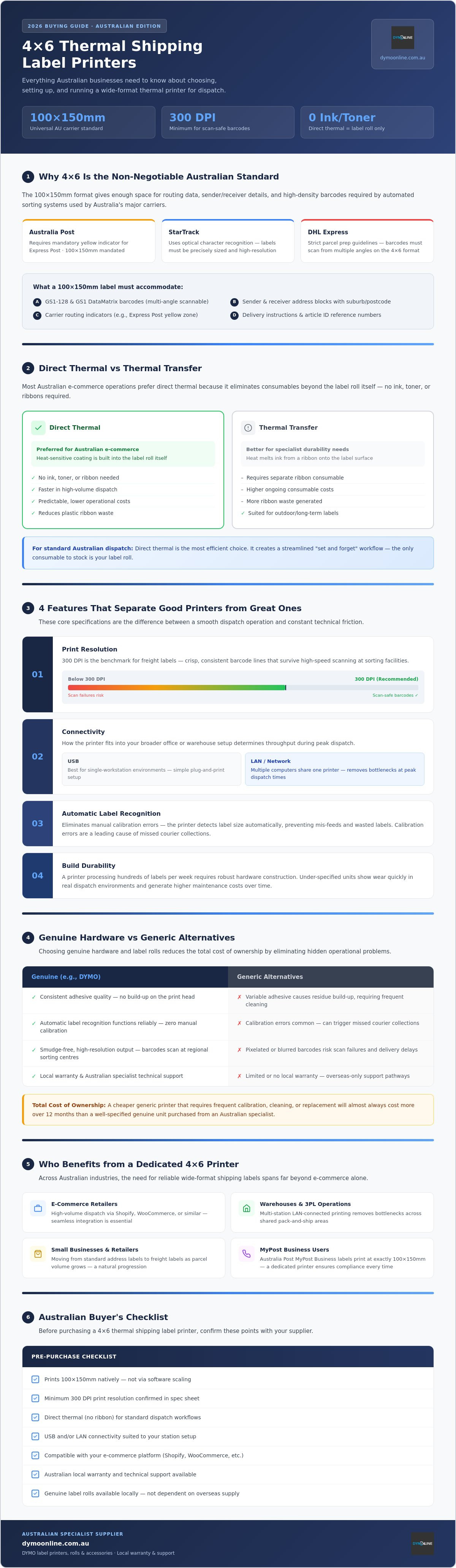
In the Australian logistics sector, the 100x150mm format, commonly known as 4x6 inches, has established itself as the non-negotiable standard for freight. Whether you are dispatching a single parcel or managing a bustling warehouse, using a dedicated 4x6 thermal shipping label printer australia ensures your packages move through the network without manual delays. This specific dimension provides enough "real estate" to include all essential routing information, sender/receiver details, and the high-density barcodes required by automated sorting systems.
As businesses grow, the transition from standard small address labels to wide-format freight labels becomes a necessity rather than a choice. Large carriers like Australia Post and StarTrack utilise sophisticated optical character recognition and barcode scanners that require clear, appropriately sized labels to function. A 4x6 label minimises delivery errors by ensuring that every element, from the 2D GS1 DataMatrix barcode to the delivery instructions, is printed at a scale that is easily readable by both machines and courier drivers.
The 100x150mm Requirement for Local Carriers
Australia Post, StarTrack, and DHL Express have strict guidelines for parcel preparation. These carriers mandate the 100x150mm size because it accommodates the mandatory yellow indicator for Express Post and ensures barcodes are large enough to be scanned from multiple angles. Attempting to print these labels on standard 1-inch address printers often leads to pixelated barcodes or cut-off text. Using a specialist wide-format printer like the LabelWriter 5XL provides the 300 DPI resolution needed to ensure your labels survive the rough environment of a regional sorting centre.
Direct Thermal vs Thermal Transfer for Dispatch
Choosing the right thermal printing technology is a vital decision for any growing business. Most Australian e-commerce operations prefer direct thermal printing because it completely eliminates the need for ink, toner, or expensive ribbons. Because the heat-sensitive coating is built into the shipping labels themselves, the only consumable you need to stock is the label roll. This streamlined approach is not only faster in high-volume environments but also offers environmental benefits by significantly reducing the amount of plastic ribbon waste generated in your warehouse. It is the most efficient way to manage a 4x6 thermal shipping label printer australia while keeping operational costs predictable.
Key Features to Look for in a Wide-Format Thermal Printer
Selecting the right 4x6 thermal shipping label printer australia isn't simply a matter of picking the cheapest option on the shelf. The hardware you choose will be processing hundreds of labels per week, and the difference between a well-specified unit and an underpowered one becomes obvious very quickly in a real dispatch environment. Four core specifications separate reliable wide-format printers from those that create friction in your workflow: print resolution, connectivity, automatic label recognition, and build durability.
Print resolution is where many buyers make an early mistake. A 300 DPI (dots per inch) output is the established benchmark for freight labels because it produces barcode lines that are crisp and consistent, even when printed at speed. Below this threshold, the fine bars in a GS1-128 or QR code can blur together, causing scan failures at sorting facilities. As Forbes notes, a quality thermal printer is crucial for efficient shipping labels in e-commerce operations, and resolution is a central reason why. Higher DPI also matters for human-readable text; small fonts for suburb names and postcodes must remain legible after a label has been handled through multiple transit points.
Connectivity determines how well a printer fits into your broader office or warehouse setup. USB connections are straightforward for single-workstation environments, but businesses running shared pack-and-ship stations benefit considerably from a LAN-connected model. A network-ready printer can be accessed by multiple computers simultaneously, removing the bottleneck of a single dedicated printing terminal during peak dispatch periods.
Intelligent Labelling with the DYMO LabelWriter 5XL
The LabelWriter 5XL addresses a gap that most generic printers ignore entirely: automatic label recognition. Built-in sensors detect the size and type of label roll loaded into the machine, then configure print settings accordingly without any manual input from the operator. This eliminates the calibration errors that cause misaligned prints and wasted label rolls. The unit also tracks how many labels remain on the current roll, giving your team advance warning before a roll runs out mid-batch. Paired with DYMO Connect software, it integrates directly with common e-commerce and order management platforms to create a structured, repeatable dispatch workflow.
Speed and Efficiency in High-Volume Dispatch
Print speed is best evaluated in labels per minute rather than millimetres per second, because that metric reflects real-world throughput during a busy dispatch run. Energy consumption is another practical consideration; automatic sleep modes reduce power draw during quiet periods, which is relevant for Australian businesses mindful of rising electricity costs. A compact footprint also matters. Pack-and-ship stations are rarely spacious, and a printer that occupies minimal bench space leaves room for scales, packaging materials, and the other essentials of an efficient fulfilment setup.
If you're unsure which configuration suits your specific volume and connectivity requirements, the team at DymoOnline can help you work through the options. Get in touch with a labelling specialist before committing to hardware that may not scale with your operation.
The Case for Genuine Hardware: DYMO vs Generic Alternatives
The upfront price difference between a genuine DYMO printer and a generic alternative can look compelling on a purchase order. But that initial saving rarely tells the full story. For any business running a 4x6 thermal shipping label printer australia, the real measure of value is what happens over six months of daily use, not what's on the invoice at checkout.
Generic wide-format printers frequently arrive with firmware that isn't optimised for the specific label stocks available in Australia. Calibration routines that work adequately out of the box can drift over time, producing labels that print fractionally off-centre. At low volumes, this is an inconvenience. At scale, it translates directly into wasted label rolls, reprinted batches, and delayed dispatch runs. The hidden cost accumulates quietly until it becomes impossible to ignore.
Print head longevity is another area where the genuine versus generic comparison becomes stark. DYMO print heads are engineered to work with the specific heat-sensitive coating used on genuine DYMO shipping labels. Non-genuine labels often use adhesive formulations that leave residue on the print head surface. Over time, this build-up creates uneven heat distribution, resulting in faded patches and inconsistent barcode lines. Replacing a print head is a preventable expense that genuine consumables largely eliminate.
Grey-import hardware carries a separate risk that Australian buyers frequently overlook. Printers sourced from overseas marketplaces may not carry a valid Australian warranty, meaning any hardware failure sends you back to an international seller for resolution. During peak dispatch periods, even a two-day printer outage can have serious downstream consequences for customer satisfaction and carrier relationships.
Avoiding the "No Label Found" Errors
Sensor errors are one of the most disruptive issues in a busy pack-and-ship environment. Generic label rolls often vary in thickness or core diameter, and that inconsistency confuses the optical sensors in high-speed printers. The LabelWriter 5XL addresses this directly through its automatic label recognition system, which reads the loaded roll and configures print settings without operator input. Consistent label thickness is fundamental to this process; genuine labels maintain the tight tolerances that keep this system working reliably, batch after batch, without manual recalibration.
Reliable Support for Australian Businesses
Sourcing your hardware and consumables from a specialist Australian supplier like DymoOnline, part of the Mega Office Supplies group, provides access to local expertise that an offshore marketplace simply can't replicate. When a configuration question arises or a new team member needs setup guidance, speaking with someone who understands the Australian carrier environment and the specific quirks of your printer model is a practical advantage. Stock is held in Australian warehouses, which means consumables can be dispatched promptly to keep your operations running without unnecessary interruption.
Setting Up Your 4x6 Printer for Australia Post and Shopify
Getting your hardware out of the box is the easy part. The real productivity gains come from configuring your 4x6 thermal shipping label printer australia correctly from day one, so that every label prints exactly where it should, every time. A methodical setup process eliminates the misalignment headaches and software conflicts that slow down dispatch runs before they've even started.
Follow these five steps to move from unboxing to a fully operational dispatch station:
- Step 1: Install the correct drivers. Download the DYMO Connect software directly from the DYMO website rather than relying on the disc included in the box, as the online version will be current. Windows 10/11 and macOS 12 and above are both supported. Avoid using generic plug-and-play drivers; they won't expose the label recognition features that make the LabelWriter 5XL reliable at volume.
- Step 2: Configure the 100x150mm page size. In your system's printer preferences, create a custom paper size of exactly 100mm x 150mm. On Windows, this is done through the Devices and Printers panel. On macOS, set it under Page Setup in your print dialogue. Locking this in at the OS level means every application on that workstation defaults to the correct dimensions automatically.
- Step 3: Connect your e-commerce platform. Shopify, eBay, and Etsy all allow you to set a default label format in their shipping or fulfilment settings. Navigate to your platform's admin panel, locate the label format option, and select 4x6 or 100x150mm. This single change prevents the platform from generating A4-formatted PDFs that require manual resizing before printing.
- Step 4: Print a test label. Before running a live batch, print a test label using a real order from Australia Post MyPost Business or StarTrack. Scan the barcode with your phone's camera to confirm it resolves correctly. A successful scan at this stage confirms your driver, page size, and label stock are all working in concert.
- Step 5: Adjust print darkness. In DYMO Connect's printer settings, the darkness or density slider controls how much heat the print head applies. For maximum barcode contrast on genuine DYMO shipping label rolls, a mid-to-high darkness setting produces the clearest GS1-128 lines without causing the heat-sensitive coating to bleed at the edges.
Optimising for Australia Post MyPost Business
The MyPost Business portal generates labels as PDF files. When printing, open the PDF in Adobe Acrobat Reader rather than a browser window, and set the print scale to Actual Size, not "Fit to Page" or "Shrink to Printable Area." Those scaling options are the most common reason sender addresses and barcodes get clipped. If you're processing multiple consignments, DYMO Connect supports batch printing; import the PDF pages as a queue rather than printing each label individually to keep your dispatch run moving at pace.
Shopify and eBay Integration Tips
Browser-based printing is a frequent source of alignment problems. Chrome and Firefox both apply their own margin settings that can shift a label by several millimetres. The practical fix is to install a dedicated labelling app, such as Shopify's built-in shipping label tool or a third-party fulfilment app, which communicates directly with the printer driver rather than routing through the browser's print dialogue. For eBay sellers, setting the default label format to 4x6 under My eBay's postage preferences ensures that every label generated from the platform is correctly sized before it reaches your printer queue, removing the need for manual adjustment on busy dispatch days.
If you're working through platform integrations for the first time or scaling up your fulfilment setup, the team at DymoOnline can walk you through configuration specific to your operating environment. Speak with a labelling specialist to get your setup right before your next peak period.
Why Sourcing Your 4x6 Printer from an Australian Specialist Matters
Where you buy your hardware matters just as much as which hardware you buy. For any business running a 4x6 thermal shipping label printer australia, the purchase decision doesn't end at the checkout. Warranty coverage, consumables availability, and access to knowledgeable support all depend directly on who you bought from and where they operate.
Australian Consumer Law provides meaningful protections that simply don't apply when hardware is sourced from offshore marketplaces. If a printer develops a fault within a reasonable period, you're entitled to a repair, replacement, or refund from a local supplier without needing to navigate international return logistics or time-zone-delayed customer service queues. For a piece of equipment that sits at the centre of your daily dispatch workflow, that protection has genuine operational value.
Delivery speed is another practical consideration that offshore suppliers consistently underdeliver on. When a printer fails during a peak period or a label roll runs out unexpectedly, waiting two to three weeks for international freight isn't a viable option. Sourcing from an Australian specialist means replacement hardware and consumables can arrive promptly, keeping your fulfilment operation on track rather than stalled.
Specialist knowledge is the third advantage, and arguably the most undervalued. Generic retailers who stock a broad range of electronics rarely carry deep expertise in the LabelWriter series. Questions about driver compatibility, label stock selection, or platform integration require specific product knowledge that a generalist simply can't provide. A specialist supplier understands the nuances of each model and can direct you toward the right configuration for your specific volume and connectivity requirements without guesswork.
The Mega Office Supplies Advantage
DymoOnline operates as part of the Mega Office Supplies group, which means it draws on the logistics infrastructure of an established Australian office supply operation. Stock is held in Australian warehouses, and metropolitan orders are dispatched promptly. For scaling retailers who need reliable access to bulk label rolls, that local stock depth removes the supply uncertainty that comes with relying on offshore fulfilment. Bulk DYMO label packs are available to help businesses manage consumable costs as their dispatch volumes grow, with wholesale pricing that reflects the realities of high-frequency label use.
Long-Term Partnership for Your Labelling Needs
A labelling setup rarely stays static. As your business evolves, your requirements will extend beyond shipping labels into areas like asset tagging, cable management, or warehouse organisation. DymoOnline's range covers industrial labelling solutions and a full suite of DYMO accessories, meaning you're not starting from scratch with a new supplier each time your needs expand. That continuity, backed by technical support that understands the Australian business environment, is what separates a specialist partner from a one-time transaction. Contact the DymoOnline team to discuss a labelling configuration that suits your current operation and scales with your growth.
Build a Dispatch Workflow That Works Every Single Day
Choosing the right 4x6 thermal shipping label printer australia comes down to three things: hardware that's built for the demands of Australian freight, genuine consumables that protect your investment over time, and a local supplier who can support you when it matters most. Get those three elements right, and your labelling setup becomes one less thing to worry about during a busy dispatch run.
The LabelWriter 5XL, backed by genuine DYMO label rolls and configured correctly for Australia Post or Shopify, gives your operation a reliable foundation that scales as your order volumes grow. Sourcing from an authorised Australian specialist means you're covered by a full local warranty and can access knowledgeable support without navigating international time zones or return logistics.
If you're ready to move forward or still have questions about the right configuration for your environment, the DymoOnline team is here to help. Get in touch with a labelling specialist and get your dispatch setup right before your next peak period. A well-configured labelling station is a straightforward win for your business.
Frequently Asked Questions
Will a 4x6 thermal printer work with Australia Post MyPost Business?
Yes, a 4x6 thermal printer is fully compatible with Australia Post MyPost Business. The portal generates labels as PDF files at 100x150mm, which is precisely the format these printers are built for. The key setup step is opening the PDF in Adobe Acrobat Reader and selecting "Actual Size" when printing, rather than letting the software scale the document automatically. That single setting prevents barcodes and sender details from being clipped or distorted.
Do I need to buy ink or toner for a 4x6 shipping label printer?
No. Direct thermal printers use heat to activate a coating built into the label itself, so there's no ink, toner, or ribbon involved. The only consumable you need to stock is the label roll. This makes ongoing costs straightforward to predict and eliminates the risk of running out of ink mid-dispatch. Genuine label rolls, such as those designed for the DYMO LabelWriter 5XL, are engineered to work with the printer's heat output for consistent results.
Can I use a 4x6 shipping label printer for smaller address labels too?
It depends on the printer model. The LabelWriter 5XL is a wide-format unit optimised for 100x150mm shipping labels and isn't designed to handle the narrower label rolls used for small address labels. If your operation requires both label sizes, a practical approach is to run a dedicated wide-format printer for freight and a standard LabelWriter model, such as the LabelWriter 550, alongside it for address and filing labels.
Is the DYMO LabelWriter 5XL compatible with Mac and Windows?
Yes, the LabelWriter 5XL supports both macOS and Windows operating systems. DYMO Connect software, which is the recommended driver and management application, is available for Windows 10 and 11 as well as recent macOS versions. Always download the current version directly from DYMO's website rather than using the disc included in the box, as the online release will include the latest compatibility updates and bug fixes.
What is the difference between genuine DYMO labels and generic brands?
Genuine DYMO labels are manufactured to precise tolerances for thickness, core diameter, and heat-sensitive coating, which means the printer's automatic label recognition sensors can read them reliably without manual recalibration. Generic labels often vary in these dimensions, which can cause sensor errors, misaligned prints, and adhesive residue build-up on the print head over time. For a business running a 4x6 thermal shipping label printer in Australia at volume, that residue build-up is a preventable cost that genuine consumables largely eliminate.
Why are my 4x6 shipping labels printing blurry or too light?
The most common causes are an incorrect darkness setting or print head contamination. In DYMO Connect's printer preferences, the darkness or density slider controls how much heat is applied during printing; a mid-to-high setting typically produces the sharpest barcode lines on genuine label stock. If adjusting the darkness doesn't resolve the issue, the print head surface may have adhesive residue from non-genuine labels, which creates uneven heat distribution and faded patches across the printed area.
How many labels can a thermal printer produce before it needs a rest?
Thermal printers don't require scheduled rest periods in the way inkjet printers do, as there's no ink drying or head-cleaning cycle involved. Print head longevity is measured in kilometres of media printed rather than session length. That said, sustained high-volume runs in warm environments can cause the unit to warm up; most modern thermal printers manage this automatically through internal thermal regulation. If you're processing large daily batches, ensure the printer has adequate ventilation and isn't enclosed in a confined space.
Can I print 4x6 labels from my mobile phone or tablet?
Mobile printing support varies by printer model and how it's connected. The LabelWriter 5XL is primarily designed for use with a computer running DYMO Connect software, which handles the label recognition and formatting that makes it reliable at volume. Some users access mobile printing indirectly by connecting through a shared network and using a compatible app, but for consistent 100x150mm output that meets carrier requirements, a desktop or laptop setup remains the most dependable configuration for production dispatch environments.

Article by
DymoOnline Team
The DYMOOnline Team provides practical guidance for Australian businesses, warehouses, retailers, offices, schools, healthcare workplaces and home users who rely on accurate, efficient labelling. DYMOOnline specialises in DYMO label makers, DYMO label printers, label tapes, label rolls, shipping labels, address labels, barcode labels and labelling accessories, helping customers choose the right labelling products for organisation, mailing, inventory, filing, pricing and workplace efficiency.
General Information
This article is provided as general information only to help customers compare and choose DYMO label makers, label printers, label tapes, label rolls, shipping labels, address labels, barcode labels and related labelling supplies. Product details, specifications, compatibility, availability, pricing and suitability may vary. Always check the individual product page, manufacturer information, printer model compatibility and label size requirements before purchasing or using a product.
Latest News
Choosing the Best 4x6 Thermal Shipping Label Printer in Australia: 2026 Buying Guide
Last Monday, a business owner named Sarah discovered that a simple calibration error on a generic...
Choosing the Right DYMO LabelWriter 550 Labels: A Specialist Guide for Australian Businesses
Imagine you've just unboxed a new LabelWriter 550 Turbo, ready to streamline your warehouse shippi...
Comprehensive Guide to the DYMO LabelWriter 550: The Professional Choice for Australian Offices
How much time does your team lose wrestling with misaligned labels or discovering the printer has...
DYMO LabelWriter 550 Software: The Complete Australian Guide for 2026
You've just unboxed your new printer, but instead of a crisp shipping label, you're staring at a "...
DYMO Rhino 5200: The Expert Guide to Industrial Labelling in Australia (2026)
Imagine finishing a complex switchboard installation in the 40-degree Queensland heat, only to ret...
The Ultimate Guide to the DYMO LetraTag LT-100H Label Maker: Australia’s Home Organisation Favourite
How much time do you spend each week rummaging through identical pantry containers or hunting for...