
Choosing the Right DYMO LabelWriter 550 Labels: A Specialist Guide for Australian Businesses
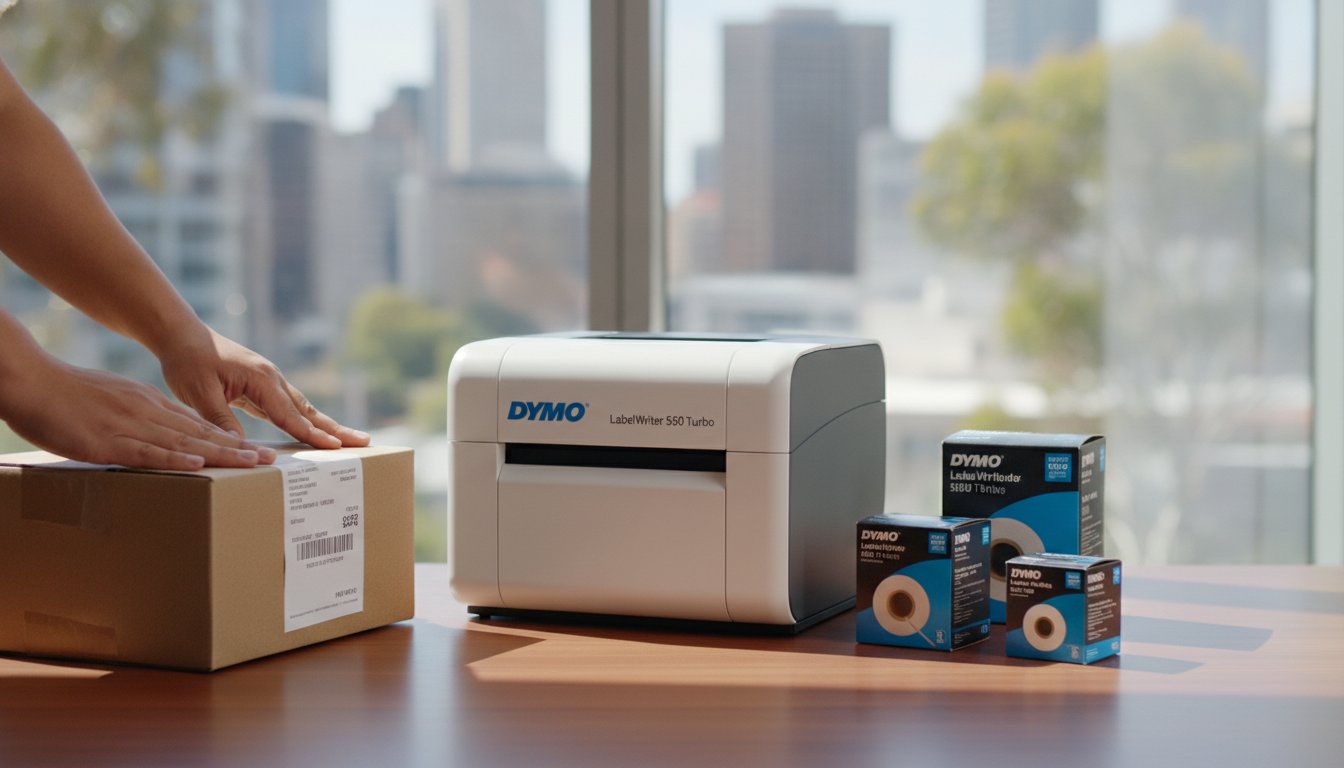
Imagine you've just unboxed a new LabelWriter 550 Turbo, ready to streamline your warehouse shipping, only to be met with a persistent "Label Not Recognised" error. It's a frustrating scenario many Australian business owners face when they don't realise that the 550 series has fundamentally changed how label rolls function. You've likely invested in this hardware for its industry-leading speed, yet the shift to RFID-enabled technology can feel like a hurdle when your existing stock is no longer compatible.
We understand that your priority is a seamless workflow without technical interruptions. This specialist guide will clarify exactly why genuine dymo labelwriter 550 labels are essential for your printer's performance. You'll learn how the Automatic Label Recognition feature actually works to eliminate guesswork by identifying label sizes and tracking remaining counts automatically, ensuring you never run out mid-print.
We'll walk you through the most effective genuine options for local needs, from Australia Post-compliant shipping labels to BPA-free filing solutions. By the end of this article, you'll have the expert knowledge required to choose the right rolls for your specific application, ensuring your organisation stays efficient and error-free.
Key Takeaways
- Understand why the new Automatic Label Recognition technology requires genuine dymo labelwriter 550 labels to ensure your printer functions without "Not Recognised" errors.
- Learn how the integrated RFID chip in genuine rolls allows your printer to automatically detect label size and track the exact number of labels remaining.
- Identify the most efficient label sizes for your industry, including wide-format shipping labels specifically designed for the LabelWriter 5XL and Australian courier standards.
- Determine whether standard paper or durable plastic materials are better suited for your environment, especially when resisting Australian humidity or UV exposure.
- Discover the benefits of sourcing genuine stock from a specialist Australian supplier to ensure hardware longevity and access to expert technical support.
Understanding the DYMO LabelWriter 550 Series and Label Compatibility
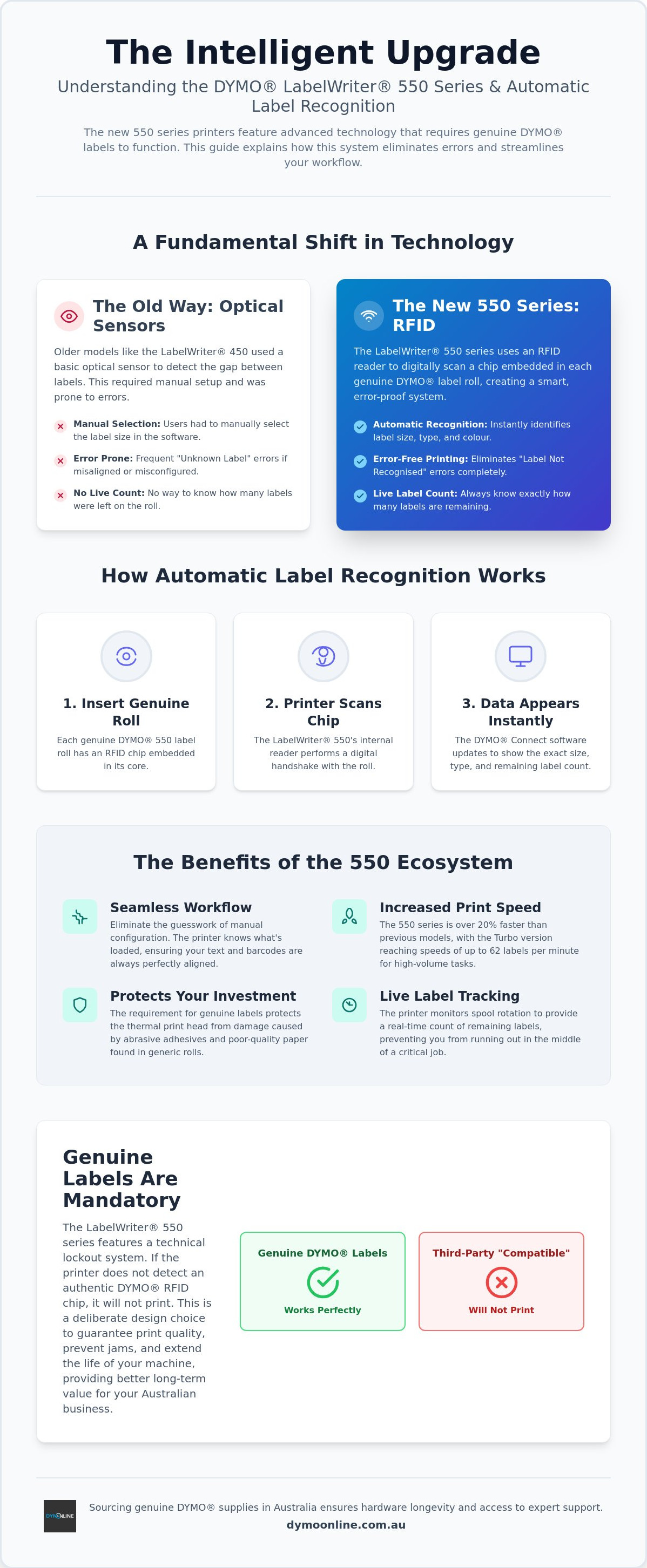
For years, the LabelWriter 450 was the standard in Australian offices, but the release of the 550 series marked a significant technological departure. While older models relied on optical sensors to detect label gaps, the new LabelWriter 550, 550 Turbo, and LabelWriter 5XL utilise an advanced digital ecosystem. This shift wasn't just about faster print speeds; it was about creating a smarter, more communicative connection between the printer and the media roll.
At the heart of this change is Dymo's Automatic Label Recognition technology. Unlike previous generations, these machines feature an internal RFID reader that scans a chip embedded in the core of every genuine roll. This allows the printer to instantly identify the label type, size, and remaining quantity. It's a sophisticated system designed to prevent the common "Out of Stock" or "Unknown Label" errors that can halt a busy dispatch line when you're in the middle of a critical run.
To better understand how this technology integrates with your daily workflow, watch this helpful video:
By moving away from simple mechanical detection, DYMO has created a environment where the hardware and software work in perfect unison. When you load a roll, the DYMO Connect software updates automatically to show exactly what's inside the machine. This eliminates the trial and error of manual configuration, ensuring that your text and barcodes are always perfectly aligned with the label dimensions. It's a no-nonsense approach to professional organisation that saves time for small businesses and industrial warehouses alike.
The 550 Series Ecosystem
The 550 series isn't just a single printer; it's a versatile family of tools designed for different scales of operation. Whether you're using the standard 550 for office filing or the high-speed 550 Turbo for retail, the intelligence remains consistent. For those handling larger logistics, the 5XL provides wide-format capabilities that were previously difficult to manage with smaller desktop units. Using dymo labelwriter 550 labels within this ecosystem ensures that you're getting the full benefit of the 20% speed increase over older models, with some units reaching speeds of up to 62 labels per minute.
Genuine vs. Generic: The 550 Difference
The most critical aspect of this new generation is the mandatory requirement for genuine dymo labelwriter 550 labels. In the past, many businesses experimented with third-party or "compatible" labels to save costs. However, the 550 series features a technical lockout; if the printer doesn't detect an authentic DYMO RFID chip, it simply won't print. While some might find this restrictive, it's designed to protect the thermal print head from the abrasive adhesives and poor-quality paper often found in generic alternatives. Using genuine rolls ensures consistent print quality and extends the life of your machine, providing better long-term value for your Australian business.
The Technology Behind Automatic Label Recognition
The 550 series doesn't just print; it communicates. Every roll of genuine dymo labelwriter 550 labels contains a miniature RFID (Radio Frequency Identification) chip embedded directly into the plastic core. When you drop the roll into the spool, the printer performs a digital handshake with the media. This isn't just about authentication; it's a functional upgrade that transmits the exact label dimensions and material type to your computer instantly.
This real-time tracking is a major shift for high-volume Australian warehouses and medical clinics. The printer monitors the rotation of the spool and cross-references it with the chip data to know exactly how many labels are left on the roll. You'll see a live countdown in the DYMO Connect software, which prevents the frustration of starting a large print run only to run out halfway through. It provides peace of mind for those managing complex inventory or patient records.
Manual calibration is now a thing of the past. In older models, users often had to feed one or two labels through to align the sensor, which led to significant waste over time. With the 550 series, the printer already knows where the first label begins based on the chip data. This ensures your first print is perfectly positioned every time, reducing costs and minimising the environmental impact of discarded label stock.
User Benefits of RFID Labelling
The primary advantage is the total removal of configuration errors. When the software detects the roll, it automatically locks the design canvas to the correct aspect ratio. This is particularly useful for businesses adhering to Australian product labelling laws, as it ensures that mandatory text, such as weight or country of origin, stays within the printable area and doesn't get cut off. You also benefit from pre-configured thermal settings, as the printer adjusts its heat intensity based on whether you've loaded standard paper or durable plastic.
Troubleshooting Recognition Issues
Even with advanced tech, physical alignment remains key. If your printer displays a "Not Recognised" error, ensure the roll is pushed firmly against the left side of the spool, as the RFID sensor is located in the printer's internal wall. Dust from paper labels can occasionally settle on the sensor area; a quick wipe with a dry cloth often restores communication. For more complex hardware queries, you can always reach out to our specialist team for technical support. For a deeper dive into resolving specific hardware errors, see our Dymo Troubleshooting Guide.
Categorising DYMO LabelWriter 550 Labels by Professional Application
Selecting the right dymo labelwriter 550 labels depends entirely on your operational environment. While the printer's internal sensors handle the technical setup, you need to ensure the physical dimensions and adhesive properties match your specific Australian industry requirements. Grouping your choices by application helps to avoid the inefficiency of using a label that is too small for a shipping manifest or unnecessarily large for a standard envelope.
Mailing and Shipping Solutions
The 89mm x 28mm address label remains the primary workhorse for general Australian office correspondence. It provides ample space for three to four lines of text, fitting standard DL envelopes perfectly. For high-volume mailing, you can explore LW Standard Labels to find rolls that balance volume with cost-efficiency. If your business regularly dispatches parcels via Australia Post or local couriers like StarTrack, the 54mm x 101mm shipping label is the most common choice for standard domestic freight.
Large-scale logistics require a different approach. The LabelWriter 5XL wide-formats accommodate the 104mm x 159mm labels necessary for complex shipping manifests and international freight. These larger dimensions are essential for businesses that must adhere to strict import labelling requirements, ensuring that trade descriptions, barcodes, and country of origin data are legible and compliant with Australian Border Force standards.
Office Organisation and Filing
Professional document management relies on clear, consistent identification. Lever arch labels (typically 59mm x 190mm) allow you to print high-contrast titles for folder spines, making archives easy to navigate. Beyond the filing cabinet, multi-purpose labels serve as the ultimate versatile tool. The 19mm x 51mm size is ideal for asset tagging office equipment, while small square or round dymo labelwriter 550 labels are frequently utilised in retail environments for pricing and barcode inventory.
For Australian businesses operating in environments with high humidity or those requiring labels for outdoor storage, standard paper rolls may not suffice. Durable labels, manufactured from tear-resistant plastic materials, offer increased longevity. These are particularly useful for medical administration where labels might be exposed to cleaning chemicals, or in warehouses where labels face fluctuating temperatures. By choosing the correct material for the task, you minimise the risk of labels peeling or fading, ensuring your organisation remains professional and your data remains readable over the long term.
Selecting the Correct Label Material for Australian Conditions
Australia's unique climate, from the high humidity of the northern tropics to the intense UV radiation in the southern states, demands a careful choice of label media. While all dymo labelwriter 550 labels utilise direct thermal technology, the substrate material determines how well your information survives its environment. Using the wrong material can lead to faded barcodes or peeling edges, which ultimately disrupts your supply chain or filing system.
Durable vs. Standard Paper
Standard paper labels are the ideal choice for general office administration where labels remain indoors and away from moisture. It's a professional, cost-effective solution for DL envelopes and internal document tracking. Since 2020, all genuine DYMO paper labels have been BPA-free, making them a safer choice for staff who handle high volumes of mail daily. However, for industrial settings, you should choose LW Durable Labels. These are manufactured from high-strength polypropylene, providing essential resistance to water, oils, and common industrial solvents.
In Australian hospitality settings, these durable options are critical for labelling containers in fridges and freezers. Condensation quickly causes standard paper to peel and disintegrate, whereas durable plastic maintains its bond. One of the primary advantages of the 550 series is the thermal printing method, which removes the need for expensive ink or toner. It's vital to remember that thermal paper is heat-sensitive. If a labelled parcel sits on a hot loading dock in 40-degree heat, the label may darken. For long-term outdoor storage or high-UV exposure, durable plastic variants are mandatory to maintain legibility over the long term.
Industry-Specific Recommendations
Different sectors have distinct requirements based on their daily workflows and environmental exposure. Choosing a label that matches your specific task reduces waste and ensures compliance with local standards.
- Medical: Clinics and pathology labs use specialised labels for specimen tubes and patient files. These must resist moisture and frequent handling without smudging, ensuring patient data remains secure and readable.
- Retail: Storefronts require shelf-edge labelling and pricing that won't fade under bright fluorescent lights or direct sunlight through shop windows.
- Warehouse: Logistics providers need heavy-duty dispatch labels with permanent adhesives that can withstand the friction of conveyor belts and the rigours of national transit across the Nullarbor or through regional hubs.
Adhesive choice is just as important as the material itself. Permanent adhesives are the standard for shipping and asset tagging, ensuring the label stays put for the life of the item. Removable adhesives are better suited for retail pricing or temporary filing, allowing you to peel the label away without leaving a sticky residue. If you're unsure which material fits your specific workplace environment, you can contact our expert team for a tailored recommendation based on your printing volume and application.
Where to Source Genuine DYMO 550 Labels in Australia
Sourcing authentic dymo labelwriter 550 labels requires a partner who understands the technical shift in the 550 series. Because these printers strictly require RFID-enabled rolls, buying from generalist marketplaces can lead to receiving older stock that won't function in your machine. Specialist Australian suppliers like DymoOnline, operated by Mega Thing Pty Ltd, have focused exclusively on this ecosystem since 2009, ensuring every roll dispatched is fully compatible with your 550, 550 Turbo, or 5XL hardware.
As a senior provider in the Australian market, DymoOnline offers more than just consumables. The business is integrated with the Mega Office Supplies group; this ensures a nationwide logistics network for rapid shipping to major metros and regional hubs. When you're ordering dymo labelwriter 550 labels, you're accessing a professional knowledge base that can assist with complex setup queries or high-volume industrial requirements that general retailers often overlook.
The DymoOnline Advantage
Efficiency is the primary goal of any professional labelling system. For businesses with high-frequency dispatch needs, accessing LabelWriter Value Packs is a practical way to reduce the cost per label while maintaining the quality of the thermal substrate. These packs provide a consistent supply for warehouses and medical clinics, ensuring you don't run out of stock during critical operations. The online ordering system is designed for professional utility, allowing for simple repeat purchases that respect your time and administrative requirements.
Final Checklist for Your Order
Before you finalise your procurement, perform a quick audit of your current environment to ensure maximum efficiency. A clear understanding of your hardware and software needs prevents downtime and ensures your labels are fit for purpose. Consider the following points before placing your order:
- Verify Your Printer Model: Confirm you're using a 550 series machine (550, 550 Turbo, or 5XL) rather than an older 450 model to ensure RFID compatibility.
- Check Software Templates: Review your DYMO Connect templates to ensure the label dimensions match your chosen roll size.
- Audit Environmental Needs: Determine if your labels will face high humidity or UV exposure, which might require durable plastic rather than standard paper.
- Volume Requirements: For large-scale logistics or retail rollouts, reach out to the team for specialist advice on bulk pricing and pallet-level supply.
By sourcing through a dedicated Australian specialist, you're not just buying a product; you're building a relationship with a partner that values the integrity of your organisational systems. This approach ensures you receive the expert support and genuine supplies necessary to keep your business moving.
Optimise Your Organisation with Genuine Labelling Solutions
Achieving a reliable labelling workflow requires more than just high-speed hardware; it's about ensuring your media matches the exact technical standards of your machine. The shift to Automatic Label Recognition means that using authentic dymo labelwriter 550 labels is now a fundamental requirement for operational uptime. By choosing genuine rolls, you're protecting your thermal print head and gaining access to real-time stock tracking that eliminates frustrating mid-job interruptions.
Whether you're managing a medical clinic in Brisbane or a high-volume warehouse in Melbourne, selecting the correct material for our local climate ensures your barcodes and text remain legible. DymoOnline has provided specialist Australian support since 2009, offering a 100% Genuine DYMO Guarantee and reliable nationwide delivery through the Mega Office Supplies network. You can Shop the Full Range of Genuine DYMO LabelWriter 550 Labels at DymoOnline or contact our team for expert guidance on bulk requirements.
Investing in the right supplies today ensures your labelling system remains efficient, professional, and entirely error-free. We look forward to helping you maintain a seamless and productive workspace.
Frequently Asked Questions
Do old DYMO labels work with the LabelWriter 550?
No, older labels designed for the 450 series or earlier are not compatible with the 550 series. These newer printers utilise Automatic Label Recognition technology, which requires an RFID chip embedded in the roll's core. If you attempt to load older stock, the printer will not recognise the media and will refuse to print. This change ensures the machine can automatically detect label sizes and track remaining counts, but it does make older non-RFID rolls obsolete for this specific hardware.
Why does my DYMO 550 say "No Genuine DYMO Labels Detected"?
This error message indicates that the printer's internal sensor has failed to detect an authentic RFID chip. It is the machine's primary method for preventing the use of incompatible or inferior third-party media. If you're using a genuine roll and still see this error, ensure the spool is pushed firmly against the left-hand side of the internal wall. Occasionally, paper dust can settle on the sensor area; a quick wipe with a dry cloth often restores the digital handshake between the printer and the roll.
Can I use third-party or generic labels in the DYMO 550 Turbo?
No, third-party or generic labels will not function in the 550 Turbo or any other model in the 550 series. The hardware features a technical lockout that only permits the use of genuine dymo labelwriter 550 labels. This requirement is designed to protect the thermal print head from damage caused by abrasive papers or low-quality adhesives found in generic alternatives. While third-party options were common for older models, they are physically and technically incompatible with the 550's sensor technology.
How many labels are on a standard DYMO 550 address roll?
A standard address label roll (28mm x 89mm) contains 130 labels. However, the quantity per roll varies significantly depending on the specific label size and its intended application. For example, a roll of small multipurpose labels typically contains 500 labels, while extra-small multipurpose rolls can hold up to 1000 labels. One of the benefits of the 550 series is that the DYMO Connect software will display the exact number of labels remaining on your current roll in real-time.
Are DYMO LabelWriter 550 labels waterproof or sun-resistant?
Standard paper dymo labelwriter 550 labels are not waterproof and will darken if exposed to direct sunlight or high heat for extended periods. For Australian conditions that require durability, you should choose the "Durable" range made from tear-resistant plastic. These specialised labels are designed to resist water, oils, and common cleaning chemicals. Additionally, all genuine paper labels manufactured since 2020 are BPA-free, making them a safer choice for staff in high-volume medical or administrative environments.
What is the largest label size the DYMO 550 can print?
The standard LabelWriter 550 and 550 Turbo can print labels up to 62mm wide, which covers most office and filing needs. If your business requires larger shipping manifests or wide-format inventory tags, you'll need the LabelWriter 5XL. The 5XL is specifically designed to handle 104mm x 159mm labels, which are the standard size for Australia Post and other local courier services. This wide-format capability is essential for logistics and international freight compliance.
Do I need ink or toner for the DYMO LabelWriter 550 labels?
No, you never need to purchase ink, toner, or ribbons for these printers. The LabelWriter 550 series uses direct thermal printing technology, which creates an image by applying heat from the print head to a specialised coating on the labels. This is a significant cost-saving benefit for Australian small businesses, as it eliminates the ongoing expense of traditional ink cartridges. The only consumables you'll need to manage are the genuine label rolls themselves and the occasional cleaning card to maintain print quality.
Where is the RFID chip located on the DYMO 550 label roll?
The RFID chip is embedded directly into the black plastic core of every genuine label roll. It is a small, flat component positioned on the side of the spool to align with the sensor on the left-hand side of the printer's internal wall. For the printer to function, this chip must be present and undamaged. If the roll is loaded backwards or if the chip is missing, the printer will display a recognition error and will not allow any printing tasks to proceed.

Article by
DymoOnline Team
The DYMOOnline Team offers practical guidance for Australian businesses, warehouses, retailers, offices, schools, healthcare workplaces and home users who rely on accurate, efficient labelling. DYMOOnline specialises in DYMO label makers, DYMO label printers, label tapes, label rolls, shipping labels, address labels, barcode labels and labelling accessories, helping customers choose the right labelling products for organisation, mailing, inventory, filing, pricing and workplace efficiency.
General Information
This article is provided as general information only to help customers compare and choose DYMO label makers, label printers, label tapes, label rolls, shipping labels, address labels, barcode labels and related labelling supplies. Product details, specifications, compatibility, availability, pricing and suitability may vary. Always check the individual product page, manufacturer information, printer model compatibility and label size requirements before purchasing or using a product.
Latest News
Choosing the Best 4x6 Thermal Shipping Label Printer in Australia: 2026 Buying Guide
Last Monday, a business owner named Sarah discovered that a simple calibration error on a generic...
Choosing the Right DYMO LabelWriter 550 Labels: A Specialist Guide for Australian Businesses
Imagine you've just unboxed a new LabelWriter 550 Turbo, ready to streamline your warehouse shippi...
Comprehensive Guide to the DYMO LabelWriter 550: The Professional Choice for Australian Offices
How much time does your team lose wrestling with misaligned labels or discovering the printer has...
DYMO LabelWriter 550 Software: The Complete Australian Guide for 2026
You've just unboxed your new printer, but instead of a crisp shipping label, you're staring at a "...
DYMO Rhino 5200: The Expert Guide to Industrial Labelling in Australia (2026)
Imagine finishing a complex switchboard installation in the 40-degree Queensland heat, only to ret...
The Ultimate Guide to the DYMO LetraTag LT-100H Label Maker: Australia’s Home Organisation Favourite
How much time do you spend each week rummaging through identical pantry containers or hunting for...