
Dymo Shipping Label Printer Guide: Choosing the Right Solution for Australian Businesses
With Australians spending a record $82.6 billion online in 2025, is your dispatch desk truly equipped to handle the increasing volume? Most business owners agree that nothing kills productivity like the tedious task of cutting out paper labels or the recurring expense of ink cartridges that fail during a busy afternoon. You've likely felt the frustration of a non-genuine label roll jamming just as you're trying to get orders out the door. We promise to show you exactly how to eliminate these bottlenecks by selecting the right dymo shipping label printer for your specific business needs. This guide provides a detailed look at high-performance solutions, from the wide-format LabelWriter 5XL designed for standard shipping labels to the high-speed LabelWriter 550 Turbo for busy office environments. We'll preview the technical advantages of genuine thermal labels and help you choose a reliable, ink-free system that ensures your parcels look professional and arrive on time.
Key Takeaways
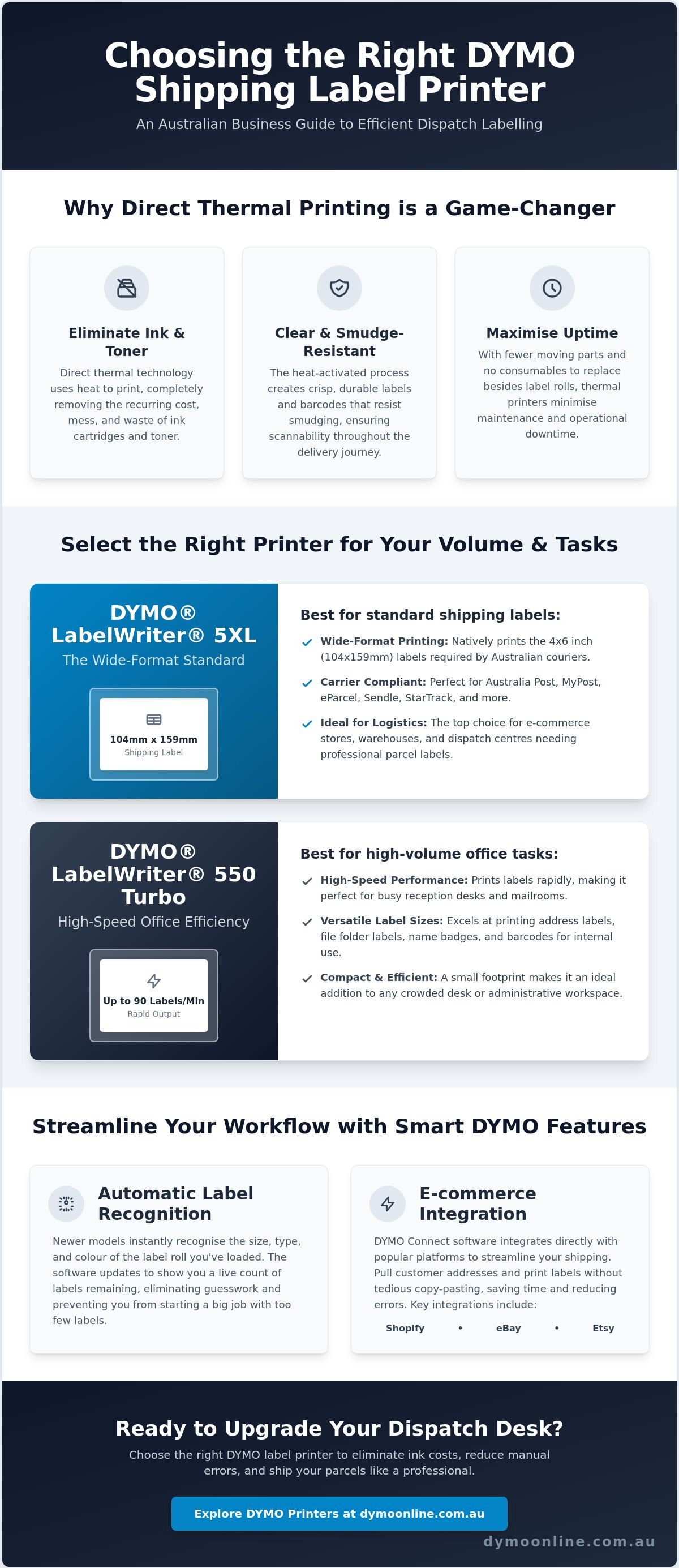
- Learn why direct thermal technology is the preferred choice for Australian logistics, as it removes the ongoing cost of ink and toner while ensuring clear, smudge-resistant barcodes.
- Understand the technical necessity of the 4x6 inch (104mm x 159mm) format and why the LabelWriter 5XL is the standard solution for local shipping carriers.
- Choose the right dymo shipping label printer for your dispatch volume by comparing the high-speed output of the 550 Turbo with the wide-format versatility of the 5XL.
- Discover how to streamline your workflow by integrating DYMO Connect software with major e-commerce platforms like Shopify, eBay, and Etsy.
- Maximise reliability and reduce manual errors with Automatic Label Recognition, which identifies the exact size and quantity of labels remaining on your roll.
Understanding Thermal Printing for Shipping and Logistics
Reliability is the backbone of any efficient dispatch operation. For Australian businesses managing high order volumes, the transition to thermal printing technology represents a fundamental shift in logistics efficiency. Unlike traditional office printers that rely on liquid ink or powdered toner, a dymo shipping label printer uses a specialised heat-sensitive print head to create images. This process is inherently simpler and more robust, making it the preferred choice for the fast-paced Australian transport sector where speed and clarity are non-negotiable. Because there are no ribbons or cartridges to replace, you can maintain a continuous workflow without the risk of faded prints during a critical dispatch window.
To better understand how these machines compare to other options in a real-world setting, watch this helpful video:
The End of Ink and Toner Costs
Switching to a thermal system allows you to remove the recurring expense of ink cartridges from your balance sheet entirely. Traditional inkjet printers are notorious for clogged nozzles and expensive replacements, which often fail at the most inconvenient times. In contrast, the DYMO LabelWriter series features a streamlined internal mechanism with very few moving parts. This design minimises maintenance requirements and significantly reduces consumable waste, as the only ongoing requirement is the label roll itself. For a busy warehouse, this translates to fewer technical interruptions and a more sustainable labelling process by eliminating the environmental impact of empty plastic cartridges.
Direct Thermal vs. Thermal Transfer
While there are different types of thermal printing, DYMO utilises direct thermal technology for its shipping solutions due to its simplicity and rapid output. Direct thermal is an ink-free process that creates images by applying heat directly to heat-sensitive paper labels. This method is perfectly suited for short-to-medium term applications like parcel delivery, where the label needs to remain legible throughout the domestic delivery cycle. Because the print is chemically embedded in the paper, it's highly resistant to smudging during transit. This durability ensures that barcodes remain scannable even after handling by multiple couriers or exposure to the varied light conditions found in Australian distribution centres.
Using a dedicated dymo shipping label printer also removes the frustrations associated with laser printing, such as paper jams or the need to tape down paper slips. The labels are self-adhesive and ready to apply the moment they exit the machine. This efficiency allows staff to focus on packing rather than troubleshooting hardware, which is vital for maintaining high dispatch standards during peak seasonal periods.
The DYMO LabelWriter 5XL: Australia’s Wide-Format Standard
The LabelWriter 5XL is the flagship solution for businesses that require a reliable, wide-format dymo shipping label printer. While smaller models are excellent for administrative tasks, the 5XL is specifically engineered to handle the larger formats required by the modern Australian logistics network. This machine bridges the gap between home-office utility and professional-grade performance. It offers high-resolution output that ensures every barcode is crisp and easily readable by automated courier sorting systems. By producing clear, high-contrast prints, you significantly reduce the risk of manual sorting delays or lost parcels due to unreadable labels.
The 4x6 Shipping Label Requirement
In the Australian market, the 4x6 inch (104mm x 159mm) format has become the non-negotiable standard for parcel delivery. This specific size is mandated by major carriers including Australia Post (MyPost Business and eParcel), Sendle, and StarTrack. Standard address labels simply don't provide enough surface area for the complex tracking barcodes and customs data required today. By adopting the 5XL, you align your dispatch process with the National Freight and Supply Chain Strategy, which emphasises the need for digitised and efficient transport solutions across the country. You can find more technical details on this model in our LabelWriter 5XL pillar article.
High-Volume Capacity for Growing Businesses
Scalability is a critical consideration for any growing enterprise. The 5XL is designed to handle extended print runs without the overheating issues that often plague entry-level hardware. Its compact footprint is another practical advantage. It fits comfortably on crowded packing benches or retail counters without compromising on output power. Many businesses find that starting with a dedicated warehouse station is the most efficient way to manage increasing order volumes during peak seasonal periods.
A standout feature of the 500 series is the Automatic Label Recognition technology. This system uses a built-in sensor to identify the exact size, type, and colour of the loaded roll. It also displays the remaining label count on your screen, which prevents the frustration of running out of supplies halfway through an order batch. This hardware intelligence ensures that your settings are always correct before you hit print. If you're unsure which roll size suits your current carrier, feel free to reach out to our specialist team for tailored guidance. This level of technical precision ensures that your labelling remains consistent and professional as your business expands.
Comparing the 5XL and 550 Turbo for Dispatch Tasks
Selecting a dymo shipping label printer requires a clear understanding of your daily dispatch requirements. While both the LabelWriter 5XL and the 550 Turbo share the same advanced thermal technology, they are designed for different operational scales. The most significant technical difference lies in the maximum print width. The 5XL supports labels up to 104mm wide, making it the only choice for standard 4x6 shipping labels. Conversely, the 550 Turbo is capped at a 58mm width. This makes it an exceptional tool for address labelling and small satchel barcodes, but it cannot produce the wide-format documents required by most Australian couriers.
A recent Productivity Commission report on logistics highlights that supply chain inefficiencies can significantly impact the bottom line, making the choice of hardware a strategic business decision. Choosing the wrong model can lead to bottlenecks where staff are forced to manually resize labels or use multiple machines for a single order. Connectivity is another factor to consider. Both models offer USB and LAN (Local Area Network) capabilities. The LAN feature is particularly useful in shared office environments, as it allows multiple team members to send print jobs to a single station without needing a direct physical connection to a computer.
When to Choose the LabelWriter 550 Turbo
The 550 Turbo is the preferred option for businesses that primarily handle administrative tasks or small-scale shipping. It excels at high-speed output for standard address labels, file organisation, and barcode tracking for internal inventory. If your workflow involves printing hundreds of small return-address or product labels, the Turbo's rapid print cycles will save you significant time. For a deeper look at how this machine fits into a professional workspace, you can refer to our LabelWriter 550 guide. It remains the office standard for general labelling needs due to its compact size and shared network versatility.
When the 5XL is Non-Negotiable
There are certain scenarios where the 5XL becomes an essential asset. If your business manages international shipping or regularly sends large cartons via Australia Post or Sendle, you cannot compromise on label size. Attempting to scale down a complex shipping label to fit a smaller printer often results in unreadable barcodes and rejected parcels. The 5XL is built to maintain high resolution at a larger scale, ensuring that every detail of a customs declaration or a domestic tracking code is perfectly rendered. For businesses managing global distribution, staying informed about different carrier systems is crucial; Linemark offers detailed insights into tracking international shipments effectively. It's also the more reliable choice for industrial-grade adhesive applications, as the larger surface area of the 4x6 label provides a more secure bond to varied packaging materials like corrugated cardboard and heavy-duty poly mailers. For a dedicated dymo shipping label printer that meets every carrier requirement, the 5XL stands alone.
Integrating Your Printer with Australian Shipping Platforms
Hardware performance is only half the battle in a modern dispatch environment. To get the most out of your dymo shipping label printer, you must ensure the software configuration is correctly aligned with your chosen e-commerce platforms. DYMO Connect for Desktop serves as the primary interface for this integration, providing a robust bridge between your printer and your sales data. The latest version, 1.6, is specifically designed for Windows 10 and higher, as well as macOS 14 and higher, ensuring compatibility with the current 2026 operating systems. This software allows you to import order details directly from Shopify, eBay, and Etsy, which removes the need for manual typing and significantly reduces the risk of delivery errors caused by typos.
DYMO Connect and Software Compatibility
The modern DYMO Connect interface is built for efficiency. One of its most practical features is the "Snapshot" tool, which is invaluable when dealing with various carrier portals. Because many Australian shipping platforms generate labels as PDF documents, the Snapshot tool allows you to capture the exact barcode and address area and send it to your printer without complex reformatting. This ensures that the layout remains consistent and the aspect ratio of the barcode isn't distorted. Keeping your drivers up to date is essential for maintaining this functionality, as it ensures the hardware can accurately interpret the high-resolution data sent from the desktop application.
Carrier-Specific Setup Tips
When setting up your 5XL for Australia Post MyPost Business or eParcel, the most common hurdle is the paper size setting. You must navigate to your printer preferences and manually select the 104mm x 159mm layout. This ensures the print area perfectly matches genuine DYMO 4XL and 5XL labels. If this isn't correctly configured, you may find your barcodes are cut off or the printer skips labels, leading to unnecessary waste.
Scaling errors are another frequent issue that can lead to parcels being rejected by courier sorting machines. Always ensure that your print settings are set to "Actual Size" rather than "Fit to Page." Scaling a label even by a few percentage points can blur the edges of a barcode, making it unreadable for high-speed scanners. By locking in these settings once, you create a repeatable and reliable workflow that handles high volumes with ease. If you're encountering persistent alignment issues or need help synchronising your store data, contact our specialist support team for technical guidance tailored to the Australian shipping environment.
Maximising Reliability with Genuine DYMO Labelling Supplies
The long-term performance of your dymo shipping label printer depends heavily on the quality of the media you feed into the machine. While the hardware provides the precision, the labels themselves determine the final legibility and durability of your parcel tracking. In the current 5-series lineup, including the 5XL and 550 Turbo, DYMO has moved toward an integrated system where the printer and the label roll communicate in real time. This technical synergy is designed to remove the guesswork from the labelling process, ensuring that what you see on your screen is exactly what appears on the adhesive paper.
The Technology Behind the Roll
The LabelWriter 550 and 5XL series utilise a sophisticated "smart" chip technology embedded in every genuine roll. This chip communicates directly with the printer's internal sensors to enable Automatic Label Recognition. The moment you drop a roll into the bay, the software identifies the exact size, type, and colour of the labels. It even tracks the quantity remaining, which is displayed on your computer. This removes the need for manual layout adjustments in the software, as the digital template automatically snaps to the correct dimensions. Genuine DYMO labels prevent the "recognition errors" common with third-party alternatives, ensuring your workflow remains uninterrupted by hardware rejections.
Opting for non-genuine or "compatible" labels often introduces hidden risks to your operation. These third-party rolls frequently use inferior coatings that can leave behind adhesive residue or dust. Over time, this buildup can damage the sensitive thermal print head, leading to faded barcodes or permanent hardware failure. Because thermal printing relies on direct contact between the head and the paper, any inconsistency in the label surface can result in poor heat distribution. This is particularly problematic for shipping, where a slightly blurred barcode can lead to a parcel being rejected by automated sorting facilities.
Specialised Labels for Shipping Environments
Australian businesses must also consider the varied climates their parcels will encounter. From the humidity of Queensland to the dry heat of Western Australia, label adhesive needs to remain secure. Genuine supplies are engineered to withstand these environmental stresses, ensuring that labels don't peel or flag during transit. For items that might face harsher conditions, such as moisture or frequent abrasion, LW Durable labels provide an extra layer of protection. These are specifically designed to resist chemical exposure and water, making them ideal for industrial warehouses or outdoor storage areas.
For those managing complex supply chains that require specialised equipment, exploring the Sale of industrial label printing hardware and consumables through OptiMediaLabs Canada can provide additional insights into maintaining professional standards across all levels of production and shipping.
High-volume dispatch centres can also benefit from High Capacity rolls, which contain more labels per roll to minimise downtime during busy periods. Reducing the frequency of roll changes allows your team to maintain momentum during peak dispatch windows. If you ever encounter issues with label feeding or alignment, our Dymo Troubleshooting Guide offers expert solutions to keep your dymo shipping label printer running at peak efficiency. By pairing your hardware with the correct genuine supplies, you protect your investment and ensure every parcel leaves your warehouse looking professional and ready for delivery.
Streamline Your Shipping with Professional Labelling
Selecting the right hardware is a strategic investment in your business's logistics efficiency. Whether you require the wide-format capabilities of the 5XL for standard 4x6 shipping labels or the rapid output of the 550 Turbo for administrative tasks, matching the tool to your carrier's requirements is essential. By integrating a dedicated dymo shipping label printer into your workflow, you eliminate the hidden costs of ink and manual cutting while ensuring every parcel meets professional standards. Remember that maintaining this reliability long-term depends on using genuine supplies that communicate directly with your printer's sensors.
At DYMOOnline, we provide specialist Australian support to help you navigate technical setups and supply choices. Our genuine DYMO products are fulfilled by Mega Office Supplies, ensuring you receive authentic hardware and rolls for your specific applications. With same-day shipping available in major metro areas, you can upgrade your packing station and reduce dispatch times without delay. If you need assistance selecting the ideal model or roll type for your warehouse environment, get in touch with our expert team today. We're ready to help you build a more reliable and efficient dispatch process.
Frequently Asked Questions
Can I use any shipping labels with my DYMO LabelWriter 5XL?
No, the LabelWriter 5-series printers, including the 5XL, are designed to work exclusively with genuine DYMO labels. These rolls contain a specialised smart chip that communicates with the printer to enable Automatic Label Recognition features. Using third-party or compatible rolls will result in the machine not recognised the media, which prevents the print job from starting. This system ensures technical accuracy and protects the thermal print head from damage caused by inferior materials.
Does the DYMO 5XL work with Australia Post MyPost Business?
Yes, the LabelWriter 5XL is fully compatible with Australia Post MyPost Business and eParcel platforms. To ensure your labels print correctly, you must select the 104mm x 159mm (4x6 inch) paper size in your printer preferences before generating your labels. This wide-format dymo shipping label printer is the industry standard for producing the high-resolution barcodes required by the national postal network and other major Australian couriers.
What is the difference between the DYMO 4XL and the 5XL?
The primary difference is that the 5XL features modern LAN connectivity and Automatic Label Recognition technology, which were not present on the older 4XL. While both can print wide-format shipping labels, the 5XL allows multiple staff members to share the printer over a local network. Additionally, the 5XL provides real-time data on the label type and the number of labels remaining on the roll, which significantly reduces downtime in a busy warehouse.
Do I ever need to buy ink or toner for a DYMO shipping printer?
No, you will never need to purchase ink, toner, or ribbons for your DYMO shipping printer. These machines utilise direct thermal printing technology, which creates images by applying heat to specialised heat-sensitive paper. This ink-free process is a major advantage for high-volume dispatch environments, as it eliminates the recurring cost of cartridges and prevents the frustration of ink running out during a critical print run.
How do I print 4x6 labels from my Shopify or eBay store?
You can print labels from Shopify or eBay by using the DYMO Connect software or the platform's native print settings. For the best results, open your shipping label as a PDF and use the Snapshot tool within DYMO Connect to capture the barcode area. Ensure your printer settings are set to Actual Size to avoid scaling errors. This ensures your dymo shipping label printer produces a crisp, scannable barcode for every order.
Why is my DYMO printer not recognising the labels I just loaded?
Your printer is likely not recognised the rolls because they lack the required genuine DYMO smart chip. The 5-series printers use an internal sensor to verify the authenticity of the labels before printing. If you are using genuine rolls and still face issues, the sensor may need a quick clean with a lint-free cloth. Always ensure the roll is seated firmly in the bay and that the labels are fed through the guide correctly.
Can the LabelWriter 550 Turbo print large shipping labels?
No, the LabelWriter 550 Turbo is limited to a maximum print width of 58mm, which is too narrow for standard 4x6 shipping labels. It is an excellent tool for printing address labels, file folder labels, and small barcodes for satchels. However, if your business requires the full 104mm wide format mandated by carriers like Australia Post or Sendle, the LabelWriter 5XL is the only suitable model in the range.
What software do I need to install for my DYMO shipping printer?
You should install the latest version of DYMO Connect for Desktop, which is currently version 1.6 for both Windows and macOS. This software provides the necessary drivers and a user-friendly interface for designing layouts and importing store data. It is compatible with modern operating systems and offers specialised tools for capturing shipping layouts from PDF documents, ensuring your labelling process remains efficient and technically accurate for current logistics standards.
General Information
This article is provided as general information only to help customers compare and choose DYMO label makers, label printers, label tapes, label rolls, shipping labels, address labels, barcode labels and related labelling supplies. Product details, specifications, compatibility, availability, pricing and suitability may vary. Always check the individual product page, manufacturer information, printer model compatibility and label size requirements before purchasing or using a product.
Latest News
Small Business Label Printer Australia: The 2026 Guide to Automated Labelling Systems
Imagine spending your Monday morning handwriting fifty delivery addresses, only to have several parc...
Australian Food Safety Label Requirements: A 2026 Compliance Checklist
Could your current food labels trigger a mandatory recall after 25 February 2026? It is a critical q...
Choosing the Best Australia Post Shipping Label Printer for Your Business in 2026
We understand that as your order volume increases, you need a reliable australia post shipping label...
Asset Tag Printer: 2026 Australian Buying Guide
When an expensive piece of portable equipment goes missing from a job site or office, the real cost...
Asset Labelling Solutions for Australian Schools: The 2026 Buying Guide
Imagine walking into a classroom at the end of term only to find that dozens of new student laptops...
The Ultimate Guide to Professional Archive Box Labelling Systems
Imagine the frustration of an urgent compliance audit where the only thing standing between you and...