
DYMO LabelManager 420P: The Professional Handheld Labelling Choice for Australia
Imagine being halfway through an urgent asset-tagging project in a humid warehouse, only for your device to die because you've run out of AAA batteries again. It's a common frustration that stalls productivity and forces unnecessary delays. Most Australian professionals agree that while entry-level handhelds have their place, they often fall short when you need to type long lists or print complex barcodes on the fly. The dymo labelmanager 420p solves these specific pain points by bridging the gap between portable convenience and desktop-level power.
By reading this guide, you'll discover why this specific model is the preferred choice for Aussie businesses that require versatile, PC-connected labelling solutions. We'll look at the benefits of its rechargeable battery pack, the efficiency of importing custom logos via DYMO Connect software, and how its durable D1 tapes withstand local environmental conditions. We also explore the long-term reliability of the device and the value of choosing a tool backed by professional knowledge. This overview provides the technical clarity you need to decide if this high-performance tool is the right investment for your professional organisation.
Key Takeaways
- Leverage PC and Mac connectivity to import data directly from Excel or Outlook, streamlining high-volume labelling tasks for improved accuracy.
- Eliminate the cost and downtime associated with disposable batteries by utilising the integrated lithium-ion rechargeable power system.
- Discover why the dymo labelmanager 420p is the essential upgrade for Australian professionals who require more customisation than entry-level models provide.
- Apply specialized labelling solutions to retail and medical environments to ensure clear organisation and long-term durability in local conditions.
- Protect your hardware investment and ensure label longevity by choosing genuine D1 tapes designed to prevent adhesive leakage and mechanical damage.
Introducing the DYMO LabelManager 420P: High Performance for Pros
The dymo labelmanager 420p represents the pinnacle of the current handheld range. It's designed for those who need more than a basic tool for occasional files. By combining the immediate accessibility of a handheld device with the sophisticated customisation of PC connectivity, it serves as a bridge between two worlds. This model draws on the extensive Dymo Corporation history of innovation, providing a solution that experts consistently rank as the top choice for professional organisation in demanding environments.
To better understand this concept and see the hardware in action, watch this helpful video:
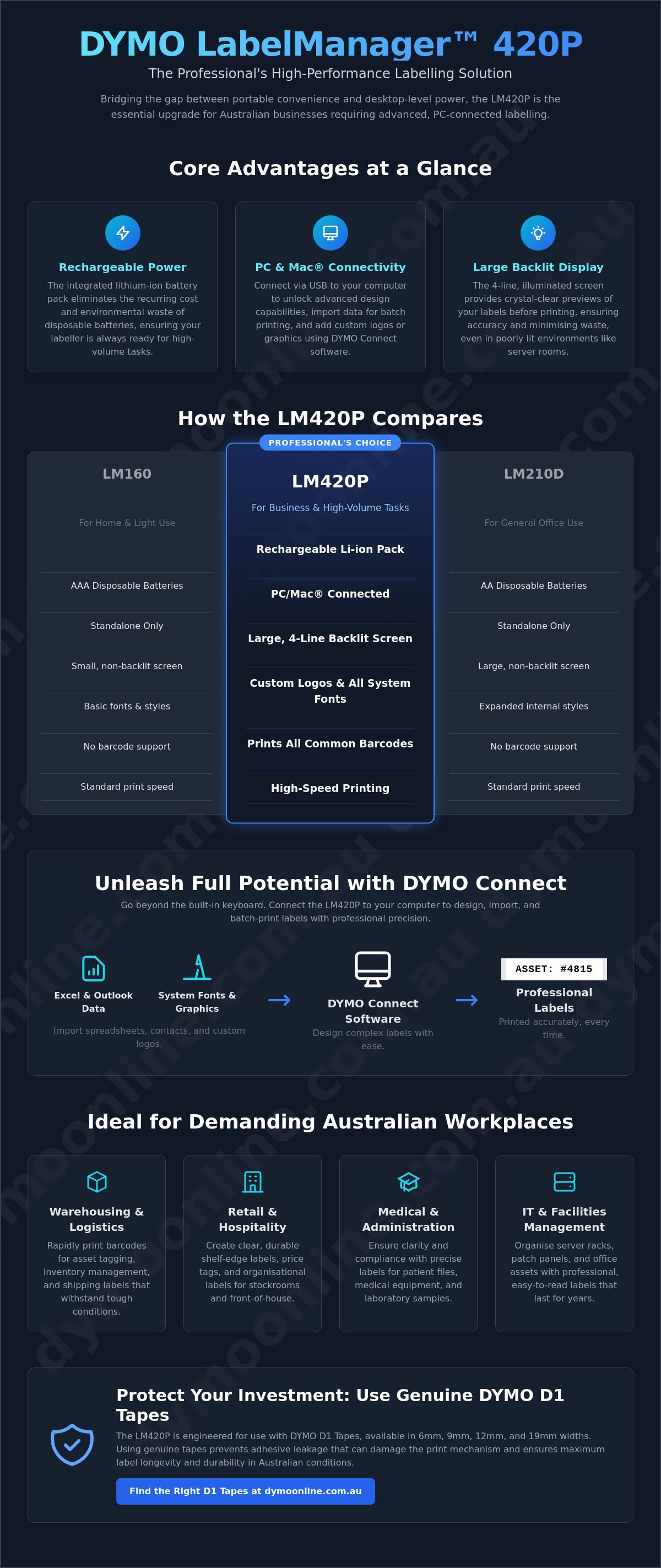
A significant advantage for Australian businesses is the integrated rechargeable lithium-ion battery. Traditional handhelds often rely on AA or AAA batteries. These are a recurring expense. They also create environmental waste. By switching to a rechargeable system, you eliminate the risk of a device failing mid-job due to flat batteries. This makes the unit a cost-effective choice for high-volume environments where labels are printed daily. It's a reliable partner for your DYMO LabelManager needs.
Why 'High-Performance' matters in the workplace
In a busy warehouse or a dark server room, visibility is paramount. The dymo labelmanager 420p features a large, backlit screen that ensures you can read your text clearly before you commit to printing. Speed is another critical factor. This model prints significantly faster than entry-level models, allowing you to move through large batches of equipment or inventory quickly. The ergonomic design is specifically weighted to reduce hand strain. This is vital for staff members who spend hours organising workspace infrastructure.
The Australian professional's choice
From medical clinics in Melbourne to automotive workshops in Perth, this labeller adapts to diverse requirements. The large 4-line display allows you to review complex multi-line labels. This ensures accuracy before wasting tape. It isn't just a disposable office gadget. It's a long-term asset built for durability. Whether you are creating shelf-edge labels or patient file identifiers, the clarity of the output reflects the professional standards of your business. It handles the pressure of a professional environment with ease.
Technical Mastery: PC Connectivity and Customisation
The dymo labelmanager 420p distinguishes itself through its seamless USB connection, compatible with both Windows and Mac operating systems. This interface allows you to bypass the constraints of a small device keyboard for complex projects. When you connect the unit to your computer, it functions as a high-precision peripheral capable of producing intricate designs that would be impossible to create manually. You can import custom company logos or specific graphics to ensure every piece of equipment is identified with professional branding. This level of control is essential for businesses that must adhere to strict Australian workplace labelling regulations regarding safety and identification.
Unlocking the power of DYMO Connect
Advanced formatting at your fingertips
Even when disconnected from a PC, the dymo labelmanager 420p offers substantial customisation through its standalone interface. You have access to eight font sizes, seven text styles, and ten distinct border options to ensure every label serves its specific purpose. Quick-access keys provide immediate entry for symbols and special characters, which is particularly useful for technical, electrical, or medical applications where precision is non-negotiable. The internal memory stores up to 15 frequently used templates, allowing for rapid deployment of standard labels in the field without needing to re-enter data. By supporting multiple barcode formats including Code 39, Code 128, and EAN 13, the 420P eliminates the need for expensive specialised barcode printers in many small-to-medium enterprise scenarios. This versatility ensures that your investment continues to provide value as your organisational requirements grow.
If you have questions about software compatibility or technical specifications for your workplace, our team can provide expert technical advice tailored to your specific hardware setup.
LabelManager 420P vs LM160 vs LM210D
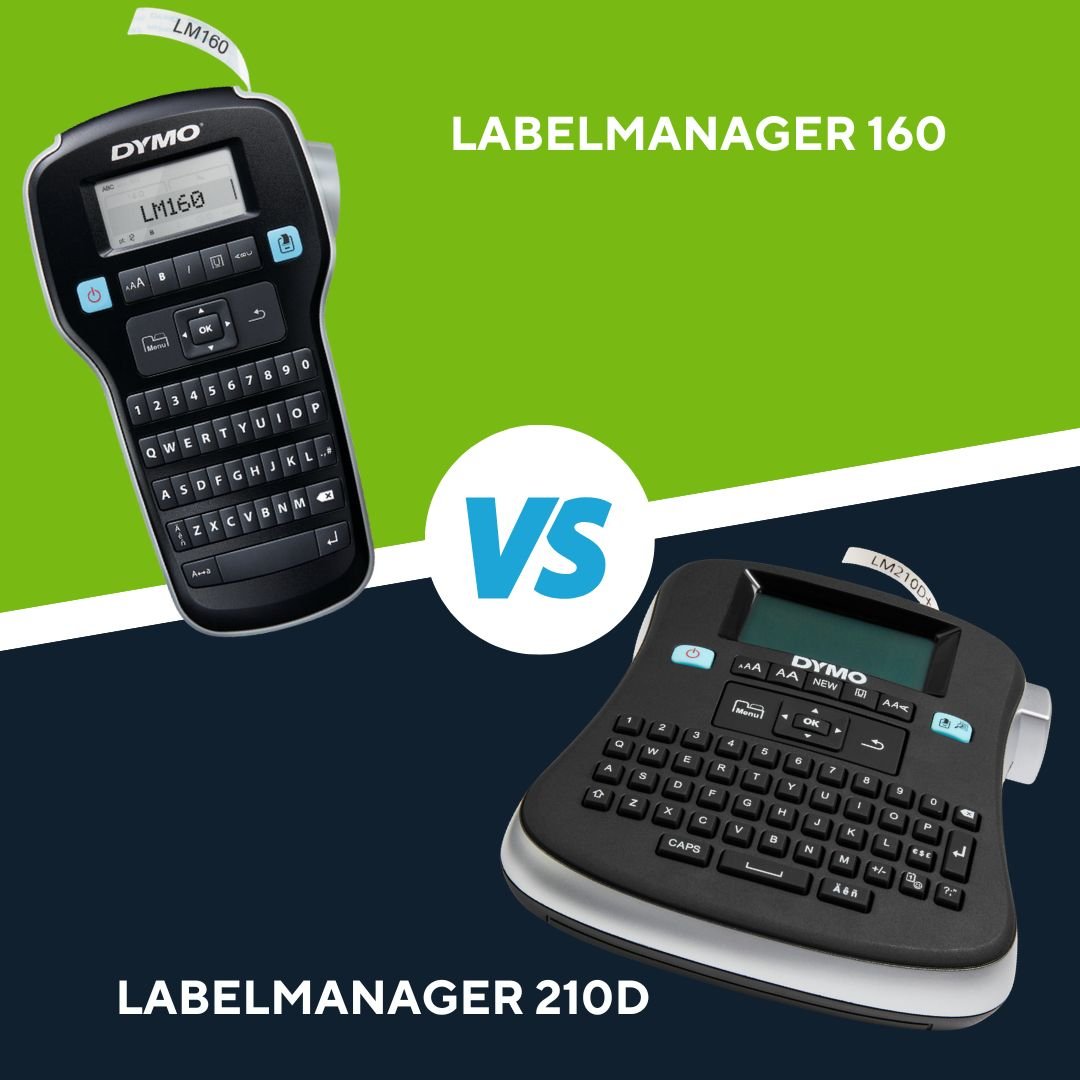
The dymo labelmanager 420p sits at the top of the handheld hierarchy. While the LabelManager 160 is a reliable entry point for home offices, professional environments quickly expose its limitations. The transition from the LM160 to the 420P is the most logical step for growing Australian businesses that require more than basic identification. The most immediate difference lies in the power source. Relying on six AAA batteries is a logistical burden and a hidden cost that adds up over a year of operation. The 420P utilises a rechargeable lithium-ion battery pack. This ensures the device is always ready and significantly reduces ongoing operational expenses.
Screen technology also sees a major upgrade in this flagship model. Entry-level models use basic LCDs that can be difficult to read in bright Australian sunlight or poorly lit storage areas. The 420P features a large backlit display. This allows you to see exactly how your label will look before you commit to printing. According to PCMag's in-depth review of the DYMO 420P, this visual feedback is a key reason for the model's high performance rating in professional settings.
Is the 420P worth the extra investment?
Handheld vs Desktop: LM420P vs LM210D
While the DYMO LabelManager 210D is a popular desktop choice, it lacks the true mobility required for site inspections and audits. The dymo labelmanager 420p is designed to be gripped in one hand while you navigate a workshop or clinic. It features an ABC keyboard layout. This is often more intuitive for staff who are used to mobile device interfaces rather than a traditional QWERTY computer setup. This design makes it the superior choice for on-the-spot labelling where you need to move quickly between different locations without being tethered to a desk.
Practical Applications in Australian Industries
The dymo labelmanager 420p is a specialised instrument that meets the rigorous demands of various Australian sectors. In retail environments, it excels at creating durable shelf-edge labels and barcodes that remain legible under harsh shop lighting. Medical and pathology clinics rely on its precision for patient file organisation and sample labelling where clarity is a matter of clinical safety. The ability to print multiple lines of text ensures that critical data is never omitted due to space constraints.
Australian environmental conditions, particularly high humidity in northern regions and intense heat during summer, can cause inferior adhesives to fail. The dymo labelmanager 420p, when paired with genuine D1 Standard Tapes, ensures that labels don't peel or fade over time. This durability is vital in hospitality settings for tracking expiration dates in commercial kitchens, where steam and temperature fluctuations are constant. For electrical contractors and data centre managers, the 19mm tape support provides the necessary visibility for marking high-density patch panels and complex cable looms in dim environments.
Organising the commercial office
Modern office management requires a systematic approach to asset tracking and document retrieval. You can implement sophisticated colour-coding for your archives by utilising the extensive range of DYMO D1 tape colours. This visual system allows staff to identify relevant files at a glance, reducing time spent searching for historical records. Asset management is another primary use case. By marking laptops, monitors, and shared chargers, you create a clear audit trail that prevents loss and simplifies end-of-year inventory checks. It also enables the creation of professional health and safety signage to ensure common areas comply with local standards.
Warehouse and logistics utility
Efficiency in the warehouse starts with clear identification. Pick-bin labelling is essential for faster inventory retrieval and reducing costly dispatch errors. Using high-contrast 19mm tapes, you can mark hazardous areas or heavy machinery with warnings that are impossible to miss. In shipping centres, the 420P complements larger systems like the DYMO LabelWriter 5XL by handling the smaller, detailed organisational tasks that wide-format printers aren't designed for. This hierarchy of tools ensures every part of your logistics chain is professionally managed.
If you need help selecting the right tape grade for your specific industrial environment, contact our specialists for professional guidance today.
Maximising Your LM420P with Genuine DYMO Supplies
To maintain the operational integrity of the dymo labelmanager 420p, the use of genuine consumables is a technical necessity rather than a suggestion. Generic or compatible tapes often lack the precise engineering required for the 420P's thermal print head. A primary risk with third-party alternatives is adhesive leakage. Over time, inferior glue can seep from the tape backing and coat the internal rollers and print mechanism. This leads to persistent jams and can eventually cause permanent hardware failure. Genuine DYMO supplies are designed to withstand the friction and heat of the printing process, ensuring your device remains a reliable long-term asset.
The Australian climate presents unique challenges for label longevity. Intense UV exposure and high ambient temperatures can cause non-genuine labels to become brittle or lose their bond entirely. Genuine D1 tapes are tested to remain legible and securely attached in these specific conditions. For specialised applications, you can utilise Flexible Nylon for curved surfaces like cables or Permanent Polyester for flat, high-traffic areas where maximum adhesion is required. These specialised materials ensure that your organisation's identification remains intact regardless of the environmental pressure.
Compatibility and tape widths
The dymo labelmanager 420p provides exceptional versatility by supporting four different tape widths. You can easily switch between 6mm, 9mm, 12mm, and 19mm D1 Standard Tapes depending on the task at hand. This range allows for everything from subtle file identification to bold warehouse signage. A key feature of these genuine tapes is the 'Easy-Peel' split backing. This design allows staff on a busy shop floor to remove the backing and apply labels in seconds, which significantly improves workflow efficiency. Selecting the right adhesive is also critical; while standard tapes suit office folders, specialised nylon is the superior choice for wrapping around curved electrical conduits or textured surfaces.
The DymoOnline specialist advantage
Choosing DymoOnline ensures you are receiving genuine Australian stock backed by local expertise. Our position as a specialised provider means you have direct access to DYMO troubleshooting and technical support tailored to the Australian business environment. For organisations requiring high-volume supplies, we offer reliable national shipping through Mega Office Supplies to ensure your operations never stall due to a lack of consumables. Using authentic supplies provides the peace of mind that comes from knowing your high-performance machine is protected by the manufacturer's own standards. This commitment to quality ensures that every label you print reflects the professional standards of your business.
Elevate Your Organisational Standards
Implementing a professional labelling system is a long-term investment in your business's efficiency and safety compliance. The dymo labelmanager 420p provides the perfect balance between handheld portability and the technical sophistication of PC connectivity. By eliminating the ongoing cost of disposable batteries and offering the versatility of 19mm tapes, this device ensures your assets are clearly identified and your workflows remain uninterrupted. Whether you're managing a medical clinic or a high-traffic warehouse, the ability to import data and print custom barcodes directly from your desktop is a significant operational advantage.
Choosing a high-performance tool requires a partner that understands the specific needs of the Australian market. We provide specialist Australian support and ensure the authenticity of all genuine DYMO products and accessories we sell. With same-day dispatch to major metro areas, you can upgrade your organisational infrastructure without unnecessary delay. Contact our Australian experts today to discuss the best labelling solution for your organisation. We look forward to helping you achieve a more organised and efficient workplace.
Frequently Asked Questions
What tapes are compatible with the DYMO LabelManager 420P?
The dymo labelmanager 420p is compatible with the full range of D1 Standard Tapes. This includes versatile materials such as standard plastic for office use, flexible nylon for curved cables, and permanent polyester for heavy-duty industrial applications. Using these genuine tapes ensures that your labels withstand the Australian climate while protecting the device's thermal print head from adhesive leakage and mechanical damage.
Can I use the DYMO 420P with my Mac or Windows 11 computer?
Yes, this model is fully compatible with both Windows 11 and current Mac operating systems. You can connect the unit via USB to access the DYMO Connect for Desktop software. This integration allows you to design complex labels using your full computer keyboard and any installed system fonts. It's a significant efficiency gain for organisations that need to manage large data sets or intricate branding requirements.
How long does the rechargeable battery last on the LabelManager 420P?
The integrated lithium-ion battery pack is engineered for high-performance use and typically lasts through several hundred labels on a single charge. While the exact duration depends on your specific printing volume and backlit screen usage, it's designed to handle a full day of intensive labelling. This rechargeable system provides a reliable power source that eliminates the ongoing expense and waste of disposable alkaline batteries.
What is the maximum tape width the DYMO LM420P can print?
The dymo labelmanager 420p supports a maximum tape width of 19 mm. This width is ideal for creating highly visible warehouse signage, safety warnings, and large asset tags. The device is also backwards compatible with 6 mm, 9 mm, and 12 mm tape widths. This versatility allows you to switch between slim file identifiers and bold industrial markers quickly, depending on your specific organisational requirements.
Does the DYMO 420P print barcodes and logos?
Yes, the device prints a wide variety of barcodes and custom graphics when connected to your computer. It supports standard formats such as UPC-E, Code 39, Code 128, and EAN 13. By using the desktop software, you can also import company logos and specific icons. This makes the 420P a powerful tool for Australian retailers and logistics centres that require professional inventory tracking and consistent brand representation.
Why is my DYMO LabelManager 420P not connecting to my PC?
Connection issues are often resolved by ensuring you've installed the latest version of the DYMO Connect for Desktop software. Check that the USB cable is connected directly to a port on your computer rather than through a non-powered USB hub. If the device still isn't recognised, try restarting the software or checking your system's device manager to confirm the drivers are active and up to date.
Is the DYMO 420P better than the LM160 for high-volume labelling?
The 420P is the superior choice for high-volume tasks due to its rechargeable battery and PC connectivity. While the LabelManager 160 is suitable for occasional home use, it lacks the speed and customisation options required in a professional environment. The 420P's ability to import data from Excel and its support for wider 19 mm tapes make it a more efficient long-term asset for busy Australian workplaces.
How do I update the software for my LabelManager 420P?
You can update your software by visiting the official DYMO website to download the latest version of DYMO Connect for Desktop. Currently, versions 1.2 and 1.3.2 are available for download to ensure compatibility with modern operating systems. Keeping your software current is essential for maintaining a secure connection to your hardware and accessing new label templates and barcode formats as they are released.

Article by
DymoOnline Team
The DYMOOnline Team provides practical guidance for Australian businesses, warehouses, retailers, offices, schools, healthcare workplaces and home users who rely on accurate, efficient labelling. DYMOOnline specialises in DYMO label makers, DYMO label printers, label tapes, label rolls, shipping labels, address labels, barcode labels and labelling accessories, helping customers choose the right labelling products for organisation, mailing, inventory, filing, pricing and workplace efficiency.
General Information
This article is provided as general information only to help customers compare and choose DYMO label makers, label printers, label tapes, label rolls, shipping labels, address labels, barcode labels and related labelling supplies. Product details, specifications, compatibility, availability, pricing and suitability may vary. Always check the individual product page, manufacturer information, printer model compatibility and label size requirements before purchasing or using a product.
Latest News
Asset Tag Printer: 2026 Australian Buying Guide
When an expensive piece of portable equipment goes missing from a job site or office, the real cos...
Asset Labelling Solutions for Australian Schools: The 2026 Buying Guide
Imagine walking into a classroom at the end of term only to find that dozens of new student laptop...
The Ultimate Guide to Professional Archive Box Labelling Systems
Imagine the frustration of an urgent compliance audit where the only thing standing between you an...
How to Print Address Labels from Excel: A Step-by-Step Guide for Australian Businesses
How much time did your team spend this week manually typing customer addresses into a template, on...
The Truth About Dymo Labels: Myth-Busting Genuine vs Generic in 2026
On a busy Monday morning, an Australian business owner discovers their printer has ground to a hal...
Best Address Label Printer for Mac in Australia: 2026 Buying Guide
Updating your macOS shouldn't feel like a gamble with your office hardware, yet many Australian prof...