
Dymo LabelManager 160 Review: The Ultimate Aussie Guide for 2026
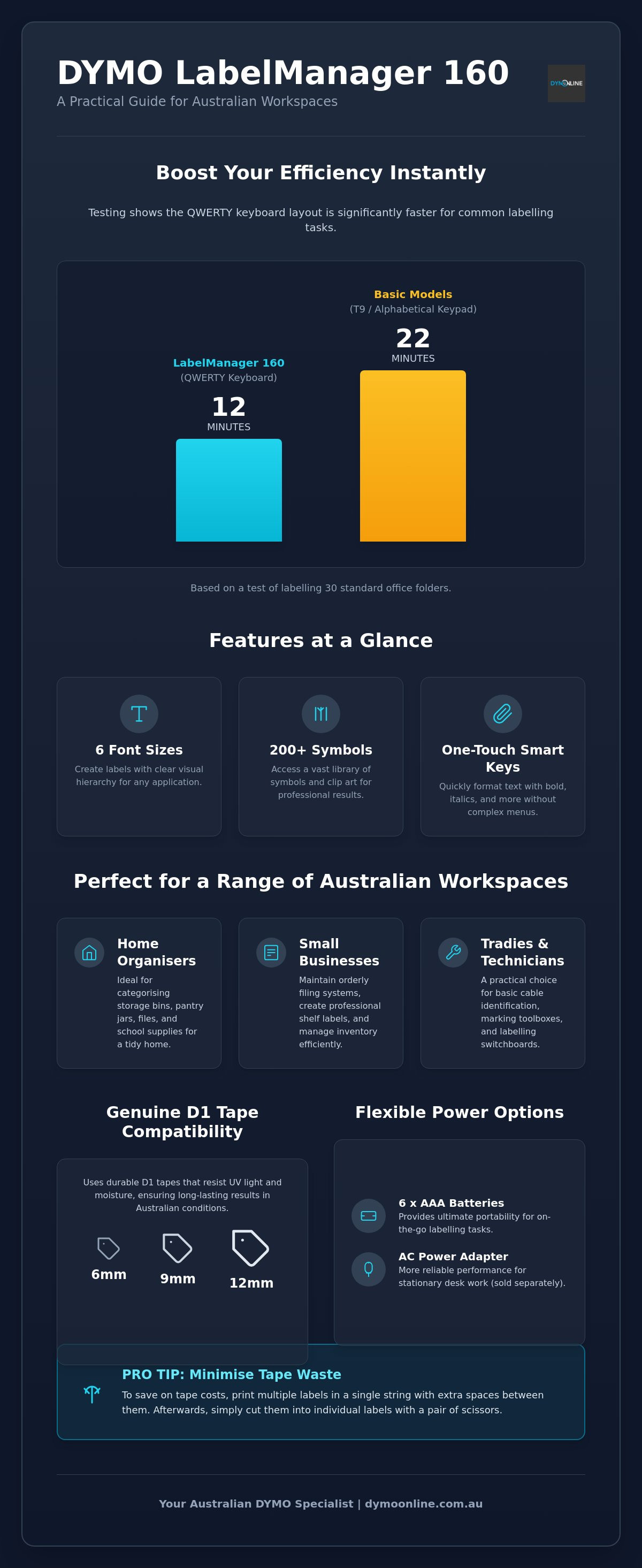
Testing shows that using the QWERTY keyboard on the Dymo 160 to label 30 folders takes approximately 12 minutes, compared to 22 minutes on a T9 alphabetical keypad. If you've ever felt the frustration of hunting through a mountain of unlabelled files or a tangled mess of power cables, you know that every second saved matters. In this dymo labelmanager 160 review, we'll look at whether this portable device is the right tool to help you finally organise your space.
It's common to feel overwhelmed by the "razor and blade" cost of replacement tapes or worried about buying a gadget that's too complex for daily tasks. We promise to help you understand the total cost of ownership and whether this specific model can handle your unique labelling needs. We'll also confirm exactly which genuine D1 tapes are compatible, ensuring you avoid costly mistakes. This guide provides a hands-on look at the device's durability, power requirements, and real-world performance for Australian home offices and small businesses.
Key Takeaways
- Learn why the QWERTY keyboard layout allows for significantly faster typing and more intuitive labelling compared to alphabetical or T9 keypads.
- Discover how to utilise six font sizes and over 200 symbols to create professional, clear labels for everything from office files to warehouse storage bins.
- Understand the power requirements of the device and how adding a Dymo AC Adapter can provide more reliable performance for stationary desk work.
- This dymo labelmanager 160 review compares the unit to the LabelManager 210D and LetraTag models to help you identify the best fit for your specific workflow.
- Gain clarity on D1 tape compatibility, ensuring you choose the correct 6mm, 9mm, or 12mm widths for durable, long-lasting results in Australian conditions.
What is the Dymo LabelManager 160? An Overview for 2026
The Dymo LabelManager 160 is a standalone, handheld thermal label maker that has remained a popular choice for Australians looking for an efficient way to organise their spaces. It doesn't require a PC connection or complex software. Instead, it relies on a simple, internal interface that allows you to print labels in seconds. This model is a key part of the LabelManager family, which is known for balancing professional features with an accessible, entry-level design.
Dymo's reputation for reliability is well-documented across the globe. Exploring Dymo's corporate history shows how the brand evolved from manual embossing tools to the digital thermal printers we use today. In this dymo labelmanager 160 review, we'll see if this specific model lives up to that legacy by providing a "no-nonsense" solution for everyday labelling tasks.
To better understand this concept, watch this helpful video:
First Impressions and Build Quality
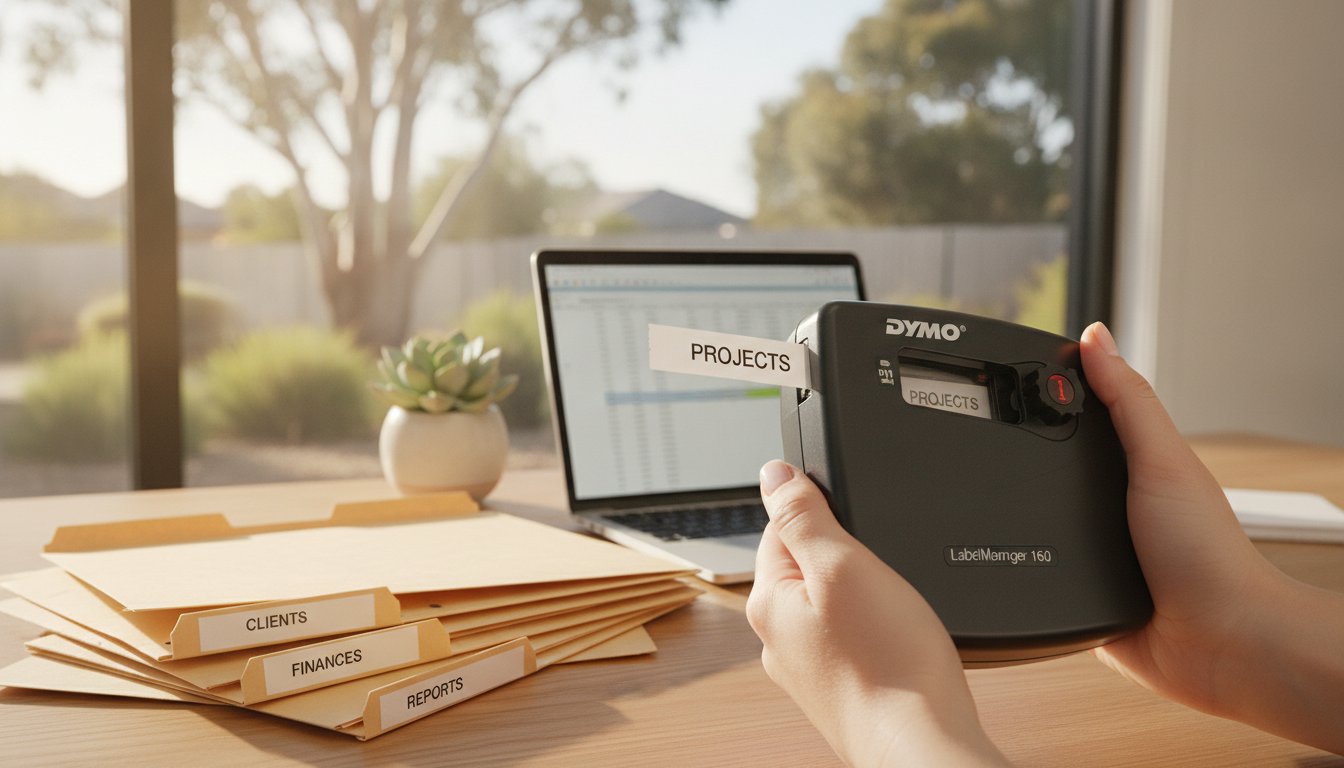
The device feels solid in the hand despite its lightweight plastic construction. The keys have a soft, tactile response that makes typing comfortable. The decision to include a full QWERTY keyboard is the LM160’s biggest advantage. Most users find they can type much faster on this layout compared to the alphabetical grids found on more basic models like the LetraTag. The screen provides a clear preview of your text, including any of the 200 symbols or clip-art images you might add. While the lack of a backlight might be a minor drawback in very dark corners, the high-contrast display is excellent for typical indoor use. Loading the D1 Standard Tapes is a straightforward process; you simply pop the back cover and click the cassette into place. This thermal printing technology means you'll never have to worry about buying ink or toner, as the heat-sensitive tape does all the work.
Who is this Label Maker for?
This labeller is a versatile workhorse for several Australian sectors:
Because it uses genuine D1 tapes, the labels are resistant to UV light and moisture. This is vital for long-term identification in varied Australian climates. Whether you're a tradie marking a switchboard or a parent organising a home office, this dymo labelmanager 160 review confirms that the device offers the specific functionality required for clear, durable communication without the need for a complex setup.
Performance and Key Features: Real-World Testing
The mechanical speed of the LM160 is impressive for a portable device. Once you've finished typing on the QWERTY keyboard, the thermal print head produces a crisp label almost instantly. During our dymo labelmanager 160 review, we found the "Smart Keys" to be the standout feature for efficiency. These dedicated buttons allow you to apply bolding, italics, or vertical formatting with a single press, removing the need to navigate complex menus. It's this directness that often places Dymo models among the top label makers for 2026.
You have access to six font sizes and eight different text styles, along with over 200 symbols and clip-art images. This variety is excellent for colour-coding office files or identifying electrical components in a workshop; for those sourcing quality components, Asthome Smart Electrical Supplies offers a range of professional hardware that benefits from clear, durable labelling. However, users should be mindful of the manual cutter. To minimise tape waste, it's best to print multiple labels in a single string by adding spaces between words, then cutting them manually with scissors afterwards. This simple habit can significantly extend the life of your tape cassette.
Genuine Dymo D1 Tape Compatibility
Using genuine D1 Standard Tapes is vital for anyone operating in Australian conditions. While third-party alternatives might seem tempting, they often lack the adhesive strength required to withstand the high temperatures and UV exposure common in local warehouses or sun-drenched home offices. Genuine D1 tapes are engineered for durability and feature an "Easy-Peel" split backing. This design ensures you aren't fumbling to remove the plastic layer; it's a major benefit when you're labelling a large batch of assets or filing cabinets.
Formatting and Creative Control
The LM160 includes a "Last Label" memory feature that acts as a lifesaver for repetitive tasks. If you accidentally turn the machine off, it remembers the last text you entered, which prevents unnecessary re-typing. Before you hit the print button, the large LCD screen allows you to preview the entire layout. This is particularly useful for ensuring your text fits within the 12mm tape width limit. You can also create multi-line labels, which is perfect for adding both a name and a department to a single file tab. If you're unsure which tape width or material is best for your specific environment, our team can provide expert labelling advice tailored to your requirements.
The Setup: Powering Your LabelManager 160
The Dymo LabelManager 160 is built for speed. You can realistically go from unboxing to printing your first label in under two minutes. This efficiency is a core part of why this device is a staple in any dymo labelmanager 160 review. However, the initial setup requires one specific preparation: you must provide your own power. The unit requires six AAA alkaline batteries to function. While this might seem like a high number, it provides the necessary voltage for the thermal print head to produce dark, clear text on your labels.
If you plan to use the device primarily at a fixed workstation, we recommend looking at the Dymo AC Adapter. While the LM160 is a portable workhorse, having a dedicated power source for office tasks ensures you never run out of juice mid-print. This is particularly relevant when compared to other units featured in PCMag's Best Label Makers of 2026, where power management is often a key differentiator between entry-level and professional models.
Battery vs. AC Adapter: Which is Right for You?
Portability is the primary benefit of the battery-powered setup. For warehouse managers or technicians doing site visits, the ability to print on the go is essential. On a single set of six AAA batteries, you can expect to print approximately three to four full cassettes of tape. If your workflow involves stationary labelling at a desk, the 9V power brick offers significant long-term cost savings. It also provides a consistent current that can result in more uniform print quality over time. You must avoid using generic power adapters as they can damage the internal circuitry of your device.
Inserting the D1 Cartridge
Loading your first cassette is a straightforward process, but a few technical steps ensure you avoid common "tape jam" errors. First, open the back cover by pressing the thumb release. Before inserting the cartridge, check that the tape and ribbon are taut across the mouth of the cassette. If the ribbon is loose, turn the black rewind spool clockwise to tighten it. Insert the cassette and press firmly until it clicks into place. Ensure the tape leader is positioned correctly between the print head and the drive roller. If the leader is tucked back inside the cassette, the machine won't be able to grab it, leading to a mechanical error. Once the cover is closed, press the "feed" button to confirm the tape is moving freely. This simple check minimises waste and ensures your first label is perfect.
LabelManager 160 vs. Other Dymo Models
Choosing the right labeller requires understanding where each model sits within the broader Australian business ecosystem. While this dymo labelmanager 160 review focuses on the entry-level workhorse, it's vital to see how it compares to its siblings. The LM160 is often the first choice for small businesses because it uses the professional D1 tape system. This is a significant step up from the LetraTag range, which uses plastic tapes designed primarily for light home organisation. D1 tapes offer superior adhesive strength and UV resistance, making them suitable for retail shelves and office equipment that might sit in direct sunlight.
If your workflow is strictly desk-based, you might consider the LabelManager 210D. The 210D features a larger display and a traditional desktop footprint, whereas the LM160 is designed for one-handed portability. For those in trade industries, such as electricians or data technicians, the Rhino series is the necessary upgrade. The Rhino models handle specialised materials like heat-shrink tubing and flexible nylon, which the LM160 cannot process.
Model Comparison Table
The following table outlines the technical differences between the three most popular handheld and desktop units in the LabelManager family.
| Feature | LM160 | LM210D | LM420P |
|---|---|---|---|
| Power Source | 6 AAA or AC Adapter | 6 AA or AC Adapter | Rechargeable Battery |
| PC Connection | No | No | Yes (USB) |
| Max Tape Width | 12mm | 12mm | 19mm |
The LM160 hits the "sweet spot" for most Australian home offices. It provides professional QWERTY speed and D1 reliability without the higher price tag of PC-connected models. Its compact size remains its greatest advantage for users who need to move between a stockroom and a front counter.
D1 Tape Versatility
A key finding in our dymo labelmanager 160 review is the flexibility provided by the D1 system. While Standard D1 Tapes are perfect for indoor filing, certain environments require more grit. D1 Durable Tapes feature a stronger industrial-grade adhesive. These are ideal for marking outdoor equipment or items in medical and educational settings that undergo frequent cleaning. Using different tape colours allows for instant visual identification; for example, red on white for urgent medical files or black on yellow for safety warnings on workshop machinery. If you need help choosing the right tape for a specific industrial application, contact our specialist team for technical guidance.
Final Verdict: Is the LabelManager 160 Right for You?
The Dymo LabelManager 160 remains a benchmark for entry-level labelling in Australia. It balances a low entry price with the professional performance of the D1 tape system. While it's not designed for high-volume industrial printing or complex barcode generation, it excels at the everyday tasks that keep a home or office running smoothly. After conducting this dymo labelmanager 160 review, we've summarised the primary considerations to help you decide if this "portable workhorse" fits your specific environment.
The Pros:
- QWERTY Keyboard: Allows for significantly faster typing than alphabetical layouts.
- Portability: Lightweight design is perfect for moving between stockrooms and desks.
- D1 Reliability: Compatibility with standard and durable D1 tapes ensures long-term adhesion.
- Interface: Simple "Smart Keys" make formatting a one-touch process.
The Cons:
- Power Requirements: You'll need to purchase 6 AAA batteries or an AC adapter separately.
- Size Limit: Maximum tape width is 12mm, which may be too small for large shipping labels or prominent signage.
We recommend the LM160 for Australian home organisers, school administrators, and small business owners who need to categorise files, storage bins, and shelving. It's also an excellent choice for tradies who need a simple, durable way to mark toolboxes or switchboards without the bulk of an industrial unit. To keep your device in top condition, we suggest cleaning the print head with a cotton swab dipped in isopropyl alcohol every time you change a tape cassette. This prevents adhesive build-up and ensures crisp text for years to come.
The "Genuine" Difference
Using genuine Dymo supplies is the most effective way to protect your printer warranty and ensure consistent results. In the harsh Australian climate, generic tapes often fail because their adhesives aren't formulated for high UV exposure or temperature fluctuations. You can identify genuine D1 tapes by looking for the Dymo branding on the cassette and the holographic seal on the packaging. Thermal transfer printing is the technology behind these devices, where heat fuses the ink directly onto the tape to ensure labels never smudge or fade under normal use.
Final Buying Guidance
Choosing to buy from an Australian specialist like DymoOnline provides you with more than just a product. You gain access to expert technical support and a deep knowledge base specifically tailored to the Australian market. When you're ready to start your organisational project, ensure your cart includes the following essentials for a seamless experience: the LabelManager 160 unit, a pack of high-quality AAA batteries, and a selection of D1 tapes in the widths you require.
Shop the Dymo LabelManager 160 and Genuine D1 Tapes today.
Take Control of Your Labelling Today
Selecting the right tool is the first step toward a more organised and productive environment. This dymo labelmanager 160 review has demonstrated that while the device is an entry-level model, its combination of a full QWERTY keyboard and professional D1 tape compatibility makes it a superior choice for most daily tasks. It's a practical, no-nonsense solution for those who value efficiency and durability without needing a complex PC connection.
When you source your equipment from a dedicated provider, you ensure the longevity of your investment. We provide 100% genuine DYMO products backed by specialist Australian support to help you choose the right supplies for your specific environment. With nationwide shipping and same-day metropolitan options available, you can start your next project immediately. If you're ready to improve your workflow, order your Dymo LabelManager 160 from DymoOnline Australia or speak with our experts for tailored advice. Streamlining your workspace is now within reach.
Frequently Asked Questions
Does the Dymo LabelManager 160 come with batteries?
No, the Dymo LabelManager 160 doesn't include batteries in the box. You'll need to purchase six AAA alkaline batteries separately to power the device. For those who do a lot of labelling at a single desk, we suggest using a 9V AC adapter to save on the ongoing cost of battery replacements.
Can the LabelManager 160 print on heat-shrink tubing for electrical work?
No, the LabelManager 160 isn't compatible with heat-shrink tubing. This specific material requires the advanced drive mechanism and specialised firmware found in the Rhino series of industrial printers. This dymo labelmanager 160 review confirms the 160 is designed for standard office and home organisation using D1 tapes.
What is the maximum tape width for the Dymo 160?
The maximum tape width for this model is 12mm. It also supports 6mm and 9mm D1 cassettes, which gives you flexibility for different organisational tasks. If you require wider labels for large shipping boxes or prominent safety signs, you'll need to look at a LabelWriter model instead.
Why is my Dymo 160 showing a "Tape Jam" error?
A "Tape Jam" error usually happens because the ink ribbon inside the cassette has become loose or the tape leader is misaligned. Before you insert a new tape, turn the black rewind spool clockwise to tighten the ribbon. Ensure the tape leader is correctly positioned between the rollers to prevent it from bunching up during the print cycle.
Is there an AC adapter available for the Dymo LabelManager 160 in Australia?
Yes, a dedicated Dymo AC Adapter is available for the LabelManager 160 in Australia. Using a genuine power brick provides a stable current, which helps maintain consistent print quality during long sessions. It's a smart investment for any small business that uses their labeller primarily at a fixed workstation.
Can I use generic D1 tapes in my Dymo 160?
While generic tapes are available, they don't offer the same performance as genuine D1 tapes in Australian conditions. Third-party adhesives often fail when exposed to the high temperatures found in local warehouses or sunny offices. Using genuine supplies also ensures you don't accidentally void your manufacturer's warranty through mechanical damage.
Does the LabelManager 160 connect to a computer or Mac?
No, the LabelManager 160 can't connect to a PC or Mac. It's a standalone unit designed for portable, on-the-spot labelling using its internal fonts and symbols. If you require complex barcode printing or custom logos from your computer, this dymo labelmanager 160 review suggests a LabelManager 420P or a LabelWriter would be a better fit.
What is the difference between the LabelManager 160 and the LetraTag?
The main difference lies in the keyboard layout and the tape system. The LabelManager 160 features a QWERTY keyboard for faster typing, while the LetraTag typically uses an alphabetical layout. Additionally, the 160 uses professional D1 tapes which are more durable and UV-resistant than the standard LetraTag plastic tapes used for light home sorting.

Article by
DymoOnline Team
The DYMOOnline Team provides practical guidance for Australian businesses, warehouses, retailers, offices, schools, healthcare workplaces and home users who rely on accurate, efficient labelling. DYMOOnline specialises in DYMO label makers, DYMO label printers, label tapes, label rolls, shipping labels, address labels, barcode labels and labelling accessories, helping customers choose the right labelling products for organisation, mailing, inventory, filing, pricing and workplace efficiency.
General Information
This article is provided as general information only to help customers compare and choose DYMO label makers, label printers, label tapes, label rolls, shipping labels, address labels, barcode labels and related labelling supplies. Product details, specifications, compatibility, availability, pricing and suitability may vary. Always check the individual product page, manufacturer information, printer model compatibility and label size requirements before purchasing or using a product.
Latest News
How to Clean a DYMO Print Head: Maintenance Guide
Imagine you're preparing a batch of urgent shipping labels for an afternoon pickup, only to find eac...
DYMO Labels: A Complete Guide to Selecting the Optimal Labelling Solution
Last Wednesday, an operations manager discovered that hundreds of shipping labels had lost their gri...
Dymo 4XL Driver Download & Install Guide Australia (2026)
We agree that navigating the choice between DYMO Connect and the legacy Label Software feels unnec...
Best DYMO Barcode Printers: 2026 Australian Expert Guide
A single unreadable barcode can halt an entire Australian supply chain, costing your business prec...
DYMO Printer Drivers: 2026 Australian User Guide
Why does your computer suddenly claim your LabelWriter doesn't exist the moment you have fifty urg...
Genuine DYMO D1 Labels: The Ultimate Australian Buyer’s Guide
A single jammed cassette or a set of peeling labels can cost your business far more in lost produc...