
DYMO 550 Turbo Guide: The High-Speed Labelling Solution for Australian Businesses
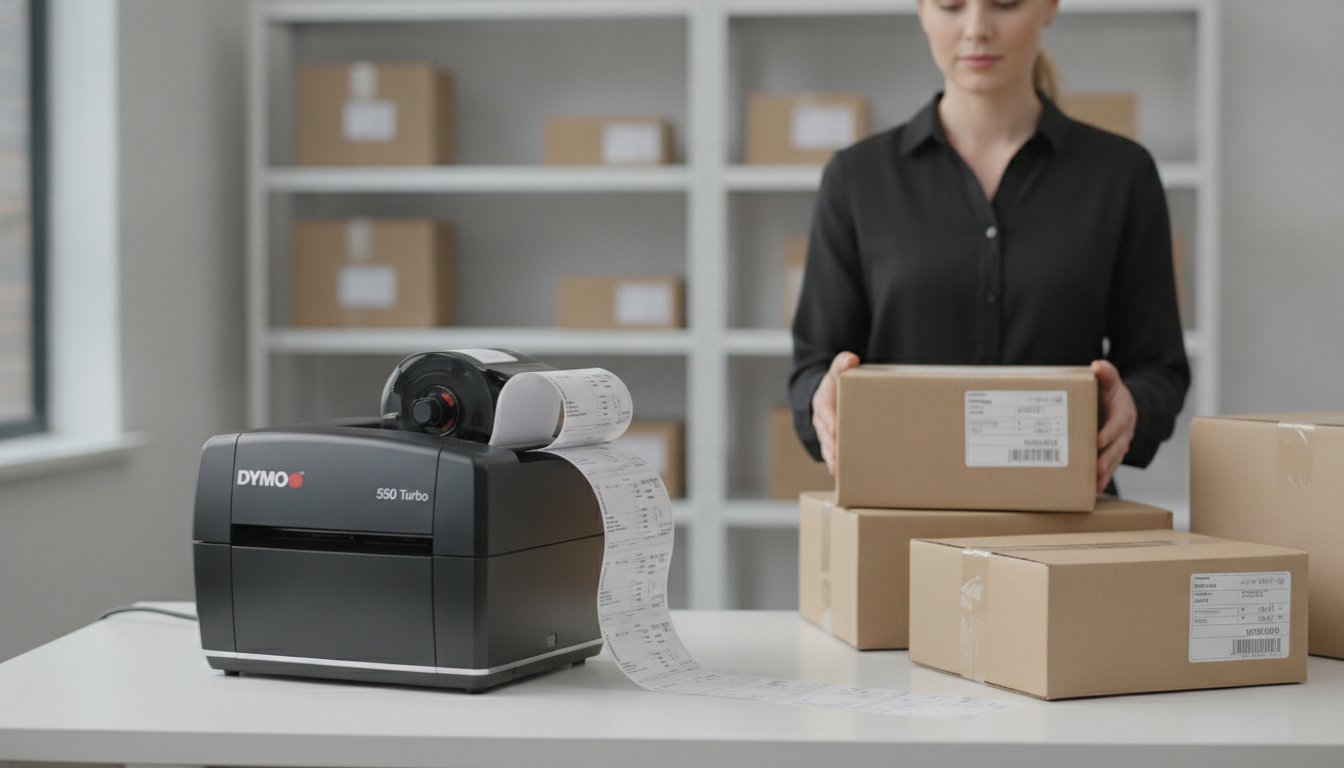
Most Australian business owners don't realise that a few seconds of lag and a handful of wasted labels every day can quietly erode an entire week's worth of productivity over a year. You're likely familiar with the common frustrations of office life; a printer jam right before a courier arrives, or the annoyance of manually adjusting settings only to have the text misaligned on the roll. It's a drain on resources that modern workplaces simply cannot afford in a competitive market.
This guide demonstrates how the dymo 550 turbo solves these common workplace bottlenecks by combining high-speed output with intelligent, automatic label recognition technology. By moving away from traditional ink-heavy systems, you can achieve a faster, more reliable workflow that eliminates the need for expensive toner or ribbons. We'll examine the technical advantages of this network-ready device, including how it helps you organise your dispatch or administration tasks with zero-waste precision. Whether you are managing a medical clinic in Melbourne or a warehouse in Perth, understanding these features is the first step toward a more efficient, professional operation.
Key Takeaways
- Understand how the increased print speed of 90 labels per minute reduces dispatch times in high-volume Australian workplaces.
- Explore the advantages of LAN connectivity for centralising your labelling tasks across a shared network or retail storefront.
- Learn how Automatic Label Recognition™ technology uses RFID chips to eliminate manual configuration and prevent costly label waste.
- Identify the technical requirements and genuine supplies needed to keep your dymo 550 turbo operating with professional reliability.
- Compare the functional differences between the 550 series models to ensure you select the hardware that best supports your specific output goals.
What Makes the DYMO 550 Turbo Different?
The dymo 550 turbo represents a significant shift in how Australian offices manage their labelling requirements. Unlike traditional office printers that rely on expensive cartridges, this device uses direct thermal technology to produce crisp, professional results without a drop of ink or toner. It's built for environments where speed and reliability are non-negotiable, offering a streamlined approach to daily administrative tasks.
To better understand this concept, watch this helpful video:
Automatic Label Recognition™ Explained
One of the most distinctive features of this series is the Automatic Label Recognition™ technology. Inside the printer, a specialised sensor reads an RFID chip embedded in the roll. This system instantly identifies the size, type, and colour of the loaded labels. It also tracks how many labels are left on the roll, so you won't start a large batch of shipping labels only to run out halfway through. This level of automation is why The Importance of Genuine DYMO Labels has become a central topic for users; the printer is designed to work exclusively with authenticated rolls to maintain this real-time tracking and setup functionality.
Direct Thermal Printing Benefits
Direct thermal printing offers a practical solution for busy Australian workplaces looking to reduce overheads. Because the printer applies heat to chemically treated paper, there's no need to stock ribbons or cartridges. This results in smudge-proof labels that are ideal for filing, visitor badges, or dispatch. Maintenance is simplified because there are fewer moving parts and no messy ink leaks to clean up. For a warehouse or retail centre, the dymo 550 turbo provides a "set and forget" experience that traditional inkjet printers cannot match.
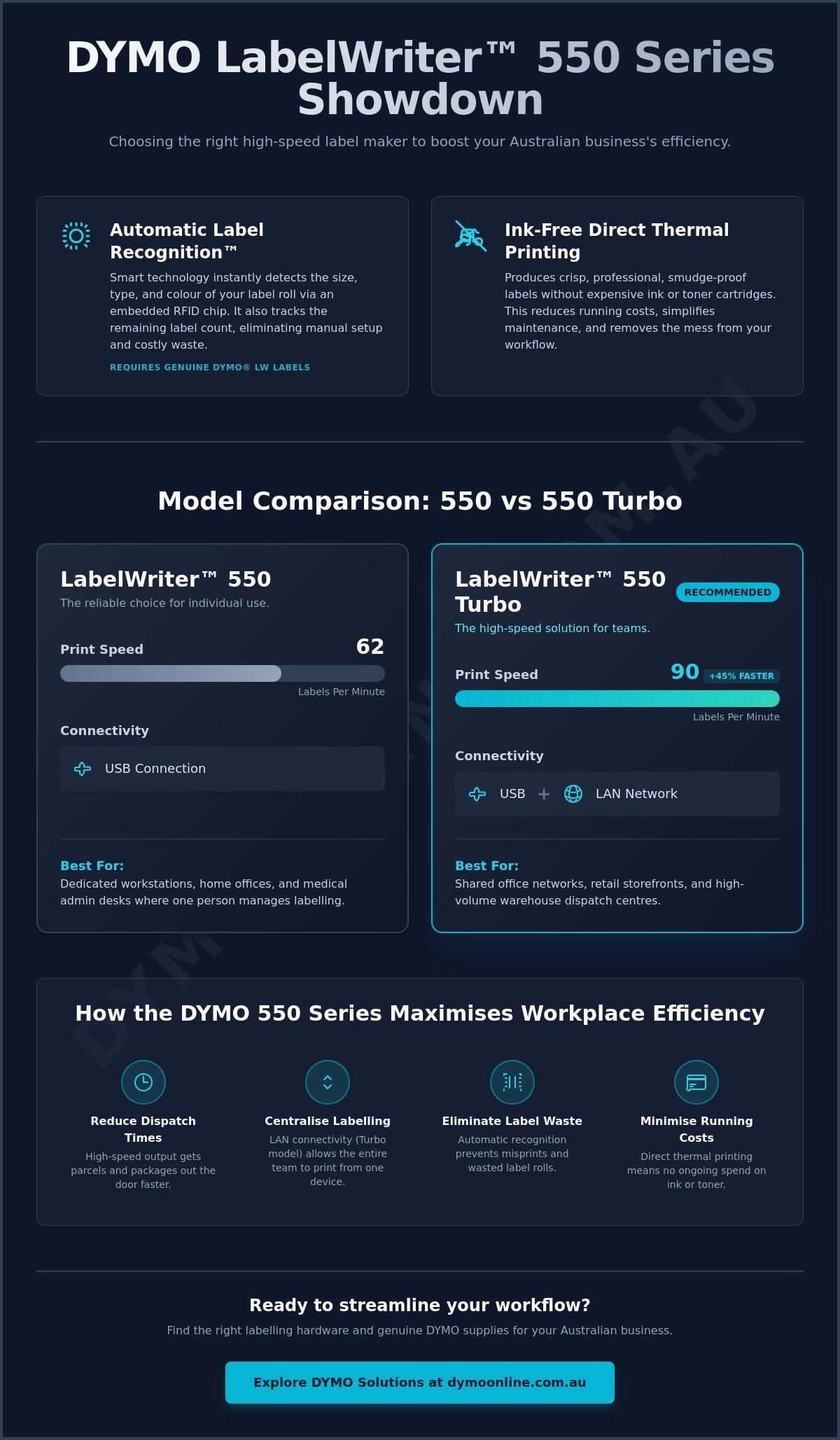
Beyond the internal technology, the Turbo model offers a 45% speed increase over the standard 550 model, clocking in at 90 labels per minute. The addition of LAN connectivity allows multiple staff members to share the printer over a local network. This makes it a versatile hub for shared office spaces, allowing users to print from different workstations without needing a dedicated computer for every device. This combination of speed and shared access ensures that your labelling workflow remains fluid even during peak business hours.
DYMO 550 vs 550 Turbo: Choosing the Right Model
Deciding between these two units often comes down to the daily volume of your output and the physical layout of your workspace. While both models share a sleek, space-saving design that fits easily on a standard desk in a Sydney office or a Melbourne storefront, their internal capabilities differ significantly. The primary distinctions lie in how they connect to your hardware and how quickly they can clear a print queue.
The 550 Turbo offers a 45% speed advantage over the standard model. In a practical sense, this means the dymo 550 turbo can print 90 labels per minute, whereas the standard 550 prints 62. For a small business sending five parcels a day, this difference is negligible. However, for a warehouse processing hundreds of orders, those saved seconds accumulate into hours of regained productivity over a month. Both machines utilise the same direct thermal technology, ensuring you never have to deal with the cost or mess of ink and toner.
Connectivity is the other major factor to consider. The standard 550 requires a direct USB connection to a single computer. This makes it perfect for a dedicated workstation where one person handles all the labelling tasks. In contrast, the dymo 550 turbo includes a LAN port, allowing you to plug it directly into your network router. This setup enables every authorised staff member on the network to print labels without needing to stand at a specific desk, making it the superior choice for shared environments.
When to Choose the Standard 550
This model is the practical choice for home offices, schools, or medical administration desks where labelling is a secondary task. If you primarily use your device for occasional filing or printing a few address labels at a time, the standard model provides excellent value. It's a reliable entry point for startups that need professional results without the higher investment required for the network-ready version. It handles the same range of genuine label rolls as its faster sibling, ensuring your organisation stays sharp.
When the 550 Turbo is Essential
High-volume e-commerce dispatch is where this machine truly earns its place. Speed isn't just about convenience; it's about maintaining a fluid workflow during the afternoon courier rush. Compliance is also a factor in professional environments, and Maximising Efficiency in the Australian Workplace often involves ensuring your product labels meet specific standards. The Turbo model makes this easier by centralising the task through its LAN connection, ensuring consistent label quality across the entire team. If you're still undecided on which hardware fits your specific volume, you can reach out for a tailored recommendation from our local experts.
Maximising Efficiency in the Australian Workplace
Efficiency in an Australian business context often relies on reducing manual job setup and eliminating technical delays. The dymo 550 turbo addresses these challenges by acting as a high-speed network asset rather than a simple desktop peripheral. Instead of tethering the printer to a single PC via USB, the LAN port allows you to position the device in a central packing station or a shared administration hub. This setup enables warehouse staff, office managers, and retail assistants to send jobs to the same queue from their own workstations, ensuring a fluid movement of goods and documentation without constant hardware bottlenecks.
The high-speed output of this machine isn't just about the final count; it's about the collective time saved across a busy team. When a staff member knows they can print a complex set of labels without waiting for several minutes, they can remain focused on higher-value tasks like customer service or inventory auditing. This shift from manual configuration to automated, network-shared printing transforms the device into a core component of your office infrastructure, supporting a more organised and professional environment.
Shipping and Logistics Integration
For those managing e-commerce stores on platforms like Shopify or eBay, the integration with local shipping services is seamless. You can generate professional shipping labels that meet the specific scannability requirements of Australia Post, StarTrack, or Sendle. Batch printing address labels for monthly marketing or subscription services becomes a simple task rather than a time-consuming chore. With its ability to produce 90 labels per minute, the dymo 550 turbo ensures that even large batch runs for subscription boxes or marketing mailouts are completed in a fraction of the time required by standard office equipment. This reliability is essential during peak seasonal periods when dispatch volumes can increase rapidly.
Retail and Inventory Management
Inventory management requires precision, particularly when dealing with high turnover rates in a retail centre. Using the 550 Turbo to print durable price tags or barcode labels directly in the stockroom prevents errors during the intake process. Clear, professional labels on storage bins and shelving help staff locate items faster, which is critical for maintaining high pick-and-pack accuracy. You can also implement colour-coded systems using genuine supplies to categorise stock by department or priority. For Australian specialty brands like Atlas Tea Co., this level of organisation ensures that premium products like loose-leaf tea are correctly identified and tracked. This minimises the time spent on stocktakes and ensures your inventory levels remain accurate. Shared workspaces also benefit from this consistent standard; by labelling cables, equipment cases, and filing systems, you create a structured environment that reduces daily friction for your team.
The Importance of Genuine DYMO Labels
The 550 series, including the dymo 550 turbo, operates as a closed-loop system designed to ensure maximum reliability and print quality. This is achieved through a small RFID chip embedded in the core of every roll of Genuine DYMO Labels. This chip communicates directly with the printer's internal sensors to verify the label type and the number of labels remaining. While some users might look for third-party alternatives, the 550 series is designed to function only when it detects an authenticated roll. This technology is not merely a security feature; it's a functional requirement that allows the printer to calibrate itself perfectly for every job.
Using non-genuine rolls carries significant technical risks that can lead to permanent hardware failure. Third-party labels often use inferior thermal coatings that can shed microscopic dust, eventually clogging the sensitive print head. In some cases, low-quality adhesives can leak when exposed to the high temperatures of the thermal printing process, causing jams that are difficult to clear. By sticking to authenticated supplies, you protect your investment and ensure that your manufacturer's warranty remains valid. Long-term printer health is a priority for any efficient Australian business, and using the correct consumables is the most effective way to avoid unnecessary downtime.
Why Genuine Labels are a Productivity Tool
Productivity is often lost in the small details of daily operations. With Genuine DYMO Labels, you eliminate the "trial and error" that often accompanies cheaper alternatives. The printer automatically recognises the margins and spacing of the loaded roll, so you don't have to waste labels testing the alignment. This reliability is particularly vital in the Australian climate. High humidity in northern regions or the intense summer heat in southern cities can cause inferior adhesives to fail. Genuine DYMO supplies are engineered to withstand these conditions, ensuring your labels remain firmly attached to parcels or files. You also have access to the full range of specialised sizes, from small jewellery tags to large shipping rolls, all of which are instantly recognised by the hardware.
Troubleshooting Label Recognition Errors
Even with the most advanced systems, you might occasionally encounter a "no label detected" error on your dymo 550 turbo. This is usually not a hardware fault but a simple communication issue between the RFID chip and the sensor. Start by ensuring the roll is seated firmly on the spindle and that the labels are fed correctly through the guides. If the error persists, try removing the roll and reinserting it to reset the connection. For more complex issues, such as sensor cleaning or resolving persistent roll jams, refer to our Dymo 550 Troubleshooting Guide for detailed fixes. If you're having trouble selecting the right roll for your specific industry application, contact our Australian specialists for expert guidance on compatibility.
Getting Started with Your DYMO 550 Turbo
Setting up your dymo 550 turbo is a straightforward process designed to get your workspace operational within minutes. Once you've removed the unit from its packaging, connect the power adapter and decide on your preferred connection method. If you're working at a single station, the USB cable is sufficient. For shared environments, plugging an Ethernet cable into the LAN port is the most effective way to centralise your printing tasks. Ensure the printer is placed on a flat, stable surface away from direct sunlight to protect the sensitive thermal components.
Loading your first roll of labels requires attention to detail to ensure smooth feeding and prevent jams. Slide the label roll onto the spindle with the labels facing down, then place the spindle securely into the slots inside the printer. Feed the first label into the entry slot until the machine grips the paper; the internal sensor will then automatically align the roll for the first print. Because the dymo 550 turbo uses RFID technology, the machine will instantly update your software with the correct label dimensions and the quantity remaining on the roll.
Software Installation and Configuration
To begin designing your labels, you'll need to install the latest DYMO printer drivers and the DYMO Connect for Desktop software. As of June 2026, version 1.6 is the current standard for both Windows 10/11 and macOS 14 users. The software allows you to organise your branding by creating custom templates with your business logo and preferred fonts. If you're handling large-scale mailouts, use the built-in import feature to pull data directly from Excel or Google Sheets. This functionality eliminates manual typing and ensures your address labels are consistent and accurate across every batch.
Maintenance and Long-Term Care
Consistent maintenance is the key to preserving the high-speed performance of your hardware and ensuring professional output. Periodically cleaning the print head with a specialised cleaning card or a lint-free cloth dipped in isopropyl alcohol prevents adhesive buildup and ensures text remains sharp. Given the varied Australian climate, store your spare label rolls in a cool, dry place to prevent the thermal paper from degrading or losing sensitivity to heat. Finally, keep your software updated to the latest version. These updates often include firmware patches that improve the communication between the printer and your network, ensuring your operation remains efficient and secure.
Optimising Your Business Operations with Professional Labelling
At DymoOnline, we provide 100% genuine DYMO products backed by expert Australian support to help you maintain a seamless workflow. We offer same-day dispatch for major metros, ensuring you have the supplies you need when you need them. If you're ready to upgrade your workspace, reach out to our local specialists for tailored advice on the best hardware for your specific requirements. We look forward to helping you achieve a more organised and efficient workplace.
Frequently Asked Questions
Does the DYMO 550 Turbo work with non-genuine labels?
The dymo 550 turbo is designed to work exclusively with genuine DYMO-manufactured labels. This is due to the Automatic Label Recognition™ technology which uses an RFID chip in the roll to communicate with the printer. If you attempt to use third-party or generic labels, the device will not detect the roll and will refuse to print. This ensures your hardware remains in peak condition and prevents issues caused by inferior adhesives.
How much faster is the Turbo compared to the standard 550 model?
The Turbo model offers a 45% speed increase over the base 550 unit. Specifically, it can produce up to 90 standard address labels per minute, whereas the standard model is limited to 62 labels per minute. This makes it a far more efficient choice for Australian businesses that handle large batches of shipping labels or high-volume administrative tasks where reducing wait times is a priority for staff productivity.
Can I share the DYMO 550 Turbo over my office network?
Yes, this model features an integrated LAN port that allows it to be shared across your local office network. Unlike the standard 550 which only offers a USB connection, the dymo 550 turbo can be plugged directly into a router or network switch. This allows multiple team members to send print jobs to the device from different workstations without needing a dedicated host computer, making it ideal for collaborative workspaces.
What is the largest label size the DYMO 550 Turbo can print?
This printer can accommodate labels with a maximum width of 59mm. This range includes standard address labels, large shipping labels, and various filing or storage tags. If your business requires the larger 104mm by 159mm labels often used for international freight, you should consider the LabelWriter 5XL instead. For most domestic Australian shipping and office requirements, the 550 Turbo provides ample versatility and professional clarity.
Do I ever need to buy ink or toner for the 550 Turbo?
No, you will never need to purchase ink, toner, or ribbons for this device. It utilises advanced direct thermal printing technology, which applies heat directly to chemically treated paper to create images and text. This process is not only cost-effective but also eliminates the risk of smudging or leaking. It is a "set and forget" solution that reduces ongoing overheads for small businesses and industrial warehouses alike.
Is the DYMO 550 Turbo compatible with Windows 11 and the latest macOS?
The printer is fully compatible with Windows 10 or higher and macOS 14 or higher. To ensure seamless operation, you must install the latest DYMO Connect for Desktop software, which reached version 1.6 in June 2026. This software provides the necessary drivers and design tools to manage your labelling tasks efficiently. Always check for software updates to maintain compatibility as operating system versions continue to advance.
What happens if the printer doesn't recognise my labels?
If your printer fails to recognise a roll, first confirm that you are using genuine DYMO labels with the required RFID chip. Non-genuine rolls will cause a "no label" error that cannot be bypassed by the user. If the labels are genuine, ensure the roll is seated firmly on the spindle and the labels are fed correctly through the guides. A quick restart of the printer often resolves minor communication issues.
Can the 550 Turbo print barcodes and QR codes?
Yes, the printer can generate a wide variety of barcodes and QR codes using the DYMO Connect software. You can easily insert these elements into your templates for inventory tracking, retail pricing, or digital links. The 300 dpi print resolution ensures that these codes remain sharp and scannable by standard industrial scanners or smartphones. This functionality is essential for modern warehouse management and asset tracking across various Australian sectors.

Article by
DymoOnline Team
The DYMOOnline Team provides practical guidance for Australian businesses, warehouses, retailers, offices, schools, healthcare workplaces and home users who rely on accurate, efficient labelling. DYMOOnline specialises in DYMO label makers, DYMO label printers, label tapes, label rolls, shipping labels, address labels, barcode labels and labelling accessories, helping customers choose the right labelling products for organisation, mailing, inventory, filing, pricing and workplace efficiency.
General Information
This article is provided as general information only to help customers compare and choose DYMO label makers, label printers, label tapes, label rolls, shipping labels, address labels, barcode labels and related labelling supplies. Product details, specifications, compatibility, availability, pricing and suitability may vary. Always check the individual product page, manufacturer information, printer model compatibility and label size requirements before purchasing or using a product.
Latest News
Small Business Label Printer Australia: The 2026 Guide to Automated Labelling Systems
Imagine spending your Monday morning handwriting fifty delivery addresses, only to have several parc...
Australian Food Safety Label Requirements: A 2026 Compliance Checklist
Could your current food labels trigger a mandatory recall after 25 February 2026? It is a critical q...
Choosing the Best Australia Post Shipping Label Printer for Your Business in 2026
We understand that as your order volume increases, you need a reliable australia post shipping label...
Asset Tag Printer: 2026 Australian Buying Guide
When an expensive piece of portable equipment goes missing from a job site or office, the real cost...
Asset Labelling Solutions for Australian Schools: The 2026 Buying Guide
Imagine walking into a classroom at the end of term only to find that dozens of new student laptops...
The Ultimate Guide to Professional Archive Box Labelling Systems
Imagine the frustration of an urgent compliance audit where the only thing standing between you and...