
DYMO Rhino 6000+: Australian Industrial Labelling Guide
How many hours has your team lost re-typing repetitive wire wraps or scraping off peeling, hand-written labels that simply couldn't handle the Australian heat? Using the dymo rhino 6000+ allows you to move away from manual guesswork and towards a system that prioritises both speed and professional standards. It's a common frustration on rugged job sites where inconsistent labelling styles can make even the most technical installation look amateur. You likely agree that a tool should be as tough as the environment it operates in, yet many handhelds fail to survive a standard tool bag.
This guide explains how to maximise the efficiency of your labelling tasks using advanced automation and dedicated hot keys. We will explore how to meet AS/NZS standards and use PC connectivity for complex projects, ensuring your work remains compliant and your labels stay put. Discover how this industrial powerhouse can streamline your next project while maintaining the high quality your clients expect.
Key Takeaways
- Learn how the ruggedised design and protective bumpers safeguard your equipment during daily use on demanding Australian work sites.
- Discover how the dymo rhino 6000+ utilises advanced PC connectivity to bridge the gap between office-based design and on-site execution.
- Identify which high-adhesion industrial tapes are most effective for specific surfaces to ensure long-term durability and protect your printer hardware.
- Maximise your workflow efficiency by using pre-programmed hot keys to create professional labels that align with Australian industry standards.
Mastering Industrial Labelling with the DYMO Rhino 6000+ in Australia
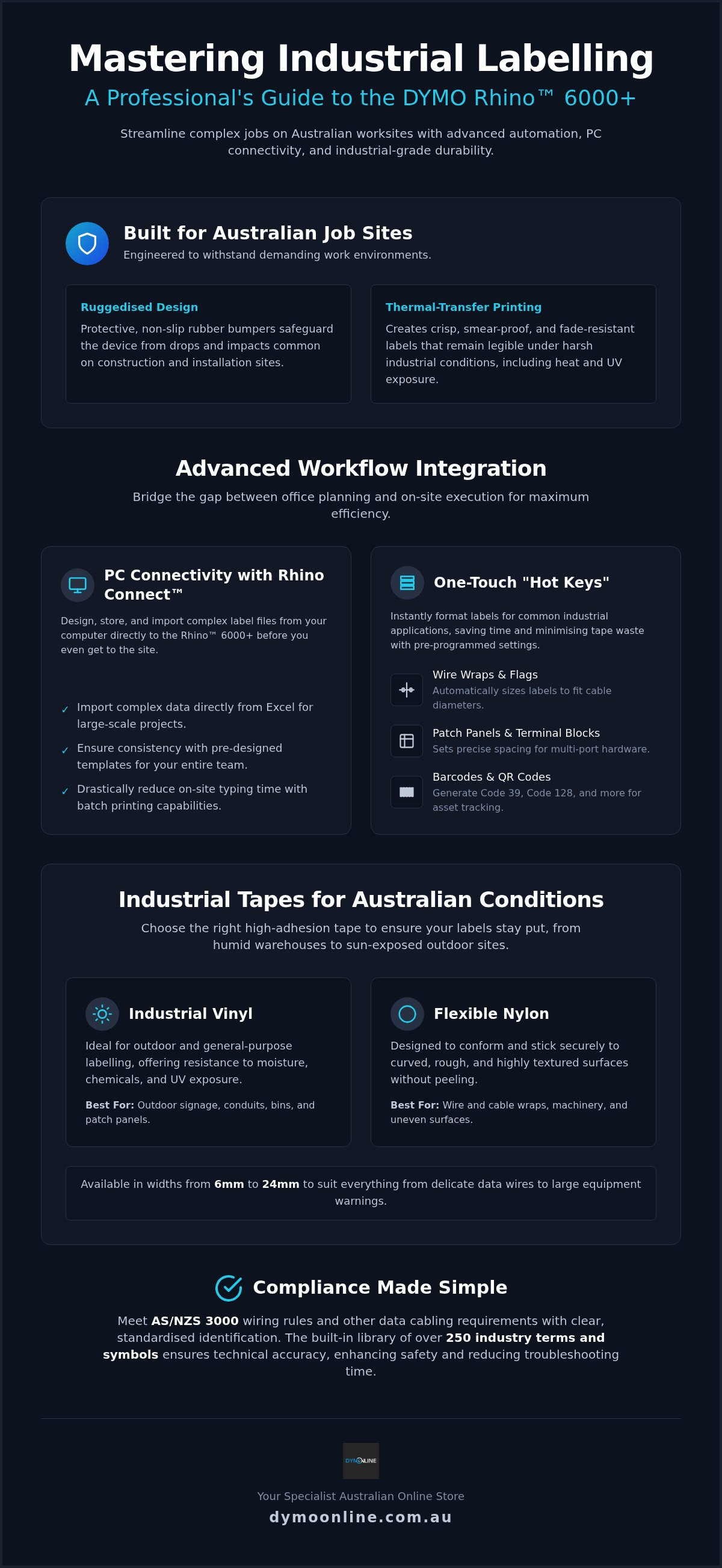
The dymo rhino 6000+ serves as a specialized tool for professional installers and electricians who require more than just basic identification. Unlike standard consumer models, this machine is built with ruggedised bumpers to withstand the physical demands of an active site. It utilizes thermal-transfer printing technology to create crisp, legible text that won't smudge or fade under harsh conditions. By moving away from manual, handwritten markers, Australian businesses can transition to a digitalised site management approach that ensures accuracy across large-scale projects. The DYMO Rhino series has become a staple for high-volume work because it combines durability with high-adhesion tapes that stick to curved or textured surfaces. This reliability helps maintain a clean, professional appearance that reflects the quality of the installation.
Meeting Professional Standards on Australian Job Sites
Standardised labelling is a practical necessity for complying with Australian wiring rules and data cabling requirements. Clear identification helps teams meet AS/NZS 3000 standards, ensuring every circuit and component is easily identifiable. The dymo rhino 6000+ includes a library of over 250 pre-programmed industry terms and symbols. This feature ensures that labels are technically accurate, which provides essential clarity for future maintenance teams. Professional labelling does more than just look clean; it plays a vital role in minimising safety risks and significantly reducing troubleshooting time during system faults. Using standardised terms means that anyone who steps onto the site later can understand the layout immediately. This consistency prevents costly errors and helps contractors deliver a handover that meets high professional expectations. Beyond site organisation, maintaining this level of quality during the shipping of sensitive equipment can be achieved by using specialist solutions from Packaging For Industry (PFI).
Advanced Features and Rhino Connect Software Integration
The dymo rhino 6000+ offers a distinct advantage through its enhanced PC connectivity, which separates it from the more basic Rhino 5200. This model allows users to utilise Rhino Connect software, a productivity tool that bridges the gap between office planning and site execution. By designing labels in a controlled office environment, you can ensure every tag meets the rigorous Australian Standards for safety signs and tapes before anyone sets foot on site. The software's batch printing capability is a major time-saver; it allows you to import complex data from Excel and create hundreds of consistent cable wraps in seconds.
Maximising Efficiency with One-Touch Hot Keys
On-site speed with the dymo rhino 6000+ is driven by the dedicated hot keys located on the front of the device. These buttons provide instant formatting for common tasks without the need for complex menu navigation. To maintain a high standard of efficiency throughout your manufacturing process, you can learn more about OEM Materials & Supplies for specialised industrial packaging and supplies. You don't have to guess lengths or spacing anymore.
- Wire Wraps and Flags: These keys automatically calculate the correct length for different cable diameters.
- Patch Panels and Terminal Blocks: Set precise spacing for multi-port hardware without manual measuring.
- Barcoding: Generate industrial-grade barcodes or QR codes for immediate asset management and tracking.
The auto-format feature is particularly helpful because it eliminates the need for manual measurements, which directly avoids expensive tape waste. This level of automation ensures that even complex labelling tasks remain uniform across the entire project. If you have questions about integrating this hardware into your current workflow, you can contact our specialist support team for practical guidance on setup and software compatibility.
Choosing Industrial Tapes for Australian Conditions
Selecting the right material from the Rhino Industrial tape range is essential for ensuring labels survive the high UV exposure and humidity found on Australian job sites. Vinyl tapes are a practical choice for outdoor safety signage and conduit because they resist chemical and weather damage. For curved surfaces like cable wraps, Flexible Nylon is a reliable option because it conforms to the wire and stays stuck. Using authentic tapes is critical to protect your dymo rhino 6000+ from adhesive residue that can clog internal components. This practice safeguards the print head and maintains the clarity of your output over thousands of prints. You can choose widths from 6mm for delicate data wires up to 24mm for large-scale equipment identification and safety warnings.
Professional Maintenance and Kit Accessories
A hard carry case is a practical investment for any technician working in dusty or damp Australian environments. It protects your gear. This case provides a secure space for the dymo rhino 6000+ and several tape cartridges, preventing physical damage during transport. Power management on-site is equally important for maintaining workflow. While the device accepts standard AA batteries, the rechargeable lithium-ion battery pack offers longer run times for high-volume labelling tasks. Regular cleaning of the cutter blade and print head is necessary to prevent jams and maintain sharp text. For detailed maintenance steps and technical support, refer to our Dymo troubleshooting guide. These simple habits extend the life of your device and ensure consistent performance in the field.
Streamline Your On-Site Labelling Workflow
Adopting a professional labelling strategy ensures your work meets Australian standards while significantly reducing time spent on repetitive tasks. We've covered how the dymo rhino 6000+ integrates with PC software to handle complex data and why selecting the correct industrial tape material is vital for durability in local conditions. Using authentic DYMO industrial hardware from DymoOnline protects your device and guarantees a high-quality finish on every installation. Our specialist Australian support team is available to help you find the right solution; we offer fast nationwide delivery to keep your projects moving. You can Shop the DYMO Rhino 6000+ Hard Case Kit at DymoOnline to secure a tool built for the rigours of the field. You can now approach your next project with the confidence that your identification systems are as professional as your technical work.
Frequently Asked Questions
Can the Rhino 6000+ print barcodes directly on the job site?
Yes, you can print eight different types of barcodes, including QR codes and Code 39, directly from the device while in the field. This functionality is integrated into the symbol library; it allows for immediate asset tracking without needing a computer connection. It is a practical feature for technicians who must identify equipment or link to digital manuals using QR codes on rugged job sites.
What is the difference between the Rhino 6000 and the Rhino 6000+ model?
The primary difference is the enhanced PC connectivity and updated software compatibility found in the dymo rhino 6000+. While the original model relied on legacy Rhino Connect software, the plus version utilises the modern DYMO ID platform. This update ensures better integration with current operating systems and provides a more streamlined interface for designing complex labels and managing large-scale batch printing tasks.
Is the Rhino Connect software compatible with the latest Windows and Mac versions?
The current DYMO ID software is designed for compatibility with Windows 10 and later versions to ensure stable performance. While software support exists for various platforms, industrial users should verify specific Mac OS version requirements with our technical team before installation. Using the latest software version is essential for accessing all the advanced features and ensuring a reliable connection to your hardware during setup.
How do I import data from Excel into the Rhino 6000+ for batch labelling?
To import data, you first connect your dymo rhino 6000+ to a PC and open the DYMO ID software. You can then select the data import tool to upload your Excel or CSV file. Once the fields are mapped to your label template, the software allows you to transfer the entire batch to the printer's internal memory for efficient on-site application without a computer.
Does the Rhino 6000+ support heat shrink tubing for cable identification?
Yes, this model fully supports DYMO Industrial Heat Shrink Tubing, which is a standard choice for professional cable identification. These tubes provide a clean, shrink-to-fit solution that won't slip or peel off over time. It's a reliable method for meeting technical specifications on Australian infrastructure projects where cables are exposed to movement or varying temperatures in tight electrical enclosures or data racks.
How long does the rechargeable battery last on a typical Australian work day?
The included lithium-ion rechargeable battery is designed to last through a standard work day under typical industrial usage conditions. This rechargeable system eliminates the ongoing cost and environmental waste associated with standard AA batteries. For high-volume projects, the device can also be powered using the AC adapter, ensuring you don't experience downtime during critical labelling phases on a busy Australian job site.

Article by
DymoOnline Team
The DYMOOnline Team provides practical guidance for Australian businesses, warehouses, retailers, offices, schools, healthcare workplaces and home users who rely on accurate, efficient labelling. DYMOOnline specialises in DYMO label makers, DYMO label printers, label tapes, label rolls, shipping labels, address labels, barcode labels and labelling accessories, helping customers choose the right labelling products for organisation, mailing, inventory, filing, pricing and workplace efficiency.
General Information
This article is provided as general information only to help customers compare and choose DYMO label makers, label printers, label tapes, label rolls, shipping labels, address labels, barcode labels and related labelling supplies. Product details, specifications, compatibility, availability, pricing and suitability may vary. Always check the individual product page, manufacturer information, printer model compatibility and label size requirements before purchasing or using a product.
Latest News
DYMO Rhino 6000+: Australian Industrial Labelling Guide
How many hours has your team lost re-typing repetitive wire wraps or scraping off peeling, hand-writ...
DYMO LabelManager 160 Review: Portable Labelling for Australian Workspaces in 2026
How much time do you lose each week searching for an unlabelled power adapter or a specific file tuc...
Pass Around the Smile Listener Offer | DymoOnline
Pass Around the Smile listener offer • $15 off $150+ • Use code SMILE15 DymoOnline × Pass Ar...
DYMO D1 vs LetraTag: Choosing the Right Labelling System for Your Needs in 2026
You've just spent an hour carefully organising your home office files, only to realise the new tape...
How to Clean a DYMO Print Head: Maintenance Guide
Imagine you're preparing a batch of urgent shipping labels for an afternoon pickup, only to find eac...
DYMO Labels: A Complete Guide to Selecting the Optimal Labelling Solution
Last Wednesday, an operations manager discovered that hundreds of shipping labels had lost their gri...