
DYMO Jewellery Price Tag Printing: Maximising Efficiency with Extra Labels
Could your current labelling process be costing you more in wasted time and label space than you realise? Many Australian jewellers struggle with generic tags that leave stubborn, sticky residue on fine gold or smudge the moment a customer handles a piece. When you master dymo jewelry price tag printing extra labels, you move away from these frustrations and toward a more professional retail environment. Using the specific 2191635 label style allows you to print two tags at once, effectively doubling your output without adding complexity to your daily tasks.
It's clear that maintaining a clean appearance for your stock is vital for building trust with your clients. This article explains how to utilise the unique two-up format of DYMO jewellery labels to print extra tags and maximise your retail efficiency. We'll cover printer compatibility for the LabelWriter 550 series and technical tips for achieving crisp, direct thermal results that won't damage your inventory. You'll soon feel confident in your ability to organise a reliable pricing system that keeps your stock looking its finest.
Key Takeaways
- Direct thermal printing technology eliminates the need for ink, ensuring your stock remains free from smudges and the sticky residue often left by generic labels.
- Maximise your retail efficiency by utilising the "two-up" roll format; mastering dymo jewelry price tag printing extra labels allows you to print two tags at once to double your output.
- Use the additional space on jewellery labels for barcodes to minimise manual entry errors and improve the accuracy of your inventory tracking system.
- Ensure hardware compatibility and prevent printing jams by using authentic rolls with the LabelWriter 550 or 5XL series, which feature Automatic Label Recognition.
Understanding DYMO Jewellery Labelling Options for Australian Retailers
The 10mm x 19mm jewellery label is the established standard for tagging delicate items in Australian showrooms. These labels provide a professional finish that complements high-end stock without overwhelming small pieces. By using thermal printing technology, your DYMO LabelWriter creates crisp text without the need for messy ink or toner. It's vital for jewellery environments where smudged ink or ribbon residue could easily damage precious metals or gemstones.
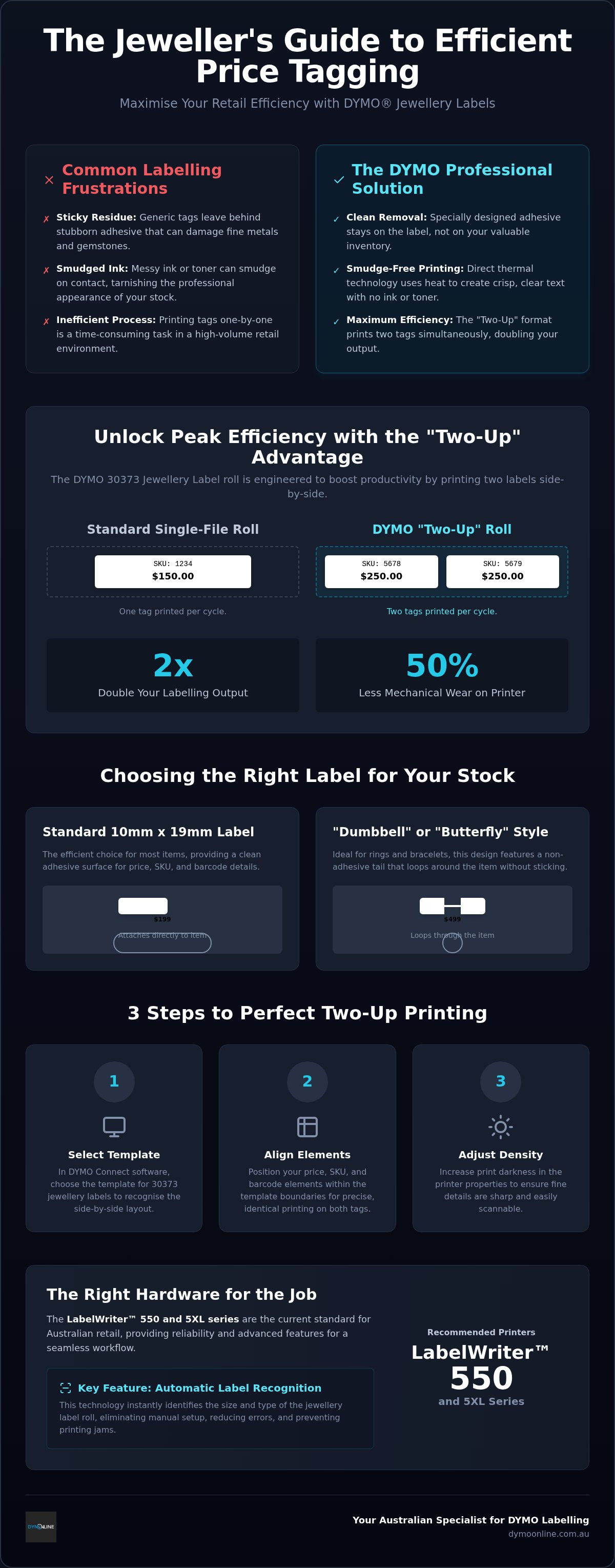
A key feature of these authentic rolls is their side-by-side "two-up" structure. This design is specifically engineered for high-volume environments. When you focus on dymo jewelry price tag printing extra labels, you can produce twice the amount of tags in the same timeframe compared to single-file rolls. High-quality materials also ensure the adhesive remains on the label rather than transferring to your gold and silver inventory. This reliability is why many professionals choose to organise their stock with authentic DYMO supplies.
Comparing the 10mm x 19mm and Tail-Style Labels
While the 10mm x 19mm size offers a compact footprint for price and SKU details, some boutique settings require specific shapes. "Dumbbell" or "butterfly" labels are often preferred for rings and bracelets because they feature a non-adhesive centre tail. This design allows the tag to loop around a band without sticking to the jewellery itself. Choosing between these styles depends on your display needs; however, the two-up 10mm x 19mm roll remains an efficient choice for items that accommodate a standard adhesive surface. It provides the reliable inventory tracking necessary for modern retail while maintaining a clean, professional aesthetic across your entire collection.
Maximising Efficiency: Printing Extra Labels and Barcodes
The "Two-Up" roll format is a specific engineering choice that significantly boosts productivity in high-volume showrooms. Unlike standard single-file rolls, the 30373 style positions two labels side-by-side across the width of the carrier. This layout means that for every single rotation of the print head, you generate two distinct tags. When you utilise dymo jewelry price tag printing extra labels, you aren't just increasing volume; you're halving the mechanical wear on your printer for the same number of items.
Using this additional real estate for barcodes is a practical way to minimise manual entry errors. By adhering to global barcode standards, you ensure that your inventory system remains accurate during busy showroom hours. To maintain the professional look required for high-end boutique branding, ensure your print queue is organised to handle similar stock types together. This reduces label waste and keeps your workflow consistent, so you don't have to restart batches frequently. If you need help choosing the right roll for your specific stock, our team can provide expert support for your setup.
Setting Up Your LabelWriter for Two-Up Printing
Correct software configuration is essential for successful dymo jewelry price tag printing extra labels. Follow these steps to prepare your system:
- Step 1: Open the DYMO Connect for Desktop software and select the template specifically designed for 30373 jewellery labels to ensure the software recognises the side-by-side layout.
- Step 2: Align your price, SKU, and barcode elements within the template boundaries; this ensures both tags in the row print with identical precision.
- Step 3: Access the printer properties to adjust the print density settings. Increasing the darkness ensures that fine details on the small 10mm surfaces remain legible for scanners and customers alike.
Professional Solutions for Delicate Inventory Management
Hardware choice is the foundation of a successful pricing system. The LabelWriter 550 and 5XL series represent the current standard for Australian retail environments. These machines feature Automatic Label Recognition, a technology that identifies the specific jewellery roll type and size instantly. It eliminates the trial and error often associated with manual configuration, ensuring your dymo jewelry price tag printing extra labels process remains error-free from the first tag to the last.
Precision is vital when dealing with high-value stock. Integrating dymo jewelry price tag printing extra labels into your workflow ensures every piece is accounted for with professional clarity. This level of detail supports broader inventory management techniques that keep boutique businesses profitable and organised. To ensure the longevity of the 550 series print head, you must use authentic DYMO-branded rolls. These rolls are specifically manufactured to work with the printer's sensors, preventing the jams and mechanical strain that often occur with third-party alternatives.
Streamlining Inventory with the LabelWriter 550 Series
The latest LabelWriter models offer advanced features designed to reduce downtime. Using RFID-enabled sensors, the software monitors exactly how many labels remain on your jewellery roll, so you don't run out during a busy sales period. If your showroom handles both small items and larger shipments, you might consider the Dymo LabelWriter 5XL: The Ultimate Wide-Format Shipping Solution for Australia to cover all your labelling needs.
- High-speed Turbo and 5XL models significantly decrease the time spent on bulk inventory updates.
- Automatic recognition ensures the printer always uses the correct 10mm x 19mm template settings.
- Direct thermal technology maintains a clean showroom environment by removing the need for messy ink ribbons.
Elevate Your Showroom Efficiency with Professional Labelling
Mastering the side-by-side format is a practical way to double your output while maintaining the high standards your boutique demands. By choosing direct thermal technology, you ensure that every piece of inventory remains free from ink smudges and adhesive residue. Implementing dymo jewelry price tag printing extra labels through the DYMO Connect software allows you to organise your stock with precision and speed. It's a simple change that yields significant time savings for busy retail staff.
As a specialist Australian supplier since 2009, DymoOnline provides nationwide shipping with same-day delivery options to keep your operations running smoothly. Our team offers expert technical support for the LabelWriter 550 and 5XL series to help you achieve reliable results every time. Contact our expert team today to find the right labelling solution for your business. You'll soon see how the right tools can transform your inventory management.
Frequently Asked Questions
Can I print barcodes on the 10mm x 19mm jewellery labels?
Yes, you can print barcodes on these labels using the DYMO Connect for Desktop software. While the 10mm x 19mm surface is compact, it accommodates standard linear barcodes or modern 2D QR codes. Ensuring your print density is correctly adjusted helps scanners read the tags accurately. This integration is a key part of dymo jewelry price tag printing extra labels for efficient showroom inventory tracking.
Do these jewellery labels work with the LabelWriter 550 Turbo?
The LabelWriter 550 Turbo is fully compatible with authentic DYMO jewellery labels. These machines utilise RFID technology to identify the roll size and type automatically upon loading. This feature prevents printing errors and ensures the software uses the correct template for the two-up layout. Using authentic rolls is necessary for the 550 series to function without sensor-related interruptions during your labelling tasks.
How do I prevent the jewellery labels from leaving a sticky residue on my stock?
Using authentic DYMO jewellery labels is the most effective way to avoid adhesive transfer. These labels are manufactured with a high-quality finish specifically designed for delicate items like rings and earrings. Because the system uses direct thermal printing, you also avoid the smudging associated with ink or ribbons. This ensures your gold and silver stock remains clean and professional for display in your boutique.
Why does my printer show an error when I load non-authentic jewellery labels?
The LabelWriter 550 and 5XL series include sensors that require authentic DYMO rolls to operate. If non-authentic or generic labels are used, the printer won't recognise the roll and may display an error or refuse to print. This system is designed to protect the print head from damage and ensure that dymo jewelry price tag printing extra labels remains consistent and high-quality for your business.

Article by
DymoOnline Team
The DYMOOnline Team provides practical guidance for Australian businesses, warehouses, retailers, offices, schools, healthcare workplaces and home users who rely on accurate, efficient labelling. DYMOOnline specialises in DYMO label makers, DYMO label printers, label tapes, label rolls, shipping labels, address labels, barcode labels and labelling accessories, helping customers choose the right labelling products for organisation, mailing, inventory, filing, pricing and workplace efficiency.
General Information
This article is provided as general information only to help customers compare and choose DYMO label makers, label printers, label tapes, label rolls, shipping labels, address labels, barcode labels and related labelling supplies. Product details, specifications, compatibility, availability, pricing and suitability may vary. Always check the individual product page, manufacturer information, printer model compatibility and label size requirements before purchasing or using a product.
Latest News
DYMO Jewellery Price Tag Printing: Maximising Efficiency with Extra Labels
Could your current labelling process be costing you more in wasted time and label space than you rea...
DYMO Rhino 6000+: Australian Industrial Labelling Guide
How many hours has your team lost re-typing repetitive wire wraps or scraping off peeling, hand-writ...
DYMO LabelManager 160 Review: Portable Labelling for Australian Workspaces in 2026
How much time do you lose each week searching for an unlabelled power adapter or a specific file tuc...
Pass Around the Smile Listener Offer | DymoOnline
Pass Around the Smile listener offer • $15 off $150+ • Use code SMILE15 DymoOnline × Pass Ar...
DYMO D1 vs LetraTag: Choosing the Right Labelling System for Your Needs in 2026
You've just spent an hour carefully organising your home office files, only to realise the new tape...
How to Clean a DYMO Print Head: Maintenance Guide
Imagine you're preparing a batch of urgent shipping labels for an afternoon pickup, only to find eac...